
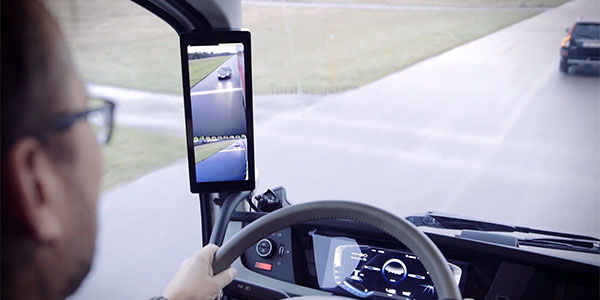
Commercial truck camera systems use multi-angle video and AI to improve safety, cut risk, and protect drivers.
If you run a fleet, you need clear facts, not hype. I have helped small and large carriers plan, install, and tune commercial truck camera systems across harsh routes and tight yards. In this guide, I break down features, costs, rules, and hard-won tips. You will learn how commercial truck camera systems work, what to buy, how to roll them out, and how to get fast wins that last.

What are commercial truck camera systems?
Commercial truck camera systems are video and sensor setups that watch the road, the cab, and the area around the truck. They record events, send real-time alerts, and give proof for claims and coaching. They can stream clips to the cloud and link with GPS, ELD, and telematics tools.
Most systems include a forward road camera, and many add a driver-facing camera. Add-on views can cover blind spots, doors, rear, and trailer. AI features can flag tailgating, lane drift, phone use, or drowsy eyes. Good systems also tag harsh brake, speed, and impact events for quick review.
When tuned well, commercial truck camera systems act like a second set of eyes. They help drivers stay safe and help managers spot risk before it grows.
Benefits and ROI of commercial truck camera systems
The first gains are safety and clear proof. Video gives context, so you can see what happened and why. This helps fight false claims and cut legal costs.
Common results fleets report after rollout:
- Fewer at-fault crashes due to faster alerts and better habits
- Lower claim payouts thanks to video proof and root-cause fixes
- Better driver coaching with short clips tied to events
- Lower insurance rates or stable premiums in hard markets
- Fewer near-miss events as drivers get steady feedback
I have seen a regional fleet cut rear-end crashes within a quarter. We set alerts for headway time and coached each event with short, kind notes. Rates of harsh brake events fell, and drivers said they felt more aware. Commercial truck camera systems paid for themselves with one avoided claim.
Core features to compare
Not all commercial truck camera systems are the same. Focus on fit, not flash.
Key factors:
- Camera views Forward, driver, side, rear, and trailer. Check true field of view and glare control.
- Image quality Aim for 1080p or better with wide dynamic range and good night vision.
- AI features ADAS for road risks and DMS for driver states. Make sure you can tune alerts.
- Storage and upload Local SD or MDVR plus LTE or Wi-Fi upload. Confirm auto offload when parked.
- Live view and alerts Useful for theft, yard moves, and urgent aid.
- Durability and power Rugged rating, heat tolerance, and stable power management to avoid reboots.
- Privacy controls Mask faces or zones. Control audio. Set consent flows and access roles.
- Integrations ELD, TMS, maintenance, and safety dashboards. Open APIs help a lot.
- Support Warranty length, RMA speed, and install help. Test the ticket process before you buy.
Tip from the field Start with a pilot. Try two or three vendors on real routes. Pull clips in bad weather and low light. If it fails there, it will fail when you need it most.
Types and configurations
You can mix setups to match risk and routes.
Common builds:
- Single forward dash cam For basic proof and crash review.
- Dual-facing cam Road plus driver view for coaching and context.
- Four-channel system Road, driver, and two side views for blind spots.
- 360 surround view For low-speed work and docks. Helps with tight turns.
- Rear and trailer cams For backing and rear impact claims.
- Exterior AI cams For side underride risk and vulnerable road user alerts.
Commercial truck camera systems are modular. Start small, then add views where risk is high. Flatbeds and tankers often add side and rear. Urban delivery trucks get 360 with bird’s-eye view.
Legal, compliance, and privacy
You must plan for laws and driver trust. It is not just about gear.
Key points:
- Video in cabs is legal in most US states, but audio may have two-party consent rules. Turn off or control audio when needed.
- Make a clear policy What is recorded, why it is used, who can see it, and how long you keep it.
- Retention limits Keep clips you need, purge the rest. Lock down access and log views.
- Union or works council Learn terms before rollout. Pilot and share results with reps.
- Sticker and notice Put a simple notice in the cab and at yards.
- Driver buy-in Share real wins. Show how video cleared drivers in not-at-fault crashes.
I once paused a rollout to add masks for sleeper areas and to block rest stops with geo rules. Complaints dropped. Compliance risk fell. Trust rose. Commercial truck camera systems work best when people feel seen and safe, not watched.
Installation and best practices
A clean install saves hours later. Plan routes, power, and mounts before you drill.
Steps that help:
- Power Use a stable fused source. Avoid loose add-a-circuits. Check for constant and ignition power.
- Cable paths Use loom and strain relief. Keep away from sharp edges and heat.
- Mounting Place the road cam high and center. Keep wipers in frame. Angle driver cam to see eyes, not knees.
- Calibration Set headway and lane marks on a straight, well-lit road. Recheck after windshield work.
- Firmware and tags Update all units. Set your fleet, unit IDs, and time zone.
- Test and train Pull a clip. Share how to mark events. Give fast, kind coaching.
Create a simple weekly check. Clean lenses. Review random clips. Flag false alerts and adjust. Small tweaks boost signal and cut noise. Commercial truck camera systems need care, like brakes and tires.
Data management and integration
Video is heavy. Plan how you store, move, and use it.
Core choices:
- Cloud vs on-prem Cloud is easy to scale and great for remote teams. On-prem can lower long-term cost if you have IT staff.
- Event-based vs continuous Event clips cut data use. Continuous helps with theft and complex claims. Many fleets blend both.
- Integrations Link with GPS, ELD, DVIR, and safety scorecards. Add video to each alert or fault code.
- Access control Use roles for safety, claims, ops, and HR. Turn on two-factor login. Log exports.
- Data retention Set rules by risk and law. Lock clips tied to incidents or audits.
In my work, the sweet spot is event-first with on-demand fetch. Claims can pull the full timeline when needed. This keeps bills low and still gives depth. Commercial truck camera systems shine when the right eyes see the right clip fast.
Cost breakdown and buying guide
Think total cost of ownership, not just device price.
Typical ranges:
- Hardware 150–600 per unit for dual cams. Multi-cam MDVR rigs cost more.
- Service 15–45 per month per truck for storage, AI, and LTE.
- Install 100–400 per truck based on channels and labor.
- Hidden costs Extra data use, SD card swaps, and windshield re-mounts.
How to compare vendors:
- Demand a pilot with your trucks and routes
- Score image quality at night, rain, and sun glare
- Check false alert rates and tuning options
- Ask for APIs and sample data exports
- Review support SLAs and warranty terms
- Confirm privacy tools and audit logs
Use a simple scorecard with weight by need. For some, it is claims and support. For others, it is AI and live view. Choose the one that fits your risks. Commercial truck camera systems should pay back within a year if well used.
Common pitfalls and how to avoid them
I have seen great tech fall flat. Here is what trips teams up and how to dodge it.
Watch-outs:
- One-size-fits-all setup Tune alerts by route, load, and weather. Start light, then add.
- No driver voice Involve drivers in the pilot. Ask what helps or hurts.
- Dirty lenses Make it a fuel-island habit to wipe lenses. Keep a kit in each cab.
- Weak data plan Align plan size with duty cycle and upload rules.
- No post-crash playbook Assign who pulls clips, how to lock data, and who talks to claims.
Commercial truck camera systems are a safety program, not just a box on glass. Treat rollout like any change. Clear goals. Fast feedback. Fair coaching.
Real-world use cases and stories
A food distributor faced tight city turns and dock dings. We put side cams and a rear cam on their day cabs. Claims for sideswipes fell the next quarter. New hires learned faster with real clips from their own routes.
A long-haul fleet had night rear-end hits on ramps. We set headway alerts and shared weekly trend charts. Drivers asked for more lead time at certain ramps. Ops shifted schedules and lanes. Events dropped. Commercial truck camera systems gave the proof to back the change.
Frequently Asked Questions of commercial truck camera systems
Do I need a driver-facing camera?
It depends on your goals. Driver-facing video helps coaching and clears drivers in many cases, but you can start with road-only and add later.
Will cameras hurt driver morale?
Not when you lead with trust and gains. Share real clips that proved a driver was not at fault, set clear limits, and allow quick feedback on false alerts.
How long should I keep video?
Keep event clips based on claim and legal needs, often 12–36 months. Purge routine footage faster to cut risk and cost.
Can cameras lower insurance costs?
Some carriers offer credits or better terms when you use video with coaching. Share your program and results with your broker to help the case.
What if LTE is weak on my routes?
Use local storage and auto upload on Wi-Fi at yards. You can also fetch key clips on demand or schedule uploads for low-traffic hours.
Are AI alerts accurate?
AI helps but is not perfect. Tune thresholds, review false alerts, and retrain habits over time for the best results.
How do I protect privacy?
Use clear policy, role-based access, and audit logs. Mask faces or zones and turn off audio where law or policy requires.
Conclusion
Commercial truck camera systems can change how you run safety, claims, and training. Start with a pilot, tune alerts, and share quick wins with drivers. Match features to your risk, plan data and privacy, and keep the program simple and fair.
Pick one step to start this week. Draft your policy, book demos, or line up a pilot route. Want more tips and field checklists? Subscribe or leave a question, and I will help you plan your rollout.