
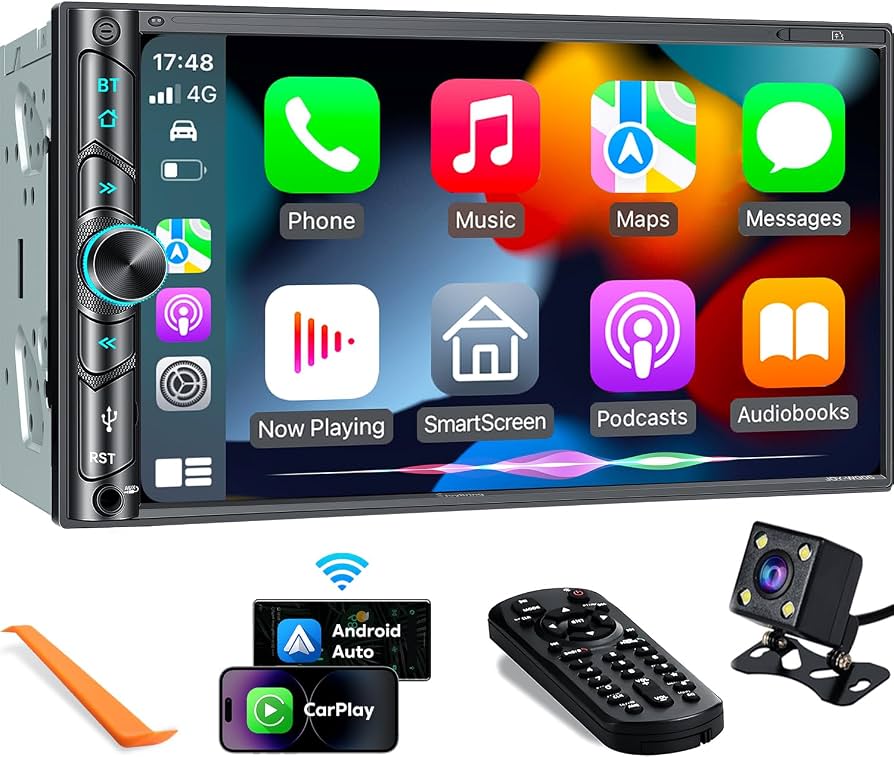
A Bluetooth car radio lets your phone wirelessly stream music and handle hands-free calls.
I’ve worked with car audio for years and tested many Bluetooth car radio units. This guide explains how these radios work, what features matter, and how to pick, install, and troubleshoot one. Read on for clear, practical advice and proven tips to get the best sound and safety from your Bluetooth car radio.

How a Bluetooth Car Radio Works
A Bluetooth car radio pairs with devices over short-range wireless links. Pairing creates a secure audio channel. Most modern units use Bluetooth A2DP for music and HFP or HSP for calls. The radio decodes the stream and sends it to speakers or an amplifier. A simple design keeps latency low for calls and good sync with video.
Key technical parts:
- Bluetooth module handles pairing and data encryption.
- DSP (digital signal processing) adjusts tone and equalization.
- Amplifier powers the speakers.
- Microphone input supports hands-free calling.
Common features to expect in a Bluetooth car radio:
- Phone pairing for two devices at once.
- Metadata display for song titles and artist names.
- Steering-wheel control compatibility.
- Voice assistant access from your phone.
How it affects driving
- Hands-free calling cuts distractions when paired right.
- Streaming avoids messy cables and fits modern phone use.
- Good codecs improve clarity and reduce buffering.
PAA-style questions
How does a Bluetooth car radio connect to my phone?
It searches for nearby devices, you select the radio on your phone, and confirm a PIN if prompted. After first pairing, phones usually reconnect automatically when both have Bluetooth on.
What Bluetooth profiles matter for audio quality?
A2DP is for stereo music. aptX, AAC, and LDAC are higher-quality codecs if both devices support them. For calls, HFP or HSP provide low-latency voice channels.
Can a Bluetooth car radio work with older phones?
Yes, most radios are backward-compatible with older Bluetooth versions, but audio quality and features may be limited by the phone’s Bluetooth profile.
Benefits of Upgrading to a Bluetooth Car Radio
Upgrading to a Bluetooth car radio brings clear benefits for everyday driving. It improves safety, convenience, and streaming quality. Here are the main advantages.
Convenience and usability
- Hands-free calls reduce the need to touch your phone.
- Wireless audio frees you from cables and adapters.
- Multiple-device pairing lets passengers connect quickly.
Audio and media features
- Track metadata and caller ID appear on the radio screen.
- Many units support internet radio and USB playback as backups.
- Voice assistant access lets you use navigation and messages hands-free.
Safety and legality
- Using a Bluetooth car radio helps comply with hands-free driving laws.
- Minimal interaction with a single interface reduces distraction.
Cost and value
- Entry-level Bluetooth car radios are affordable.
- Mid-range and premium units add features like GPS and better sound.
- Long-term value comes from safer driving and better sound in older cars.
Personal note: I swapped a basic head unit for a Bluetooth car radio on my daily driver. The hands-free calls and smooth podcast streaming made long commutes less tiring. I suggest choosing a unit with good microphone quality to avoid muffled calls.
Types and Key Features to Look For
Choosing the right Bluetooth car radio depends on your needs. Below are common types and essential features to consider.
Types of units
- Single-DIN: Compact and fits most cars with simple displays.
- Double-DIN: Larger screens and advanced features like touch or navigation.
- Retrofit adapters: Add Bluetooth to factory radios without changing the dash.
Must-have features
- Stable pairing and multi-device support.
- Clear screen for song titles and caller info.
- Built-in microphone or mic input for hands-free calls.
- Steering-wheel control compatibility.
Nice-to-have features
- Wireless Apple CarPlay or Android Auto.
- USB ports for charging and file playback.
- Backup camera input and video playback.
- High-resolution audio support like AAC or aptX.
Performance specs to check
- Output power and preamp outputs for amps.
- Equalizer bands and presets for sound tuning.
- Bluetooth version for range and power use.
Practical tip: If you stream a lot of podcasts, pick a radio with low reconnection time and stable multipoint pairing. If sound is key, look for a model with a good DSP and RCA outputs.
Installation and Setup Basics
Installing a Bluetooth car radio can be simple or complex. It depends on your vehicle and the unit type. Below are the general steps and tips for a smooth setup.
Pre-install checklist
- Verify single- or double-DIN fit for your dash.
- Check wiring harness for vehicle compatibility.
- Acquire dash kit and antenna adapter if needed.
Step-by-step install overview
- Disconnect the car battery to be safe.
- Remove the old head unit and unplug wiring.
- Connect the new harness to factory wires using the adapter.
- Fit the unit in the dash and secure it.
- Reconnect the battery and power on to pair a phone.
Pairing tips
- Put the radio into pairing mode and enable Bluetooth on your phone.
- Try deleting old devices if pairing fails.
- Set the radio as the audio and call device on the phone.
When to call a pro
- If the car has complex factory systems or steering controls.
- If airbag or electrical systems are near the dash.
- For high-end audio systems needing custom wiring and amp integration.
Personal experience: I once tried to install a double-DIN radio in a car with factory navigation. I ended up using a pro to preserve steering controls. That saved me time and avoided wiring mistakes.
Compatibility, Troubleshooting, and Maintenance
Compatibility issues and glitches can be frustrating. This section helps you diagnose common problems and keep a Bluetooth car radio working well.
Common compatibility issues
- Older phones may not support newer codecs.
- Some factory steering controls need special adapters.
- Voice assistant features may vary by phone and radio.
Quick troubleshooting steps
- Reboot the phone and radio to reset connections.
- Clear paired devices on both phone and radio, then pair again.
- Update phone OS and radio firmware if available.
- Ensure Bluetooth is enabled and the radio is discoverable.
Sound and call problems
- Low volume in calls: check microphone placement and volume settings.
- Audio dropouts: check for Bluetooth interference or distance limits.
- Poor sound quality: confirm phone uses high-quality codec and reboot.
Maintenance tips
- Keep firmware up to date for fixes and features.
- Clean the head unit face gently with a soft cloth.
- Check wiring regularly if you notice static or power issues.
PAA-style questions
Why does my Bluetooth car radio keep disconnecting?
Interference, outdated firmware, or too many paired devices often cause drops. Try deleting old pairings, staying within range, and updating firmware.
How do I improve sound quality on a Bluetooth car radio?
Use a higher-quality streaming codec when possible, enable DSP tuning, and tweak equalizer settings. Adding an amplifier or better speakers also helps.
Buying Guide and Practical Tips
A good buying decision balances price, features, and ease of use. This section gives practical tips to find the right Bluetooth car radio.
Set your priorities
- Budget: entry-level units are fine for basic streaming.
- Features: choose if you want CarPlay, Android Auto, or simple Bluetooth.
- Sound: pick units with DSP and preouts for upgrades.
Compare models
- Read user reviews for real-world reliability reports.
- Check support for your phone brand and common apps.
- Look for firmware update support from the maker.
Where to buy
- Authorized dealers for warranty and returns.
- Reputable online retailers for wider selection.
- Local car audio shops if you want pro install and tuning.
What to avoid
- Cheap units with no firmware updates or poor microphone quality.
- Units that lack clear wiring harnesses for your car model.
- Models with no return policy or poor customer support.
Quick checklist before purchase
- Confirm dash fit and wiring harness availability.
- Verify Bluetooth profiles and codec support.
- Check whether you can add a backup camera or steering control adapter.
- Read recent reviews about reliability and updates.
Personal buying tip: Buy from a seller with a clear return window. I once bought a budget Bluetooth car radio that had intermittent disconnections. A simple return and upgrade to a better model solved the problem quickly.
Personal Experience and Best Practices
I’ve installed, used, and repaired many Bluetooth car radio systems. Here are lessons from real work and road use.
What I learned
- Mic placement matters; a clear mic beats noisy DSP.
- Firmware updates fix many odd bugs.
- Multipoint pairing is handy but can cause reconnect issues with older phones.
Mistakes to avoid
- Don’t force-fit a double-DIN if you lack proper dash brackets.
- Avoid skipping a wiring harness adapter; direct splices can damage systems.
- Don’t ignore software updates; they improve stability and features.
Best practices
- Test pairing and call quality before reassembling the dash.
- Keep a backup USB input for older players.
- Use a professional for vehicles with complex factory electronics.
Real-world tip: For rental cars or shared vehicles, pair your phone temporarily and remove your device from the Bluetooth list when done to protect privacy and avoid reconnect problems.
Frequently Asked Questions of bluetooth car radio
What is a Bluetooth car radio and what does it do?
A Bluetooth car radio lets phones connect wirelessly to play music and make hands-free calls. It replaces or upgrades your factory head unit with modern wireless features.
Can I add a Bluetooth car radio to an older car?
Yes, you can install a Bluetooth car radio in most older cars using a compatible single- or double-DIN unit and a wiring harness adapter. Some factory systems may need extra adapters.
Will a Bluetooth car radio reduce audio quality?
Bluetooth compression can lower audio quality compared to wired sources, but good radios and modern codecs like AAC or aptX can sound very good. For audiophile-level sound, use high-quality speakers and amplifiers.
How do I keep my Bluetooth car radio secure?
Use the default pairing PIN only when needed and remove old paired devices regularly. Turn the radio’s discoverable mode off when not pairing to reduce unauthorized access.
Why won’t my phone connect to the Bluetooth car radio?
Common causes are outdated firmware, too many paired devices, or Bluetooth settings on your phone. Reboot both devices, clear previous pairings, and try again.
Can I use voice assistants through a Bluetooth car radio?
Many radios relay audio for voice assistants, but full integration depends on phone support and radio features. Wireless CarPlay or Android Auto offers the best voice assistant experience.
Conclusion
A Bluetooth car radio modernizes your car. It improves safety, convenience, and media playback. Choose a model that fits your dash, supports your phone, and offers firmware updates. Test pairing and mic quality before finalizing installation. Take one clear step: pick a trusted unit, install it, and enjoy safer, cable-free drives. Share your experience below or subscribe for more car audio tips.