
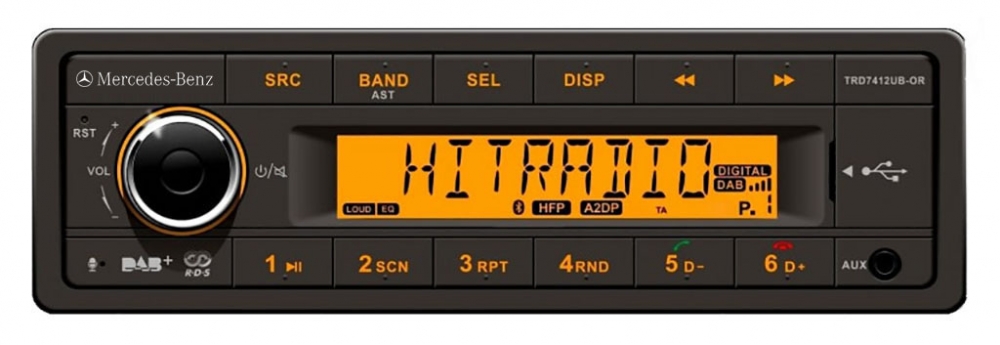
A one din car radio is a compact single-slot head unit that fits most cars.
I have spent years fixing, installing, and reviewing car audio gear. This article digs deep into the one din car radio. You will get clear definitions, real-world tips, buying advice, and troubleshooting. I explain how one din car radio works, why it may be right for your car, and how to avoid common mistakes. Read on to make a smart, confident choice.

What is a one din car radio?
A one din car radio is a single-slot head unit. It follows a standard size: about 2 inches tall and 7 inches wide. It replaces the factory radio in many cars. It can offer radio, Bluetooth, USB, and simple displays. One din units often fit dashboards with limited space. They are simple and flexible choices for upgrades.
Key features and components
One din car radio models vary. Here are common features and parts you will find.
- Display and controls. Small screens and buttons for menu, volume, and source.
- Audio outputs. RCA preouts, speaker wires, and amplifier outputs.
- Connectivity. Bluetooth, USB, auxiliary input, and sometimes Wi-Fi.
- Media playback. FM/AM, MP3, AAC, and sometimes Apple CarPlay or Android Auto.
- Power and wiring. 12V power harness and ground connection.
- Mounting kit. Dash trim and brackets to secure the unit.
Benefits of choosing a one din car radio
One din car radio offers several practical benefits.
- Saves dash space. Ideal for cars with shallow or small slots.
- Easier installation. Less trimming and wiring work for most installs.
- Cost-effective. Basic models give good value for money.
- Durable and simple. Fewer moving parts than larger head units.
- Flexibility. You can add a screen or rear-media separately.
Limitations and trade-offs
No product is perfect. Here are limits to consider.
- Smaller screen. Not ideal for navigation or big touch displays.
- Fewer features. Advanced features may be limited on budget models.
- Less integrated look. May not match some dashboards cleanly.
- Audio improvements depend on external amplifiers and speakers.
Installation basics: step-by-step
I have installed dozens of head units. These steps will help beginners.
- Prep and tools.
- Tools: screwdrivers, panel removal tools, wire crimper, tester.
- Disconnect the car battery first.
- Remove the factory radio.
- Use trim tools to avoid damage.
- Unscrew and pull the old unit out gently.
- Match wiring harness.
- Use an adapter harness to avoid cutting factory wires.
- Match color-coded wires: power, ground, speaker leads.
- Secure and test.
- Plug the one din car radio into the dash bracket.
- Reconnect the battery and test all functions.
- Finalize.
- Reinstall trim and fasteners.
- Adjust sound settings and Bluetooth pairing.
Common mistakes to avoid:
- Forgetting to disconnect the battery.
- Not using a harness adapter.
- Overlooking antenna adapter if required.
Audio upgrades and accessories
You can pair your one din car radio with add-ons to boost sound and functionality.
- External amplifiers. Improve power and clarity.
- Subwoofers. Add bass that small units cannot produce alone.
- DSP units. Fine-tune equalization and time alignment.
- Backup cameras. Use a small display or a rearview monitor.
- Steering wheel control adapters. Retain factory button functions.
One din vs two din: which to choose?
Compare both to pick the right unit.
- Size and fit.
- One din fits most compact openings.
- Two din offers large touchscreen and more features.
- Features.
- Two din often includes navigation and full touch UIs.
- One din focuses on core audio features and portability.
- Cost.
- One din tends to be less expensive.
- Two din costs more for screens and integration.
- Ease of install.
- One din is simpler and faster to install.
- Two din may need dash modifications.
If you want basic modern audio and clean install, a one din car radio is often the best pick.
Troubleshooting common issues
Here are fixes I used on real installs.
- No power.
- Check battery connection and fuse on the harness.
- Verify ignition wire is connected to switched power.
- No sound from speakers.
- Confirm speaker wires are matched and not loose.
- Test radio with headphones or line out if available.
- Bluetooth pairing fails.
- Clear previous pairings on both phone and radio.
- Update phone Bluetooth settings and restart both devices.
- Display or lighting issues.
- Check dimmer or illumination wire and fuse.
- Reset unit to factory settings if needed.
How to choose the right one din car radio
Use this checklist when shopping.
- Compatibility with your car. Check dash size and harness type.
- Needed features. Bluetooth, USB, RCA preouts, CarPlay, or Android Auto.
- Audio specs. Preout voltage, equalizer bands, and supported formats.
- Expandability. Ability to add amp, subwoofer, or camera.
- Brand and warranty. Look for well-known makers and decent support.
- Price vs value. Balance features with budget and longevity.
My tip: buy a model with RCA preouts and at least one pair of preouts for future amp upgrades.
Personal experience and tips from the field
I still remember my first install. I picked a one din car radio to replace a broken factory unit. The install took under an hour. I used a harness adapter and a dash kit. The sound was immediately better after adding a small amp. Lessons learned:
- Always use a harness adapter to avoid cutting factory wires.
- Measure the dash opening before buying.
- Test the unit on a bench with a 12V supply if unsure.
- Save the old radio and screws until the new one works perfectly.
A practical tip: label wires with masking tape during removal. It saved me time on a tricky Chrysler dash.
Maintenance and long-term care
Keep your one din car radio working well with simple steps.
- Keep firmware updated when possible.
- Clean the faceplate with a soft cloth.
- Avoid extreme heat exposure when parked in sun.
- Check wiring annually for corrosion or loose connections.
Frequently Asked Questions of one din car radio
What size is a one din car radio?
A one din car radio measures about 2 inches tall and 7 inches wide. It fits standard single-slot dash openings in many vehicles.
Can a one din car radio have a touchscreen?
Yes, some one din car radio models include small touchscreens or motorized flip-out screens. Screen size is limited compared to two din units.
Will a one din car radio support Apple CarPlay or Android Auto?
Some modern one din car radio units support Apple CarPlay and Android Auto via wired or wireless connection. Check the product specs before buying.
Do I need special tools to install a one din car radio?
No special tools are required beyond common tools like screwdrivers, panel pry tools, and a wire crimper. A harness adapter makes installation much easier.
Can I add a backup camera to a one din car radio?
Yes. Many one din car radio setups allow an external camera input via an adaptor or a small separate display. Compatibility varies by model.
Conclusion
One din car radio units are compact, practical, and cost-effective upgrades for many drivers. They deliver reliable audio, easy installs, and a path for future upgrades like amps or cameras. Use the checklist in this article to pick the right model. Try simple installs yourself or hire a pro for complex wiring. Take one step today: measure your dash, list must-have features, and compare a few one din car radio models to find the best fit. Leave a comment with your install story or questions — I’ll help you troubleshoot next.