
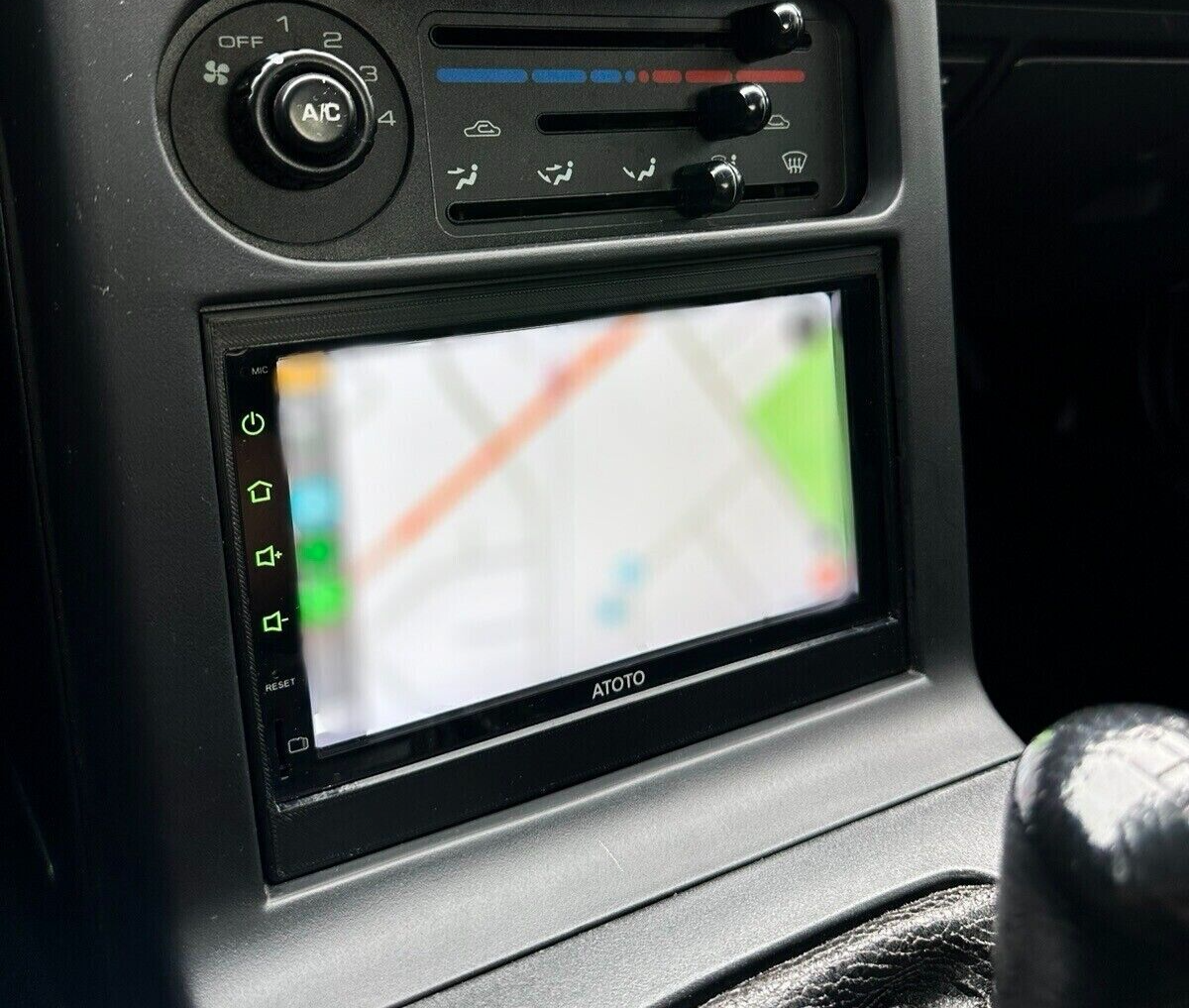
A double din head unit is a double-height car stereo that adds modern tech and better sound.
I’ve worked with cars and car audio for years, and I write about double din head unit upgrades all the time. This article covers what a double din head unit is, how it fits your car, which features matter, and real-world tips for buying and installing one. Read on to learn the practical benefits, common pitfalls, and smart ways to pick the right double din head unit for your needs.

What is a double din head unit?
A double din head unit is an aftermarket or factory car stereo that measures roughly 4 inches tall and 7 inches wide. The size is twice the height of a single DIN unit, which is why it’s called “double din.” Most double din head unit models include a large touchscreen, modern inputs, and smart features that older radios lack.
A double din head unit can replace factory systems that use the larger opening. It often serves as the car’s command center for audio, navigation, hands-free calls, and camera displays. If your dash fits the opening, a double din head unit will usually provide a cleaner, more modern interface than a standard single DIN radio.
Key features to look for in a double din head unit
Choosing the right double din head unit depends on features. Focus on the items below to match the unit to your daily needs.
- Touchscreen size and resolution — Bigger, sharper screens are easier to use and read while driving.
- Smartphone integration — Wireless or wired Apple CarPlay and Android Auto allow safe access to apps.
- Bluetooth and hands-free calling — Stable Bluetooth keeps calls and audio streaming simple and reliable.
- Navigation options — Built-in GPS or phone-based navigation via CarPlay/Android Auto are common.
- Audio inputs and outputs — Look for USB ports, AUX input, RCA preouts for amps, and high-voltage outputs.
- DSP and equalizer — Digital signal processing and multi-band EQ let you tune sound precisely.
- Backup camera support — A camera input with parking guidelines improves safety.
- Steering wheel control compatibility — Retain steering wheel buttons using adapters or built-in support.
- Power and amplifier options — Built-in amps work for stock speakers; RCA preouts are required for external amps.
- Firmware updates and app support — Units with OTA updates stay current longer.
Benefits of upgrading to a double din head unit
A double din head unit gives multiple practical benefits beyond a prettier dash.
- Better connectivity — You get smartphone mirroring, stable Bluetooth, and fast USB charging.
- Improved sound control — DSP, crossovers, and preouts let you build a proper audio system.
- Modern convenience — Touch controls, voice assistants, and on-screen navigation simplify driving.
- Safety gains — Hands-free calling and clear displays reduce distractions.
- Aesthetic upgrade — A large screen modernizes the entire interior look.
Upgrading to a double din head unit is one of the most impactful aftermarket changes you can make for daily comfort and utility.
Compatibility and fitment: will a double din head unit fit your car?
Fitment can be simple or tricky. Follow these checks before you buy.
- Measure the dash opening — Confirm you have a double DIN opening or room for a dash kit.
- Check wiring harness compatibility — Use a vehicle-specific harness adapter to avoid cutting wires.
- Confirm dash trim and mounting brackets — You may need a kit for a factory look and secure mount.
- Steering wheel control adapter — If you want to keep steering controls, pick an adapter compatible with your car and the new head unit.
- Antenna and factory amp interfaces — Some cars use factory amps or special antenna connectors; verify adapter needs.
If your car lacks space, a stereo shop can evaluate whether the dash can be modified. For most modern cars, a double din head unit fits easily with the right kit.
Installation: DIY steps and when to get professional help
Installing a double din head unit can be a weekend project for many. Here’s a straightforward plan.
- Gather parts and tools
- Double din head unit with fitting kit
- Wiring harness adapter and antenna adapter
- Screwdrivers, panel tools, wire crimpers, and tape
- Disconnect the battery
- This prevents shorts and protects vehicle electronics.
- Remove the factory radio and trim
- Use plastic trim tools to avoid scratching the dash.
- Connect the wiring harness adapter
- Match color-coded wires or use a labeled adapter to avoid mistakes.
- Test the unit before final mounting
- Power on, test speakers, radio, Bluetooth, and camera inputs.
- Secure the head unit and reassemble trim
- Ensure it sits flush and all clips and screws are tight.
When to hire a pro
- If your vehicle has factory amplifiers, complex CAN bus wiring, or airbags near dash panels.
- If you’re not comfortable with wiring or need custom speaker/amp tuning.
A professional shop reduces risk and saves time on complex installs.
Troubleshooting common issues with a double din head unit
Problems happen, but most are solvable. Here are common issues and quick fixes.
- No power after install
- Check the fuse, battery connection, and proper chassis ground.
- No sound from speakers
- Confirm speaker wiring, radio mute settings, and amp turn-on lead.
- Bluetooth pairing fails
- Delete old pairings and restart both the phone and head unit.
- Camera image not showing
- Verify video input selection and camera power wire is connected to reverse light.
- Blank or frozen screen
- Try a hard reset or firmware update. If persistent, check wiring and voltage stability.
Keeping the manual and wiring diagram handy speeds troubleshooting. Many modern units allow firmware updates that fix common bugs.
Buying guide and budget tips for double din head unit shoppers
Decide on priorities first. Use budget tiers to guide choices.
- Entry-level (under $200)
- Basic touchscreen, Bluetooth, USB, and backup camera support.
- Mid-range ($200–$500)
- CarPlay/Android Auto, better audio features, higher-resolution screens.
- Premium ($500+)
- DSP, wireless CarPlay, metal build, OTA updates, and advanced navigation.
Buying tips
- Prioritize features you will use daily, not every flashy spec.
- Look for units with regular firmware updates and good reviews.
- Buy from retailers or sellers with a clear return policy and warranty.
- Consider certified installers to protect vehicle electronics.
Spending a bit more on a well-supported model often saves money long-term.
Advanced features and future trends in double din head unit tech
Car audio keeps evolving. Know which advanced features matter now and soon.
- Wireless CarPlay and Android Auto are common and free up USB ports.
- Built-in DSP with time alignment helps tune sound to your cabin.
- High-resolution screens and capacitive touch improve usability.
- OTA firmware updates keep units secure and compatible.
- Integration with vehicle CAN bus allows deeper control of climate and vehicle info.
- Voice assistant improvements let you stay hands-free more effectively.
As cars grow smarter, the modern double din head unit will act as a flexible bridge between phone apps and vehicle systems.
Personal experience: lessons from installing double din head units
I’ve installed many double din head units in different cars. Here are my real-world takeaways.
- Test everything before reassembling the dash. I once spent an hour trimming fitment before I realized a loose harness caused no sound.
- Buy a good wiring harness adapter. Cheap harnesses create noise and unreliable connections.
- Keep the original unit and brackets until you confirm the install. They save time if you need to revert.
- When adding amps, plan wiring runs early. It’s much easier to route power and grounds before panels are back in place.
- Firmware updates fixed Bluetooth quirks for me more than once. Check for updates right after install.
These small habits reduce stress and give you a better result.
Frequently Asked Questions of double din head unit
What is the difference between single DIN and double din head unit?
A double din head unit is twice the height of a single DIN unit. This extra space usually houses a larger touchscreen and more features, like navigation and smartphone mirroring.
Can every car accept a double din head unit?
Not every car can accept one without modification. Many cars can with a dash kit and wiring adapter, but some compact dashboards lack the space.
Do double din head units support Apple CarPlay and Android Auto?
Many double din head unit models support Apple CarPlay and Android Auto, either wired or wirelessly. Check the product specs to confirm compatibility.
Will a double din head unit improve sound quality?
A double din head unit can improve sound by adding better preouts, DSP, and EQ. For big improvements, pair it with quality speakers and an amplifier.
Is professional installation necessary for a double din head unit?
Professional installation is not always necessary but recommended for complex vehicles, systems with factory amps, or if you are not confident with wiring. Pros prevent damage and ensure clean results.
How long does it take to install a double din head unit?
A straightforward install usually takes 1–3 hours for a DIYer with the right tools. Complex vehicles or custom wiring can take longer.
Can I keep steering wheel controls with a new double din head unit?
Yes, you can keep steering wheel controls using an adapter or compatible head unit. Verify compatibility with your car and the unit before buying.
Conclusion
A double din head unit is a practical upgrade that modernizes your car with better sound, smartphone integration, and safety features. Measure your dash, prioritize the features you use daily, and plan wiring and fitment carefully. If you follow the steps here and learn from small mistakes, you’ll get a clean install and a much better in-car experience.
Take action today: list the must-have features for your new double din head unit, compare models in your budget range, and decide whether to DIY or hire a pro. If you found this guide useful, subscribe for more car audio tips or share your install story in the comments.