
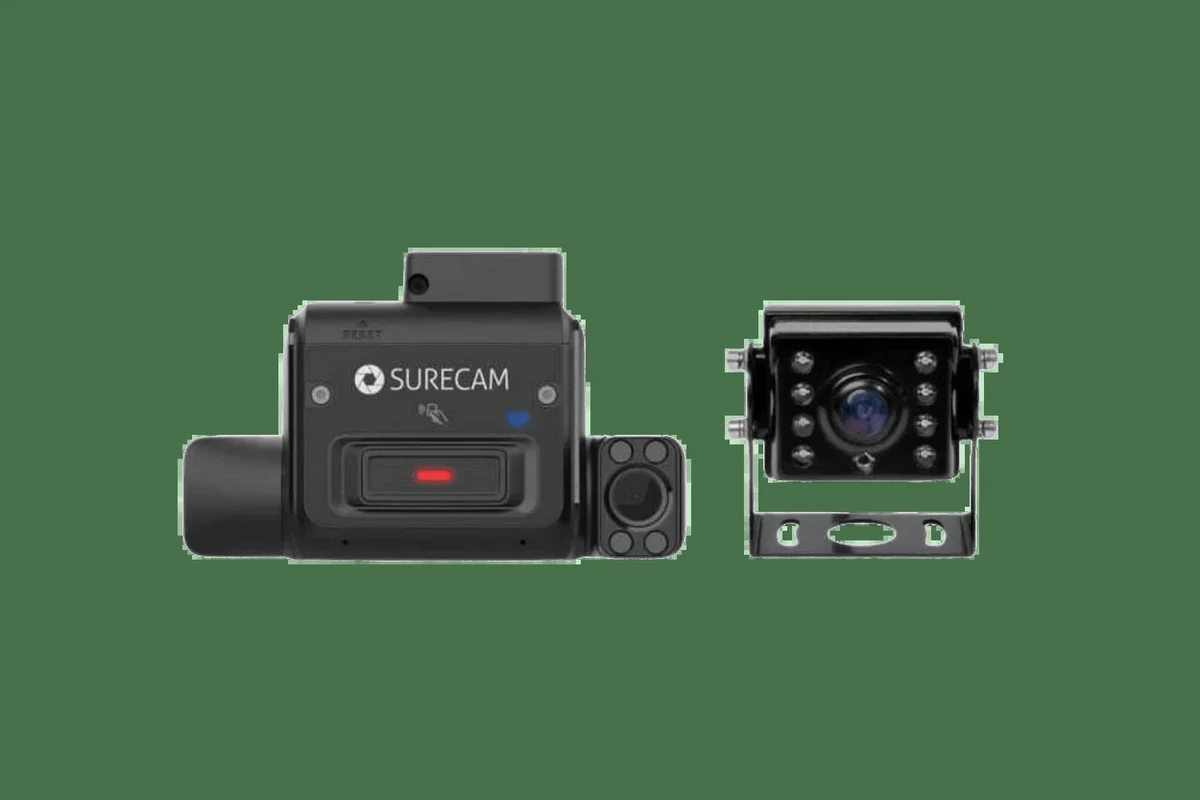
A dual camera dash cam is worth it if you want both front-road evidence and a second angle for parking, passengers, or rear incidents. The best choice in 2026 is the one with reliable video, good low-light performance, and installation that fits your vehicle.
A dual camera dash cam records the road ahead and the cabin or rear view at the same time, making it a smart choice for drivers who want more context after an incident. For many shoppers in 2026, the best setup is the one that fits how they drive, how they park, and how much evidence they want if something goes wrong.
- Coverage matters: Dual cameras add context that a front-only dash cam can miss.
- Quality beats specs: Night performance, storage reliability, and heat resistance matter more than marketing numbers.
- Parking mode needs power: Hardwiring or a battery solution is often required for off-engine recording.
- Setup affects results: Mounting angle, card formatting, and firmware updates can make or break usability.
Dual Camera Dash Cam: What It Is and Whether You Actually Need One

A dual camera dash cam usually means one front-facing camera plus a second camera that records either the rear window, the interior cabin, or both depending on the model. That second angle can matter a lot when another driver rear-ends you, when a passenger dispute happens, or when you want coverage while the car is parked.
Front-and-Rear Coverage Explained
Front-and-rear systems are the most common dual-camera setup because they capture what happens in front of your car and what happens behind it. That can help with lane-change disputes, rear-end collisions, tailgating claims, and hit-and-run documentation.
Some systems use a hardwired rear camera connected by cable, while others use a separate interior camera mounted up front. The right design depends on whether you care more about outside traffic, cabin monitoring, or parking surveillance.
Who Benefits Most: Daily Drivers, Rideshare Drivers, Parents, and Fleet Users
Daily commuters benefit from clear evidence after crashes and parking lot incidents. Parents may like the added visibility for teen drivers or family vehicles, while rideshare and delivery drivers often need cabin footage for accountability and dispute protection.
Fleet users and small business owners may also value dual cameras because they create a more complete record of how a vehicle was used. If your vehicle spends time in public parking, carries passengers, or operates for work, a dual setup is often easier to justify than a single-channel unit.
How to Choose the Best Dual Camera Dash Cam in 2026
The best dual camera dash cam is not automatically the one with the biggest resolution number. It is the one with reliable video quality, stable storage, good heat tolerance, and features you will actually use every day.
Video Quality: 1080p vs 2K vs 4K, Night Vision, and HDR
Resolution affects how much detail you can see, especially license plates, road signs, and facial features. In general, 1080p is the baseline, 2K offers a useful step up in clarity, and 4K can provide even more detail on the front camera, though the rear camera is often lower resolution.
Night vision and HDR, or high dynamic range, matter just as much as resolution. HDR helps balance bright headlights and dark shadows, which can improve footage at dusk, in tunnels, and during nighttime driving.
Manufacturer labels for “4K” or “night vision” can vary by brand. Check sample footage, sensor type, and rear-camera resolution before comparing models.
Field of View, Parking Mode, Loop Recording, and G-Sensor Protection
Field of view is the width of the scene the camera can capture. A wider view can catch more activity, but overly wide lenses may stretch the image and make distant details harder to read.
Parking mode can keep recording when the vehicle is off, but it usually needs a hardwire kit or a separate battery solution. Loop recording overwrites old footage when storage fills up, and a G-sensor can lock important clips during a collision so they are not erased.
If you want help understanding parking-power options, see our guides on a dash cam battery pack and how a dash cam works when the car is off.
Storage, App Connectivity, GPS, and Voice Control
Storage is one of the most overlooked parts of the purchase. Dual camera systems create more video data, so a high-endurance microSD card and a sensible formatting routine are important, especially if you drive often.
App connectivity can make it easier to review clips, but app quality varies a lot. GPS can add speed and location data to footage, which may help with insurance or dispute records, while voice control can be convenient if the interface is simple and responsive.
For setup help, our guide on how to format an SD card for a dash cam is a useful companion read.
Top Real-World Benefits of a Dual Camera Dash Cam
The biggest advantage of dual-camera coverage is context. A single front view can show what happened, but a second angle often shows why it happened and who was involved.
Accident Evidence and Insurance Support
After a crash, video can help clarify fault, timing, lane position, and signal use. That does not replace police reports or insurer investigations, but it can make your claim easier to explain and may help resolve disputes faster.
Footage can also support your version of events if another driver changes their story later. For that reason, many shoppers prefer dual coverage over a front-only camera when they drive in dense traffic or on crowded city streets.
Parking Security, Vandalism Deterrence, and Hit-and-Run Documentation
Parking mode can document door dings, break-ins, and hit-and-run incidents while the car is unattended. Even when a camera does not stop a bad actor, visible equipment may discourage some opportunistic behavior.
If your vehicle is often parked outside, consider heat tolerance, power draw, and whether the camera can stay stable in summer conditions. Drivers in hot climates may want to compare options with our heat-focused guides, including the best dash cam for Texas heat and best dash cam for Florida heat.
Driver Coaching, Teen Monitoring, and Rideshare Accountability
Dual cameras can be useful for families with new drivers because they document not just the road, but also what is happening in the cabin. That can help with coaching, accountability, and peace of mind.
Rideshare and delivery drivers often benefit from interior coverage because it can help resolve passenger disputes or confirm what happened during a pickup. If that is your use case, our guides to the best dash cam for Uber and best dash cam for teen drivers may help narrow the search.
Limitations, Tradeoffs, and Common Buying Mistakes
Dual camera systems are useful, but they are not perfect. The most common mistakes are assuming every model records equally well, ignoring power needs, and buying based on marketing claims instead of practical fit.
Why Cheap Models Often Fail in Heat, Low Light, or Long-Term Use
Low-cost cameras can look appealing, but cheaper components often struggle with heat, weak night performance, or unstable firmware. That matters because a dash cam is supposed to work when conditions are inconvenient, not only on a sunny day in a parking lot.
Many bargain models also use weak sensors, slow processors, or poor capacitors, which can shorten useful life. In a hot climate or a vehicle parked outdoors, reliability should matter more than flashy packaging.
Storage Overload, Poor Mounting, and Misleading Spec Claims
Dual recording fills memory faster than single-channel recording, so a small or low-quality card can become a problem quickly. If the card is not rated for constant video writing, it may wear out sooner or produce corrupted clips.
Poor mounting is another common issue. If the camera is angled badly, blocked by tint dots, or mounted too low, the footage may miss critical details even if the spec sheet looks impressive.
- Use a high-endurance microSD card and format it on a regular schedule.
- Mount both cameras with a clear, unobstructed view.
- Buying only by resolution without checking sensor quality and rear-camera detail.
- Trusting “wide angle” claims without looking at real coverage examples.
When a Single-Channel or 3-Channel Setup Makes More Sense
A single-channel camera can be enough if you only want front-road evidence and you do not park in risky areas. It is usually simpler, cheaper, and easier to manage.
A 3-channel setup may make more sense if you want front, rear, and cabin coverage at the same time. That is often a better fit for rideshare, family monitoring, or commercial use than a basic dual-camera system.
How to Install and Set Up a Dual Camera Dash Cam Safely
Installation quality affects performance as much as the camera itself. A well-placed, properly powered dash cam is less likely to fail, rattle, overheat, or leave blind spots.
Mounting the Cameras for the Best Road Coverage
Place the front camera high enough to capture the road without blocking your view. The rear camera should be positioned so it sees the rear window or cabin clearly, depending on the system design.
Before finalizing the mount, sit in the driver’s seat and check whether the camera interferes with mirrors, airbags, or visibility. If the camera is too low or tilted too far, footage quality can suffer even when the hardware is good.
Do not place cameras or cables where they can interfere with airbags, steering, pedals, or your line of sight.
Wiring Options: 12V Outlet, Hardwire Kit, and Parking Mode Setup
A 12V outlet installation is usually the simplest option because it is easy to remove and does not require permanent wiring. The tradeoff is that parking mode may be limited or unavailable.
A hardwire kit is better if you want parking mode and a cleaner cable layout. If you choose that route, follow the manufacturer instructions carefully and confirm the fuse-tap method is appropriate for your vehicle.
For step-by-step help, see our guides on how to install a dash cam with a cigarette lighter and how to hardwire a dash cam for parking mode.
Formatting the Card, Testing Footage, and Updating Firmware
After installation, format the memory card in the camera menu if the manufacturer recommends it. This can reduce file errors and help the system recognize the card correctly.
Then test both cameras in daylight and at night, review the footage on a phone or computer, and check whether audio, time stamps, and GPS data are working as expected. Firmware updates may improve stability or fix bugs, so it is worth checking the manufacturer app or support page periodically.
Care, Cleaning, and Long-Term Maintenance
Dash cams are small devices, but they still need basic care. A few minutes of maintenance can prevent blurry video, loose cables, and storage problems later.
Keeping Lenses Clear, Sensors Stable, and Cables Secure
Wipe the lenses with a clean microfiber cloth when dust, fingerprints, or haze appear. Avoid harsh cleaners that could damage the lens coating or housing.
Also check the mount and cable routing from time to time. Heat, vibration, and repeated door use can loosen clips or shift the camera angle, especially in vehicles that see daily commuting or rough roads.
- Inspect the camera angle after windshield cleaning or interior detailing.
- Re-secure loose wires before they rattle or fall into view.
- Keep the rear camera lens free of condensation and dust.
MicroSD Card Care, Heat Protection, and Seasonal Checks
Memory cards wear out over time because dash cams constantly overwrite footage. If the camera starts freezing, missing clips, or showing card errors, the card may need replacement.
Seasonal checks are also smart. Summer heat, winter cold, and long periods of storage can affect performance, so it helps to confirm that the camera powers on, records, and saves clips before you rely on it again.
Value, Budget Considerations, and Final Recommendation
Value is not just the sticker price. A good dual camera dash cam should balance image quality, heat resistance, storage reliability, and the features you actually need for your driving routine.
What a Fair Price Looks Like by Feature Tier
Entry-level models are usually fine for basic front-and-rear recording if you do not need premium night performance or advanced app features. Midrange options often offer the best balance of image quality, parking mode, and reliability for most drivers.
Higher-end systems may be worth it if you want stronger low-light performance, better GPS integration, or a more polished app experience. Still, confirm current pricing, card requirements, and installation costs with the retailer or manufacturer before buying, because those details vary by brand and region.
Best Overall Use Case and Final Verdict for My Best Car Dealer Readers
For most drivers, a dual camera dash cam makes the most sense if they want broad evidence coverage without moving to a full 3-channel setup. It is especially practical for commuters, families, rideshare drivers, and anyone who parks in public spaces often.
My Best Car Dealer’s takeaway for 2026 is simple: prioritize dependable recording, strong night performance, and proper installation over flashy specs. If you want a front-and-rear system that actually helps when something happens, choose the model that fits your driving pattern, your parking situation, and your storage needs—not just the one with the biggest number on the box.
A dual camera dash cam is a smart buy for drivers who want better accident evidence, parking protection, and accountability in everyday use. It is most worthwhile when you need both road and secondary-angle coverage, but a single-channel unit may be enough if you only want simple front-facing recording.
Common Questions
If you want more than front-road footage, yes. It is especially useful for parking incidents, rear-end collisions, and rideshare or family use.
They focus only on resolution and ignore storage, heat tolerance, and night performance. Those details often matter more in daily use.
Not necessarily. A well-made 2K system can outperform a weak 4K model in real-world conditions.
Sometimes, but it depends on the camera and power setup. Many systems need a hardwire kit or battery pack for true parking mode.
Use a high-endurance microSD card, format it regularly, and keep the lenses clean. Also check the mount and cables from time to time.
Frequently Asked Questions
It records more of the situation around your vehicle, which can help after crashes, parking lot damage, or traffic disputes. That extra context can make a claim easier to explain.
Choose front-and-rear if you want outside traffic coverage and rear-end documentation. Choose cabin coverage if you drive passengers, manage teens, or want interior accountability.
Look at low-light quality, storage support, parking mode, GPS, and how the cameras mount in your vehicle. Also confirm whether the rear camera is included and how it is powered.
Clean the lenses, check cable routing, and format the memory card on the schedule recommended by the manufacturer. It is also smart to confirm the camera still records properly after temperature changes.
The best value usually sits in the middle of the market, where you get solid image quality and practical features without paying for extras you will not use. Exact pricing varies by brand and retailer.
Confirm that the mount is stable, the card is compatible, and the firmware is current. If parking mode or wiring is involved, make sure the installation follows the manufacturer’s instructions.