
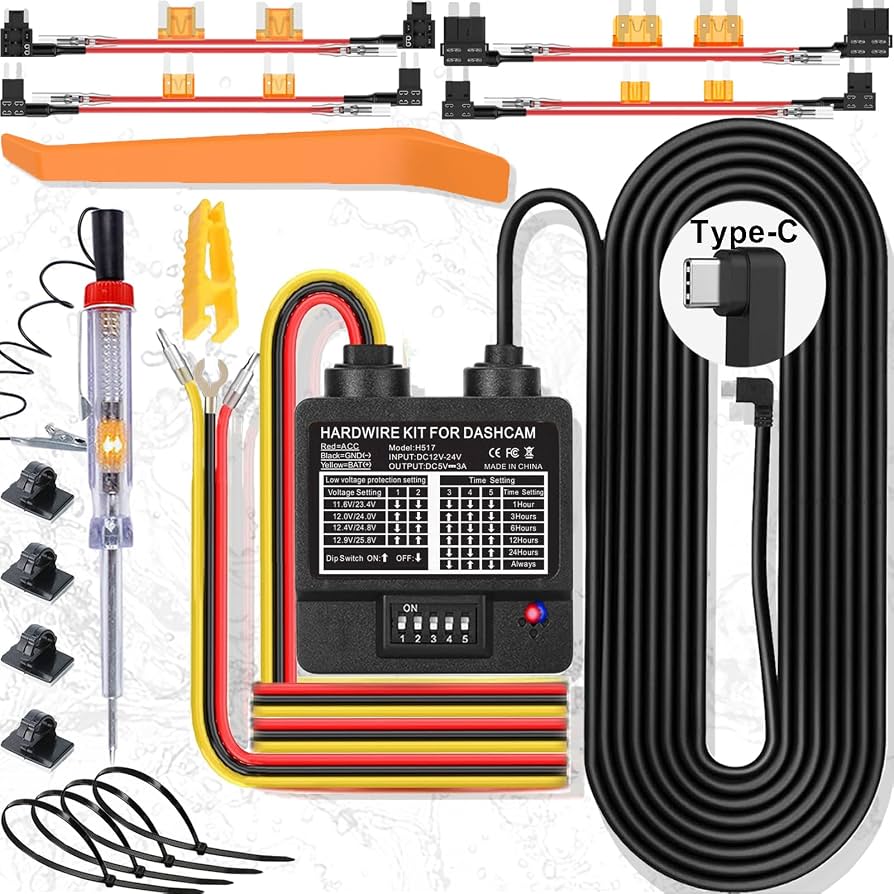
Hardwire your dash cam to switched and constant fuses using a hardwire kit and fuse tap.
I’ve spent years installing and testing in-car electronics, and this guide on how to hardwire dash cam for parking mode walks you through every step. You’ll get clear parts lists, safety checks, step-by-step wiring, battery protection tips, and troubleshooting. Read on if you want reliable parking surveillance and to avoid battery drain, blown fuses, or guesswork when learning how to hardwire dash cam for parking mode.

Why hardwire your dash cam for parking mode?
Hardwiring lets your dash cam record while the car is parked without running the cigarette lighter socket. It gives continuous parking surveillance, event-triggered recording, and low-voltage protection. Learning how to hardwire dash cam for parking mode improves security and captures hit-and-runs, vandalism, and theft attempts when you’re away.
Tools and parts needed to hardwire dash cam for parking mode
Prepare parts and tools before starting. This makes the job faster and safer.
- Hardwire kit with low-voltage cutoff and inline fuse
- Fuse tap (add-a-circuit) that fits your car’s fuse type
- Wire crimper, electrical tape, zip ties, and wire strippers
- Multimeter for voltage and continuity checks
- Panel removal tool and flashlight
- Optional: soldering kit for permanent connections
Having the right gear reduces mistakes and makes how to hardwire dash cam for parking mode straightforward.
Safety and vehicle prep
Safety keeps you and your car safe while wiring. Always disconnect the negative battery if you plan to splice into wires directly. Work in a well-lit, flat area and wear gloves and eye protection when needed.
- Read your vehicle’s manual to find the fuse box locations.
- Note the fuse type and amperage before choosing a fuse tap.
- Avoid routing cables near airbags, hot exhaust parts, or moving components.
Safe prep makes how to hardwire dash cam for parking mode less risky and more reliable.
Step-by-step: How to hardwire dash cam for parking mode
Follow these steps slowly. Short tests after each step help catch issues early.
- Identify target fuses
- Use your owner’s manual or fuse diagram. Find one switched (accessory) fuse and one constant fuse if your dash cam needs both.
- Test fuses with a multimeter or test light
- With ignition off and then on, confirm which fuse is constant and which is switched. Mark them.
- Fit the fuse tap to the chosen fuse
- Remove the fuse, insert it into the fuse tap, and install the fuse tap into the original slot.
- Connect the hardwire kit power leads
- Attach the red wire to the switched fuse tap for ignition power. Attach the yellow or second power lead to the constant fuse tap if required.
- Ground the dash cam correctly
- Find a clean metal bolt or grounding point. Scrape paint if needed and secure the ground wire firmly.
- Route and secure the cable
- Tuck wiring under trim and along the headliner and A-pillar. Avoid pinching wires when reassembling panels.
- Reconnect battery and test
- Turn ignition on and off to confirm the dash cam powers as expected in driving and parking modes.
- Configure the dash cam’s parking settings
- Set motion detection, time delays, and low-voltage cutoffs in the dash cam menu.
These steps show how to hardwire dash cam for parking mode in a clear, repeatable way.
Choosing a power source and fuse tap options
You can use different power strategies depending on your camera and vehicle. Choose what fits your dash cam’s needs.
- Accessory (switched) fuse
- Powers the camera only when ignition is on. Good for driving recording but needs a second source for true parking mode.
- Constant fuse
- Provides 12V anytime. Use with low-voltage cutoff to prevent battery drain.
- Combination (recommended)
- Use both switched and constant with a hardwire kit designed for parking mode. This enables full parking recording and smart power control.
Selecting the right method lets you balance continuous recording with battery protection when learning how to hardwire dash cam for parking mode.
Battery protection, low-voltage cutoff, and settings
Protecting the vehicle battery is essential. Hardwiring without cutoff risks leaving you stranded.
- Low-voltage cutoff
- Set a cutoff (often 11.6–12.4V) on the hardwire kit to stop camera power when the battery dips too low.
- Timer and motion options
- Use motion detection to record only when needed. Timers can limit how long parking mode remains active.
- Power draw and capacitor vs. battery-backed cameras
- Cameras with capacitors handle cold better and draw less steady current than ones with internal batteries.
Understanding these options helps you set safe, effective parking surveillance and keeps the battery healthy when you hardwire dash cam for parking mode.
Testing, troubleshooting, and tips
Testing avoids surprises. Troubleshoot in small steps.
- Test ignition and constant power separately with a multimeter before connecting.
- If the camera won’t enter parking mode, check hardwire kit wiring and dash cam settings.
- If battery drains, raise the low-voltage cutoff or reduce parking recording sensitivity.
- Secure loose wiring with zip ties and avoid tight bends.
- Label fuse taps and wires for future maintenance.
These checks make how to hardwire dash cam for parking mode more dependable and tidy.
Personal experience and common mistakes
From my installs, a few pitfalls recur. I’ve done dozens of hardwires and learned what to avoid.
- Mistake: Using a constant fuse without low-voltage cutoff. Result: dead battery after a few days. Lesson: always use a wired kit with cutoff.
- Mistake: Grounding to painted metal. Result: intermittent ground and camera reboots. Lesson: scrape paint or use a known chassis bolt.
- Tip: Test for fuse labels first. Some fuse boxes swap accessory and constant across trims. Verify with a meter.
- Tip: Route cables high and hidden. Re-routed wires save you noise and panel damage.
These real-world tips show practical ways to successfully hardwire dash cam for parking mode.
Frequently Asked Questions of how to hardwire dash cam for parking mode
How long does it take to hardwire a dash cam for parking mode?
Most installs take 30 to 90 minutes depending on car access and experience. Complex vehicles with deep trims may take longer.
Will hardwiring my dash cam drain my car battery?
It can if you use constant power without a low-voltage cutoff. Use a hardwire kit that has battery protection to prevent drain.
Can I hardwire without a fuse tap?
You can splice directly, but that is less safe and may void warranties. A proper fuse tap is cleaner and preserves fuse protection.
Do I need professional help to hardwire dash cam for parking mode?
If you are uncomfortable with electrical work, seek professional installation. A pro ensures correct fuse selection, secure grounding, and neat routing.
Will hardwiring affect my car warranty or electronics?
A proper install that uses fuse taps and OEM-compatible fuses is usually safe. Check your vehicle warranty and avoid cutting factory wiring when possible.
Conclusion
Hardwiring unlocks reliable parking mode by supplying the right fuse power, safe grounding, and battery protection. Follow the checklist, use a proper hardwire kit, test carefully, and set the dash cam’s parking options to match your needs. Try one install on a simple vehicle first, and then expand your skills with more complex cars. If this guide helped, try the steps on your vehicle, subscribe for more how-to guides, or leave a comment about your install experience.