
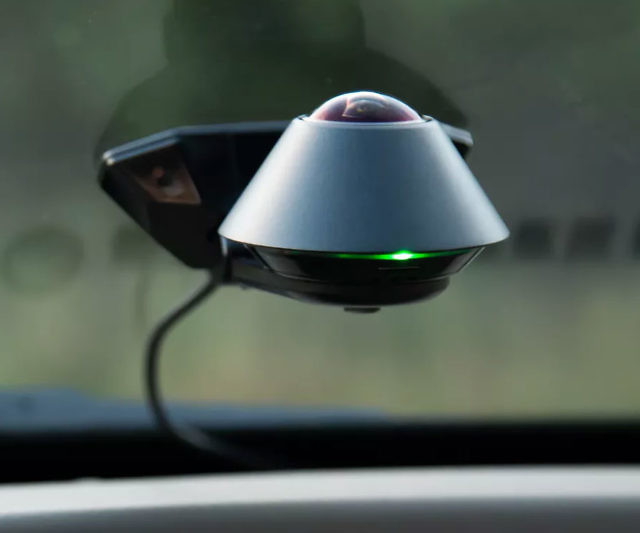
A security camera for car while parked records threats, deters crime, and protects claims.
If you park on the street, in a shared garage, or at work, you need proof when something happens. I’ve installed and tested many setups across hot summers and cold winters. In this guide, I’ll show you how a security camera for car while parked works, what to buy, how to power it, and how to use it the right way for real results.

What is a security camera for car while parked?
A security camera for car while parked is a small camera system that keeps watch when the car is off. Most are dash cams with parking mode. They use motion or impact sensors to wake and record clips. Some record time-lapse or 24/7 low-bitrate video.
Modern systems can send phone alerts. They can back up clips to the cloud over Wi-Fi or LTE. Many add GPS tags, date, time, and speed, which help with reports and claims.
Think of it as a silent guard. It sees hit-and-run events. It logs vandalism. It proves your side of the story.
Why you need a security camera for car while parked
A parked car is easy to bump, scrape, or break into. A security camera for car while parked gives you eyes when you are not there. It can scare off thieves with a blinking LED. It can record a face, a plate, or the exact event.
Claims go smoother when you have video. Adjusters like clear clips with time and GPS. In my work, I have seen claims close faster when owners share clean footage. It saves time, stress, and in some cases, your deductible.
If you park under trees or near busy roads, your car faces risk each day. A simple, smart setup protects your wallet and peace of mind.
Quick answers to common questions
- Do I need a dual-channel camera? If you park on streets or in lots, yes. Front and rear help catch plates from more angles.
- Will it drain my battery? Not if set up right. Use a hardwire kit with low-voltage cut-off or a dash cam battery pack.
- Can it send alerts to my phone? Yes. LTE models and Wi-Fi cloud options can push motion or impact alerts with short clips.
How parking mode works
Parking mode watches for motion or impact. When a sensor fires, the camera saves a short clip. Some models keep a few seconds of video from before the trigger. That is called buffered recording. It helps show what led to the impact.
There are three common modes:
- Motion or impact events. Saves short clips on trigger.
- Time-lapse. Records at 1–5 frames per second to cover hours with small files.
- Low-bitrate always-on. Records at a lower quality the whole time the car is parked.
Data use and power draw vary by mode. Motion-only uses the least power. Low-bitrate uses more. LTE cloud alerts use data, so watch your plan.
Types of systems
You have a few paths to a security camera for car while parked:
- Single-channel dash cam. Simple and cheap. Good for front-only coverage.
- Dual-channel dash cam. Front and rear coverage. Best for most drivers.
- 360-degree or 3-channel kits. Add cabin view or a full wrap. Great for rideshare or city parking.
- LTE dash cams. Built-in SIM or hotspot support. Send alerts and store key clips in the cloud.
- Battery-powered magnet cams. Fast to mount. Good for temporary needs, but watch for theft and heat limits.
Each type has trade-offs in cost, power, and ease of install. Think about where you park and what angles you need most.
Key features to look for
When you shop for a security camera for car while parked, focus on these:
- True parking mode with buffered recording. Get the seconds before the event.
- Impact and motion sensitivity control. Fine-tune to reduce false alerts.
- Video quality. 2K or 4K helps read plates. Look for good HDR and night vision.
- Wide field of view. Around 130–160 degrees is a sweet spot.
- Supercapacitor or high-temp battery. Handles heat better than standard lithium cells.
- GPS tagging. Adds speed, time, and location for claims.
- Wi-Fi and LTE support. For fast clips and remote alerts.
- Cloud backup options. Protect key files if the camera is stolen.
- MicroSD endurance support. Choose high-endurance cards for long life.
- Voice or app control. Easier to lock files and change settings.
Well-known brands offer solid support and firmware updates. Avoid no-name models with no updates or weak apps.
Power options for parking mode
Power is the heart of a security camera for car while parked. You have three main options:
- Hardwire kit. Ties into your fuse box with constant and accessory power. Add a low-voltage cut-off to protect the car battery.
- OBD power kit. Easier to install. Some kits still include voltage cut-off.
- External dash cam battery. Charges while you drive. Runs the camera for 12–48 hours while parked. Best for long parking or if you have a short commute.
Tips to avoid battery drain:
- Set timer or voltage cut-off in the app.
- Use motion-only mode if you park for days.
- In cold or hot weather, check battery health.
- If you do lots of short trips, add a dash cam battery.
Do not rely on a simple USB cable in a port that stays live. You risk a dead battery. Use a proper kit.
Installation guide
You can install a security camera for car while parked in under two hours.
Steps:
- Plan your view. Mount high and center behind the mirror. Clean the glass first.
- Route cables. Tuck into headliner and A-pillar. Keep clear of airbags.
- For rear cams, run the wire along the roof trim to the hatch or trunk.
- Hardwire. Use an add-a-fuse kit. One fuse to constant power, one to accessory. Ground to bare metal.
- Set parking mode in the app. Adjust sensitivity. Set voltage or timer cut-offs.
- Test. Lock the car. Tap a window to trigger. Review the clip.
Common mistakes to avoid:
- Mounting too low or behind tint dots. It blurs the view.
- Leaving cables loose. They can rattle or get cut.
- Skipping a low-voltage cut-off. That can drain the battery.
Storage, footage management, and privacy
A security camera for car while parked writes to a microSD card. Choose a high-endurance card. It lasts longer with constant writes. Format the card monthly in the camera. Replace it every 12–24 months, based on hours recorded.
Use loop recording so old clips overwrite first. Lock key files in the app so they do not get erased. If your model has cloud sync, back up events that matter. LTE plans can be small since uploads are short.
Respect privacy. Avoid recording private spaces through home windows. If your camera records audio, check local consent rules. Some apps let you mask parts of the image to hide areas like your driveway or a neighbor’s yard.
Legal and insurance notes
Laws differ by state and country. Windshield mount rules vary. Many places allow a small device behind the mirror. Audio recording may need one- or two-party consent. There is no privacy in public roads, but be mindful in private lots. This is general info, not legal advice.
For claims, include the raw file, not just a screen recording. Keep the time and GPS data on. Write a short event note. Share the claim number in your file name. Police and insurers value clear, short clips with context.
Real-world tests and my take
I park on a busy city street. My first setup had motion too high. I got 200 clips of leaves in one night. I learned to point the lens a bit higher and lower the motion setting. That cut false alerts by 80 percent.
At night, 2K with good HDR beats cheap 4K with weak night vision. Plate reads matter. A small dash cam battery changed my daily use. I park for 36 hours on weekends and still get full coverage. For me, that was the best upgrade after going dual-channel.
Budget and recommended setups
Pick a security camera for car while parked that fits your needs and wallet.
Good under $100:
- Single-channel 1080p with basic parking mode.
- Add an OBD kit for simple power.
Better $100–$250:
- Dual-channel 2K front and 1080p rear.
- Buffered parking mode, Wi-Fi app, GPS.
- Hardwire kit with low-voltage cut-off.
Best $250–$500+:
- Dual or triple channel with 2K or 4K front.
- Supercapacitor, HDR, cloud, LTE option.
- External dash cam battery for long parking.
If you often street park at night, favor HDR and a wide lens. If you travel a lot, LTE alerts can be worth the fee. For garages, motion zones help cut false triggers.
Troubleshooting and maintenance
If you get too many false alerts:
- Lower motion sensitivity.
- Use impact-only triggers at night.
- Tilt the lens to avoid moving trees or busy roads.
If the card errors out:
- Use a high-endurance card.
- Format monthly in-camera.
- Replace the card if errors return.
If the camera overheats:
- Park in shade when you can.
- Use a model with a supercapacitor.
- Turn off cloud live view when parked.
If GPS will not lock:
- Mount with a clear sky view.
- Wait a few minutes after start.
- Update firmware in the app.
Frequently Asked Questions
Is a security camera for car while parked legal to use?
In most places, yes. You can record public areas from your car. Check local laws for audio consent and windshield mount rules.
Will a parked car camera drain my battery?
Not if set up right. Use a hardwire kit with a low-voltage cut-off or a dedicated dash cam battery pack.
Do I need 4K for plate numbers at night?
Not always. Strong HDR and low-light performance matter more than raw resolution for plate reads.
How long can parking mode run?
With a dash cam battery, 12–48 hours is common. On the car battery, safe time depends on your cut-off voltage and battery health.
Can I get phone alerts if someone hits my car?
Yes. LTE or Wi-Fi cloud models can send push alerts with short clips when motion or impact is detected.
What size microSD card should I use?
128GB to 256GB works well for most users. Choose a high-endurance card for longer life.
Will the camera work in extreme heat or cold?
Look for a supercapacitor model with a wide temp range. Many consumer models handle from about -4°F to 140°F.
Conclusion
A security camera for car while parked is simple protection that pays for itself. It helps prevent loss, speeds claims, and brings peace of mind each time you lock up. With the right power plan, smart settings, and a good mount, it just works.
Set your budget, pick the key features, and install it this week. Your future self will thank you the next time life throws a curveball in a parking lot. Want more guides and tested setup tips? Subscribe and drop your questions in the comments.