
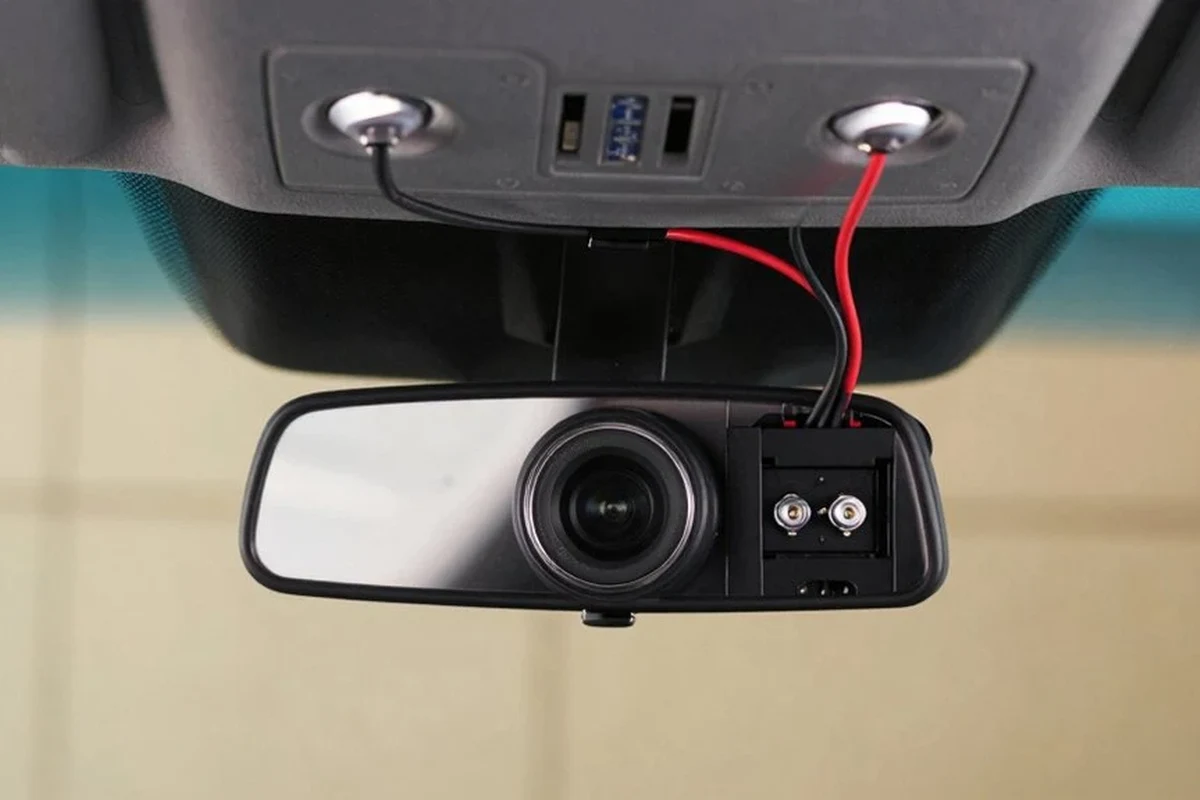
A hardwire dash cam is worth it if you want parking mode, cleaner wiring, and better protection when your car is off. If you only need basic driving footage, a plug-in dash cam is simpler and usually enough.
A hardwire dash cam is the best choice for drivers who want parking mode, cleaner wiring, and more reliable always-on protection. If you park on the street, drive for work, or want your camera to stay powered when the car is off, hardwiring is usually worth it in 2026.
- Best use case: Street parkers, commuters, rideshare drivers, and fleet users benefit most from hardwiring.
- Main advantage: Parking mode can capture incidents while the vehicle is unattended.
- Main caution: Voltage cutoff and battery health matter to avoid drain problems.
- Buy smart: Prioritize low-light video quality, storage support, and heat resistance.
What a Hardwire Dash Cam Is and Whether It’s Worth It in 2026

A hardwire dash cam connects directly to your vehicle’s fuse box instead of using only the 12V accessory socket. That setup lets the camera draw power in a more controlled way and, on many models, continue monitoring the vehicle after ignition turns off.
In 2026, hardwiring is especially appealing because more drivers want parking protection, incident evidence, and a cleaner cabin with fewer visible cables. It is not automatically the right choice for everyone, though, because the added protection comes with more installation effort and a little more responsibility for battery management.
Quick answer: who should choose hardwiring over a plug-in setup
Choose hardwiring if you routinely park in public spaces, need parking mode, drive for rideshare or delivery work, or want a more permanent installation. A plug-in dash cam is usually better if you want the simplest setup, lease your vehicle, or only need recording while driving.
How a hardwire kit works with parking mode and always-on protection
A hardwire kit typically connects to a constant-power fuse, an ignition-switched fuse, and a ground point. The camera can then tell when the car is running and when it is parked, which allows features like motion detection, impact detection, and time-lapse parking recording.
Many kits also include voltage cutoff protection. That matters because it helps prevent the dash cam from draining the battery too far while the vehicle is off. If you want a deeper walkthrough of the wiring process, see our guide on how to hardwire a dash cam for parking mode.
Exact hardwire behavior varies by camera brand, parking mode settings, and vehicle electrical system. Always confirm compatibility in the manufacturer instructions before installation.
Who a Hardwire Dash Cam Setup Fits Best
The best fit is usually a driver who spends a lot of time away from the vehicle and wants evidence if something happens when it is parked. It also makes sense for people who value a tidy interior and do not want a cable hanging from the dashboard.
Daily commuters, rideshare drivers, fleet users, and parked-on-street vehicles
Daily commuters benefit from a hardwired setup if their car sits in a parking lot for long periods. Rideshare and delivery drivers often like the added security of parking mode and the more professional-looking install. Fleet users may also prefer hardwiring because it supports more consistent power management across multiple vehicles.
Street-parked vehicles are a strong use case because parking mode can capture hit-and-runs, break-ins, or vandalism. If you want a camera mainly for work vehicles, our best dash cam for fleet vehicles guide can help narrow the feature set.
When a simple 12V plug-in dash cam may be the better choice
A plug-in setup is often the smarter option for drivers who lease, switch vehicles often, or do not want to open trim panels and access fuse boxes. It can also be the better choice if you only need event recording while driving and do not care about parking surveillance.
If your priority is convenience, a plug-in camera is easier to move between cars and usually faster to set up. That makes it a practical option for many budget buyers.
Good fit if the car is parked in public places and you want parking mode protection.
Useful if you want a cleaner cabin and extra evidence for parking-lot incidents.
Better only if you are comfortable with more setup work and added cost.
Key Features to Look For Before You Buy
Not every hardwire dash cam is built for the same job. The right choice depends on whether you care more about image quality, parking coverage, app features, or a discreet install.
Video quality, sensor performance, and low-light recording
Look for a camera that records clearly in daylight and remains readable at night. Low-light performance matters more than marketing language, because many real incidents happen in dim parking lots or after dark.
Sensor quality, lens design, and bitrate all affect how much detail you can capture. A camera that looks impressive on paper may still struggle with headlights, rain, or glare if those fundamentals are weak.
Parking mode options, voltage cutoff, and motion detection
Parking mode is one of the main reasons to hardwire a dash cam. The best setup for you depends on whether you want motion-triggered recording, impact-triggered recording, or time-lapse monitoring.
Voltage cutoff is just as important. It tells the camera to stop drawing power before the vehicle battery gets too low, which helps reduce the risk of a no-start situation. If battery protection is a concern, our guide to preventing dash cam battery drain explains the basics in more detail.
App support, GPS, dual-channel recording, and storage compatibility
App support can make it easier to review clips, change settings, and update firmware. GPS is useful when you want location and speed data attached to footage, while dual-channel recording gives you front and rear coverage.
Storage matters too. Check whether the camera supports high-endurance microSD cards and whether it limits card size or requires frequent formatting. For best results, review the camera maker’s storage recommendations and consider using a card designed for continuous recording.
Build quality, heat resistance, and cable length for cleaner installs
Heat resistance is important because dash cams live behind a windshield where temperatures can rise quickly. A model built for hot interiors is less likely to fail early or shut down unexpectedly.
Cable length also affects the install. Longer, well-routed cables make it easier to hide wires neatly and reach the fuse box without strain. If you want a cleaner cabin finish, our article on hiding dash cam wires in the headliner may help.
- Match parking mode to your actual parking habits, not just the longest feature list.
- Confirm your vehicle’s fuse type before buying a hardwire kit.
- Choose a high-endurance memory card made for constant video writing.
- Review the camera’s heat rating if you live in a hot climate or park outdoors.
Hardwire Dash Cam Benefits, Limitations, and Common Mistakes
Hardwiring can be a big upgrade, but it is not a perfect solution. Understanding the trade-offs helps you avoid frustration later.
Real-world advantages: cleaner install, continuous protection, and better security
The clearest advantage is parking coverage. A hardwired camera can keep watching when you are away, which is useful for hit-and-runs, break-ins, and parking-lot scrapes.
Another benefit is the cleaner look. Without a cable dangling from the 12V socket, the cabin feels less cluttered. That may seem minor, but it matters in daily use because the install stays out of the way and looks more permanent.
Limitations: battery drain risk, installation complexity, and vehicle compatibility
Hardwiring introduces a battery-drain risk if the cutoff setting is wrong or the vehicle battery is already weak. It also takes more effort to install than a plug-in camera, especially in modern vehicles with tightly packed fuse boxes and trim panels.
Compatibility can also vary. Some vehicles are easier to hardwire than others, and some owners may prefer a different power solution such as a dash cam battery pack. For readers comparing power options, our dash cam battery pack guide is a useful companion piece.
Common mistakes: wrong fuse choice, poor grounding, and ignoring voltage protection
One common mistake is tapping the wrong fuse. If you choose a circuit that does not behave the way you expect, the camera may stay on when it should not or fail to enter parking mode correctly.
Poor grounding is another issue. A weak ground can cause power instability, random shutdowns, or unreliable parking behavior. Just as important, some buyers ignore voltage protection and then wonder why the vehicle battery seems weaker after extended parking.
- Supports true parking mode on many setups
- Looks cleaner than a dangling power cable
- Can improve theft and incident evidence when parked
- More complicated than a plug-in install
- Can drain a weak battery if configured poorly
- Not ideal for every leased or frequently swapped vehicle
How to Install a Hardwire Dash Cam Safely
Installation is usually straightforward for someone comfortable with basic vehicle trim work, but it should still be treated like an electrical job. Rushing the process can create rattles, loose connections, or safety problems.
Step-by-step setup overview from fuse box to camera placement
Identify the constant-power fuse, ignition-switched fuse, and ground point recommended by the hardwire kit instructions.
Run the wire along trim edges and behind panels so it stays hidden and does not interfere with controls.
Place the camera where it has a clear forward view and does not block the driver’s vision.
Confirm that the camera switches modes properly and shuts down before the battery is overdrawn.
Safety notes for airbags, trim panels, and electrical systems
Do not route wires through airbag paths, cover airbag modules, or force trim panels back into place. If you are unsure where airbags are located, consult the owner’s manual before routing any cable.
It is also smart to disconnect power only when the vehicle instructions allow it and to avoid probing wires without knowing the circuit. Modern vehicles can have sensitive electrical systems, so careful handling matters.
When to DIY and when to use a professional installer
DIY makes sense if you are comfortable reading instructions, removing trim, and verifying fuse locations. A professional installer is a better choice if the vehicle has a complex fuse layout, you want the cleanest possible result, or you are not confident working around electrical components.
Professional installation may cost more, but it can reduce the chance of wiring mistakes and save time. That trade-off is often worth it for newer vehicles or for owners who want the work done once and done correctly.
Care, Cleaning, and Ongoing Maintenance
Once installed, a hardwire dash cam still needs periodic attention. Small maintenance habits help keep it reliable over the long term.
Keeping the lens, mount, and cables in good condition
Wipe the lens gently when dust or haze builds up, and check that the mount remains secure in hot or cold weather. If the camera starts to sag or shift, reposition it before the footage becomes misaligned.
Also inspect the cable path occasionally. A wire that loosens near a panel or mirror can become visible, distracting, or vulnerable to wear.
Checking firmware, memory cards, and power settings over time
Firmware updates can improve stability, app performance, and parking behavior, so it is worth checking the manufacturer app or support page from time to time. Memory cards should be formatted and replaced when they show signs of wear, because continuous recording can be hard on storage.
Power settings deserve occasional review too. If your driving pattern changes or the battery ages, you may need to adjust cutoff thresholds or parking mode sensitivity.
Value, Budget Considerations, and Final Recommendation
Hardwire dash cams vary widely in price because the real cost is not just the camera itself. You are also paying for parking features, heat tolerance, app quality, and whether you install it yourself or hire a professional.
What you should expect at entry-level, mid-range, and premium price points
| Price Tier | What You Usually Get | Best For |
|---|---|---|
| Entry-level | Basic recording, simpler parking options, fewer app features | Drivers who want hardwiring on a tighter budget |
| Mid-range | Better image quality, stronger parking mode controls, more reliable build quality | Most daily drivers and commuters |
| Premium | Advanced low-light performance, dual-channel support, stronger software and heat tolerance | Rideshare, fleet, and high-security use cases |
Because availability and pricing change often, confirm current specs and included accessories with the seller or manufacturer before buying. The best value is usually the model that matches your parking habits and climate, not the one with the longest feature list.
Best overall recommendation by use case and final verdict from Alex Carter
My Best Car Dealer’s practical recommendation is simple: choose a hardwire dash cam if parking protection, a cleaner install, and always-ready recording are important to you. If you only want basic driving footage, a plug-in model is easier and usually enough.
A hardwire dash cam is the better long-term setup for commuters, street parkers, rideshare drivers, and fleet users who need parking mode and a neater install. For Alex Carter, the best choice is the one with strong voltage protection, reliable low-light recording, and storage support that fits your real driving routine.
If your main goal is parking protection, hardwiring is usually worth the extra effort. If your goal is convenience, a plug-in camera may be the smarter buy.
Common Questions
It is better if you want parking mode and a cleaner install. A plug-in camera is better if you want the easiest setup.
Not automatically, but improper installation can create problems. Check your vehicle warranty terms and use a proper installer if you are unsure.
Parking mode lets the camera keep monitoring when the car is off. It may use motion detection, impact detection, or time-lapse recording.
Usually yes. A high-endurance microSD card is better for continuous recording than a standard card.
Most vehicles can, but fuse layouts and electrical systems vary. Always confirm compatibility with the camera and hardwire kit instructions.
Frequently Asked Questions
It is best for drivers who want parking mode, cleaner wiring, and more consistent protection when the car is unattended. That makes it a strong fit for commuters, street parkers, rideshare drivers, and fleet vehicles.
Focus on video quality, low-light performance, parking mode options, voltage cutoff, app support, GPS, and storage compatibility. Heat resistance and cable length also matter if the camera will live in a hot cabin.
The main drawbacks are installation complexity, battery-drain risk if configured poorly, and possible compatibility issues with some vehicles. A plug-in setup is easier if you do not need parking surveillance.
Keep the lens clean, inspect the mount and cable routing, and update firmware when available. You should also check the memory card and power settings periodically to keep recording reliable.
Confirm fuse type, ground point, parking mode settings, and voltage cutoff instructions. If your vehicle has complex electronics or airbag paths near the install area, consult the owner’s manual or a professional installer.
It often is if parking protection matters to you. If you only want basic footage while driving, the extra cost and effort may not be necessary.