
Garmin Dash Cam Live is best for drivers who want connected alerts, remote viewing, and parking awareness. If you only need simple recording, a lower-cost dash cam may be the smarter buy.
Garmin Dash Cam Live is a strong fit if you want a connected dash cam with remote viewing, cloud alerts, and parking protection in one package. In 2026, it makes the most sense for drivers who value convenience and incident evidence more than the lowest possible upfront price.
- Best fit: Commuters, rideshare drivers, and security-minded owners who will use app features.
- Main tradeoff: Connected features can add subscription and setup complexity.
- Ownership matters: Memory card health, power setup, and firmware updates affect reliability.
- Value test: It makes sense when remote access is more important than the lowest price.
Garmin Dash Cam Live: Is It Worth Buying in 2026?

Quick verdict: what it is, who it fits, and the main reasons to consider it
Garmin Dash Cam Live is a connected dash cam designed to keep recording while giving you app-based access to live view, saved clips, and alerts when the vehicle is parked. It is especially appealing if you want a camera that feels more like a security device than a simple recording accessory.
For buyers who only want a dependable front-facing camera, the feature set may be more than they need. But for commuters, rideshare drivers, and owners who park in busy areas, the remote access and alert system can be the main reason to choose it.
How Garmin Dash Cam Live compares to today’s connected dash cam expectations
By 2026 standards, many dash cams can record in high resolution, but not all of them combine cloud access, app control, and parking-aware monitoring in a polished way. Garmin’s name carries weight because many shoppers already associate it with navigation and in-car electronics, which helps with trust and product familiarity.
That said, modern connected dash cam buyers should expect tradeoffs. The more a camera depends on app connectivity and subscription-style services, the more important it becomes to check signal coverage, account setup, and total ownership cost before buying.
What Garmin Dash Cam Live Offers: Core Features and Smart Functions
Live view, cloud-connected alerts, and remote access basics
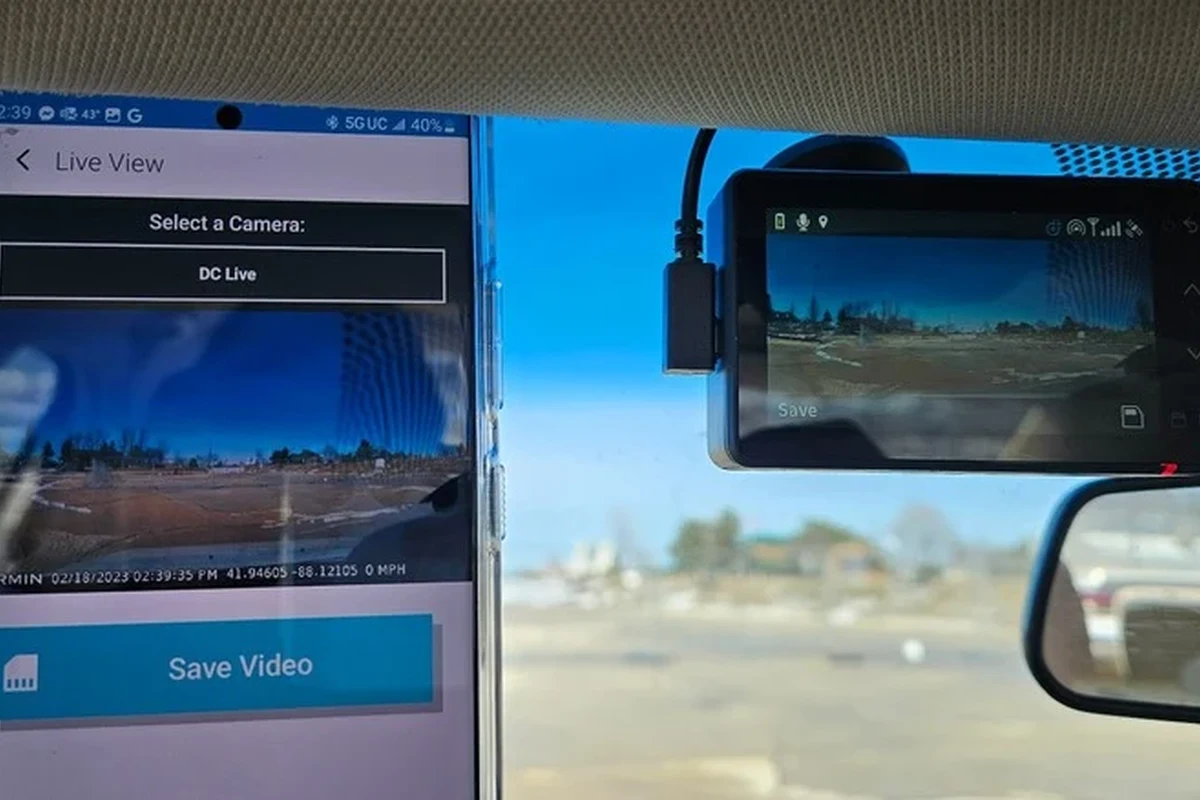
The headline feature is remote access. In plain English, that means you can use the companion app to check the camera feed, review clips, and receive alerts without being in the car.
That functionality is useful in parking lots, apartment garages, or at work, where you may want a quick look at what happened after a bump, break-in attempt, or suspicious activity. For readers comparing connected models, our guide to the best dash cam for live streaming can help explain how live-view features differ from standard recording.
Cloud-connected features can depend on cellular coverage, app permissions, account status, and the specific service plan offered in your region. Confirm those details before you buy.
Video quality, field of view, and low-light performance
For any dash cam, image quality matters more than marketing language. Look for the resolution, lens coverage, and low-light performance listed on the official product page, because those details determine how clearly a plate, lane marking, or face may appear after an incident.
Field of view is the width the camera can capture. A wider view can help record more of the road, but an overly wide image can sometimes make distant details smaller and harder to read. For buyers who want a broader setup, it is also worth comparing front-only models with a front-and-rear dash cam setup.
Driver assistance and safety-focused features
Garmin dash cams often include driver-assistance tools such as lane departure alerts or forward collision warnings, depending on the model and configuration. These features can be helpful reminders, but they should never replace attentive driving.
Driver-assistance alerts are convenience features, not substitutes for safe driving, proper following distance, or manufacturer-installed safety systems.
For some buyers, these alerts are a bonus. For others, they may feel unnecessary or occasionally distracting, especially in dense traffic or when the vehicle is driven by multiple people with different preferences.
Storage, app integration, and subscription considerations
Most dash cams rely on a microSD card for local recording, even when they also support cloud or app features. That means card quality, formatting, and overwrite behavior still matter. If you are new to memory-card maintenance, see our guide on how to format an SD card for a dash cam.
App integration is one of the biggest reasons to buy this model, but it is also one of the biggest ownership considerations. Before purchasing, confirm whether any connected services require a subscription, what happens if the subscription ends, and which features remain available offline.
Who Should Buy Garmin Dash Cam Live?
Best for commuters, rideshare drivers, and parked-car security users
This model fits daily commuters who park in public lots, street park overnight, or want an easy way to review incidents without pulling the SD card immediately. It also makes sense for rideshare drivers who want a camera that supports fast evidence access and remote awareness.
Good fit if parking security and app alerts matter more than the lowest price.
Useful if you want an easy-to-monitor vehicle camera for shared driving.
May be more camera than you need if you only want basic recording.
Best for families, road-trippers, and fleet-minded buyers
Families can benefit from a camera that is easy to check from a phone, especially when multiple drivers share the same vehicle. Road-trippers may appreciate the convenience of reviewing clips without handling the camera itself.
Fleet-minded buyers should think about how quickly footage can be accessed after an event. If you manage multiple vehicles, it may also be worth comparing this model with fleet-focused options such as our best dash cam for fleet vehicles guide.
Who may want a simpler or lower-cost dash cam instead
If you mainly want a camera that records reliably and you do not care about remote alerts, you may be better off with a simpler model. Budget shoppers should also compare total cost, not just the sticker price, because connected features can add ongoing expenses.
Drivers who rarely park in public, do not want app setup, or prefer a set-it-and-forget-it device may find better value in a basic dash cam with strong video quality and a straightforward menu system.
Real-World Benefits: Why the Garmin Dash Cam Live Stands Out
Peace of mind while parked or away from the vehicle
The biggest advantage is awareness. Even when you are away from the car, the system can help you know whether something happened while it was parked, which reduces the guesswork after a minor impact or suspicious activity.
Parking-related claims often become easier to discuss when drivers have time-stamped footage instead of relying only on memory.
Evidence capture for accidents, insurance claims, and incidents
Dash cam footage can be useful for documenting lane changes, rear-end impacts, parking-lot scrapes, and roadside disputes. It does not guarantee a claim outcome, but it can help establish a timeline and reduce uncertainty.
For that reason, buyers should think of the camera as part of a broader documentation habit. Keep the memory card healthy, save important clips promptly, and know how to retrieve footage before you need it in a stressful moment.
Convenience of connected alerts and remote monitoring
Connected alerts are the feature most likely to justify the premium for the right buyer. Instead of waiting until you return to the car, you may be able to check what happened sooner and decide whether to save footage, contact a property manager, or file a report.
That convenience is also why many shoppers compare connected models with other monitoring-focused products, including dash cams designed for parked-car protection such as a dash cam for car with parking mode.
Limitations, Drawbacks, and Evidence-Based Tradeoffs
Subscription costs, app dependence, and connectivity limits
The main tradeoff with a connected camera is that the best features may depend on an app, an account, or an active service plan. If those services are unavailable, limited, or inconvenient in your area, the value proposition drops quickly.
App-dependent products can also be frustrating if a phone update, login issue, or connectivity problem interrupts access. That does not make the camera a bad choice, but it does mean the ownership experience is more complex than a simple standalone recorder.
Potential installation complexity and power-management concerns
Parking features often require more careful power planning than basic driving-only recording. Depending on your setup, you may need a hardwire kit, a battery pack, or another power solution that supports the camera while the vehicle is off.
If you are comparing power options, our guides on dash cam battery packs and how to hardwire a dash cam for parking mode can help you understand the tradeoffs before installation.
Where competing dash cams may offer better value or simpler ownership
Some competing cameras may deliver similar recording quality at a lower price, especially if you do not need remote access. Others may be easier to install, easier to maintain, or less dependent on a subscription.
- Remote viewing and alert convenience
- Good fit for parked-car awareness
- Brand familiarity and app-based control
- Potential subscription and app dependence
- More setup effort than a basic camera
- May be overkill for simple recording needs
How to Choose the Right Dash Cam Setup Before You Buy
Resolution, storage, parking mode, and GPS as key decision criteria
Before buying any dash cam, compare the features that affect real use: resolution, storage support, parking mode behavior, and GPS. Resolution affects detail, storage affects how long clips remain available, parking mode affects protection when the car is off, and GPS can help add location and speed context to footage.
Hardwire kit vs. cigarette-lighter power vs. battery pack options
A cigarette-lighter connection is usually the simplest setup, but it may not support full parking protection once the car is off. A hardwire kit can enable parking-related features, while a battery pack can reduce strain on the vehicle battery in some setups.
There is no universal best choice. The right option depends on how long you park, whether you want monitoring after shutdown, and how comfortable you are with installation.
New vs. used dash cams: what matters and what to avoid
Buying used can save money, but dash cams are not like many other electronics. Heat exposure, worn mounts, battery degradation, and missing accessories can all reduce reliability.
- Confirm the exact model and included accessories
- Check whether the memory card is included and in good condition
- Verify the return policy and warranty status
- Review subscription or account-transfer limitations
Budget planning: upfront price, subscriptions, and accessories
Budget for more than the camera itself. You may also need a memory card, mounting accessories, a hardwire kit, or a battery pack, depending on your setup. In 2026, that total can matter more than the headline price when comparing connected models.
When comparing dash cams, write down the full ownership cost for one year: camera, storage card, power accessories, and any required service plan.
Setup, Safe Use, and Common Mistakes to Avoid
Mounting position, windshield placement, and visibility rules
Mount the camera where it has a clear view of the road without blocking your driving vision. Laws about windshield placement vary by state and country, so check local rules before you install it.
Keep the unit out of the way of airbags, mirrors, and driver sight lines. A clean installation is not just about looks; it also helps the camera stay stable and capture usable footage.
First-time setup steps, app pairing, and firmware updates
Use the recommended mounting position and make sure the cable is secure.
Follow the manufacturer’s pairing steps and confirm account access before driving.
Install updates, then confirm that clips save correctly and can be reviewed.
Common mistakes: weak power source, poor formatting, and bad placement
Many dash cam problems come from avoidable setup errors. A weak power source can cause shutdowns, a poorly maintained memory card can cause recording errors, and bad placement can leave you with unusable footage.
For more on cable routing, see our guide to how to hide dash cam wires in the headliner. Clean wiring is not only neater; it can also help reduce accidental disconnection.
Safe use in hot weather, long parking periods, and harsh conditions
Heat is a real concern for dash cams, especially in parked vehicles. If you live in a hot climate or leave the car outside for long periods, check the manufacturer’s temperature guidance and avoid assuming any camera is immune to heat stress.
Do not ignore repeated overheating, battery swelling, or electrical issues. Disconnect the device and inspect the setup if you notice unusual behavior.
Care, Cleaning, Troubleshooting, and Final Recommendation
Routine care: lens cleaning, cable inspection, and memory card maintenance
Routine care is simple but important. Wipe the lens gently, check cables for wear, and replace or reformat the memory card as recommended by the manufacturer. If the card starts to fail, footage problems often appear before the camera completely stops working.
- Reformat the card on a regular schedule if the manufacturer recommends it.
- Keep the lens free of dust, fingerprints, and windshield haze.
- Inspect the power cable after hot weather or long trips.
- Save important clips right away instead of waiting until the card overwrites them.
Troubleshooting common issues: connection drops, recording errors, and false alerts
If the app disconnects, start with the basics: confirm power, check Bluetooth or Wi-Fi permissions, and verify that the firmware is current. Recording errors usually point to a memory card issue, a formatting problem, or an unstable power connection.
False alerts can sometimes be reduced by adjusting sensitivity settings or reviewing where the camera is mounted. If the camera is too loose or aimed poorly, it may interpret vibration or passing traffic as an event.
Final recommendation: best buyer profile and transparent buying advice
Garmin Dash Cam Live is a good choice for drivers who want connected monitoring, easier evidence access, and a premium-feeling ownership experience. It is less attractive if you want the cheapest reliable recorder or prefer a dash cam that works with minimal app involvement.
My Best Car Dealer’s editorial view is simple: buy this model if remote access and parking awareness are central to your needs, and choose a simpler camera if your priorities are basic recording, lower cost, or fewer moving parts. Before you purchase, confirm the current feature set, service requirements, and accessory needs with the manufacturer or retailer.
Garmin Dash Cam Live is best for commuters, rideshare drivers, and security-minded owners who will use the app and parking features often. If you only need straightforward video recording, a less connected dash cam may deliver better value.
Common Questions
It is a connected dash cam that lets you review footage and access live features through an app. It is built for drivers who want more than basic recording.
Yes, if your setup supports parking-related features and you want remote awareness while the car is away. Confirm the power and service requirements first.
Some functions may still work locally, but connected features can depend on an active plan or account. Check the current details before buying.
Use a high-quality microSD card that matches the manufacturer’s guidance. Card reliability matters a lot for dash cam performance.
Shoppers who only want basic front-facing recording may not need the extra connected features. A simpler model may cost less and be easier to manage.
Frequently Asked Questions
Yes, especially if you park in public lots, street park, or want quick access to footage from your phone. The connected features are most useful when your car is often away from you.
Confirm the resolution, parking mode behavior, storage requirements, and whether any services require a subscription. Also check app compatibility and local mounting rules.
Not much, but it does need regular care. Keep the lens clean, inspect the cable, and maintain the memory card so recordings stay reliable.
No. A connected model is only better if you will use the app, alerts, and remote access often enough to justify the extra cost and setup.
Using a low-quality memory card, mounting the camera poorly, and ignoring power issues are common mistakes. Those problems can lead to missed or corrupted footage.
Check that the camera records properly, the app pairs correctly, and the mount has a clear view. It is also smart to confirm that firmware is up to date.