
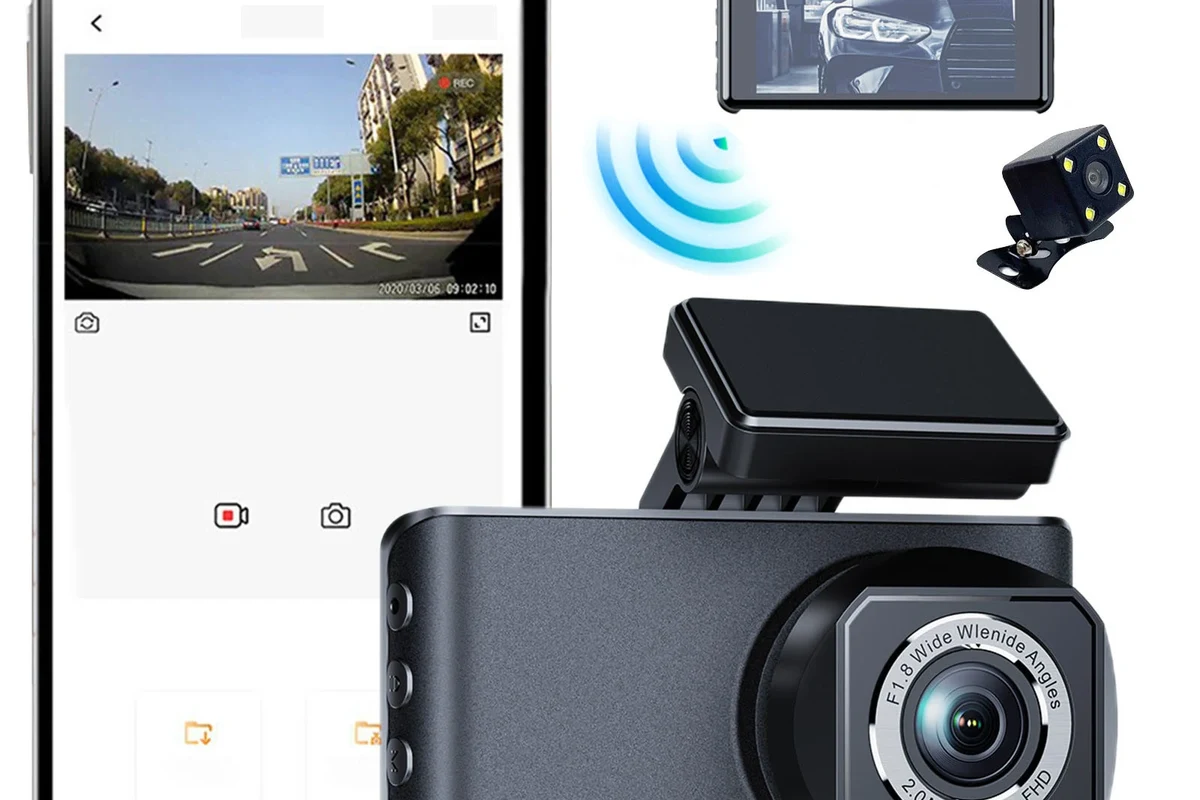
A dash cam mobile app is worth using if it makes your footage easier to access, manage, and share. The best choice is the app that stays stable, pairs reliably, and matches your daily driving needs.
A dash cam mobile app is the easiest way to view, download, and manage dash cam footage from your phone instead of pulling the SD card or using a computer. In 2026, the best option is usually the app that connects reliably to your camera, organizes clips clearly, and fits how you actually drive.
- Compatibility matters: A strong app experience often matters more than the camera’s resolution alone.
- Look for practical tools: Easy downloads, clip locking, GPS data, and parking support are the most useful features.
- Stability beats flash: A simple, reliable app is usually better than one with extra features that glitch.
- Check your phone: App performance can change based on your phone model, OS version, and firmware.
Dash Cam Mobile App: What It Is and Whether It’s Worth Using in 2026

A dash cam mobile app is companion software that lets you control a compatible dash cam from a smartphone. For many drivers, it is worth using because it can save time, simplify evidence sharing, and make routine clip management far less annoying.
Quick answer: the best dash cam mobile app depends on your camera, your driving habits, and how much control you want over footage
If you only want occasional downloads, a basic app may be enough. If you want parking alerts, GPS logs, or fast evidence sharing, look for a stronger app ecosystem with stable connections and frequent updates.
Who this guide is for: commuters, rideshare drivers, parents, road-trippers, and anyone who wants easier dash cam access
This guide is for drivers who want quick access to footage without dealing with SD cards every time something happens. It also helps buyers who are comparing camera brands and want to know whether the app experience is actually useful or just a marketing feature.
How a Dash Cam Mobile App Works with Your Camera
Most dash cam apps connect to the camera through Wi‑Fi, Bluetooth, or a cloud service. The app is only as useful as the connection behind it, so the camera’s software support matters just as much as the lens or resolution.
Wi‑Fi, Bluetooth, and cloud-connected models: the main connection types
Wi‑Fi is the most common setup for live view and video downloads because it can move larger files faster than Bluetooth. Bluetooth is usually better for initial setup or basic pairing, while cloud-connected models can send alerts or footage remotely when the vehicle has active data access.
Connection behavior can vary by brand, firmware version, and phone operating system. A model that works smoothly on one phone may feel slower or less stable on another.
What you can do in the app: live view, video download, settings control, event alerts, and firmware updates
A good app usually lets you preview the camera feed, download clips, change recording settings, check memory status, and update firmware. Some also support event alerts, which can be useful if you park in public areas or want a notification after a collision.
Why app compatibility matters more than raw camera specs for many buyers
A 4K camera is not very helpful if the app freezes, disconnects often, or makes downloads frustrating. For most owners, smooth access to footage is more important than chasing the highest resolution on paper.
Key Features to Compare Before You Buy
Before you buy, compare the app experience the same way you would compare a vehicle’s trim, safety features, and ownership costs. The goal is not just to record video, but to make that video usable when you need it.
Video quality and playback reliability: why 1080p, 2K, and 4K footage still needs a stable app
Higher resolution can help capture details like plates or road signs, but only if the app plays the file smoothly and downloads it without corruption. If playback stutters or transfer speeds are poor, the extra resolution may not help in a real claim or dispute.
File management tools: clip trimming, emergency lock, auto-backup, and easy sharing
The most practical apps make it simple to trim a clip, lock an important file, or send footage to an insurer or family member. If the app has auto-backup or cloud sync, that can reduce the risk of losing a critical video when an SD card fails.
- Look for one-tap locking of incident clips so you do not overwrite important footage.
- Check whether sharing exports preserve time, date, and GPS metadata.
- Confirm whether the app supports both front and rear camera files if you plan to use a dual-channel system.
GPS, speed data, and route logs: useful extras for incident documentation
GPS data can add context to a collision report by showing location, direction, and route history. Speed data can also help explain what happened, but it should be treated as supporting information rather than the only proof in a dispute.
Parking mode support, motion alerts, and remote access: useful for security-focused drivers
If you park on the street or in shared lots, parking mode and motion alerts can be especially useful. Drivers comparing security-focused setups may also want to look at related guides like how a dash cam works when the car is off and dash cams with parking mode.
App usability: interface clarity, connection stability, update frequency, and phone compatibility
Usability matters because you may only use the app during stressful moments. Clear menus, reliable pairing, and regular updates are often more valuable than flashy dashboards or complicated extras.
| Option | Best For | Key Consideration |
|---|---|---|
| Basic app | Drivers who only need downloads and settings | Usually simpler, but fewer tools |
| Advanced app | Rideshare, family, or security-focused drivers | More features, but more chances for bugs |
| Cloud-connected app | Remote access and alerts | May depend on service terms and connectivity |
Best Use Cases: Who a Dash Cam Mobile App Fits Best
Not every driver needs a feature-heavy app. The right setup depends on how often you review footage, how much you drive, and whether you care more about convenience or advanced control.
Good fit if you want fast clip access after a fender-bender or parking incident.
Helpful for reviewing incidents involving teen drivers or shared vehicles without removing the card.
Works well if the app is simple and the camera is dependable, not overloaded with extras.
Daily commuters who want quick access to clips without removing the SD card
Commuters often need speed and convenience more than advanced features. A mobile app lets you review an incident at home or in a parking lot without taking apart the camera or carrying a card reader.
Families and teen drivers who want simple incident review and safer driving oversight
Families may appreciate easy clip review after a parking scrape, school pickup incident, or new-driver mistake. For parents comparing options, a related guide on dash cams for teen drivers can help narrow the feature set.
Rideshare, delivery, and fleet drivers who need fast evidence sharing and frequent file transfers
Drivers who spend long hours on the road often need to move files quickly and keep records organized. If you manage multiple vehicles or commercial use cases, a broader look at fleet dash cam options may be more useful than a consumer-only setup.
Road-trippers and travelers who value route logging, trip clips, and easy storage management
Travelers often benefit from route logs, trip highlights, and simple storage cleanup after long drives. If you record a lot of scenic or multi-day footage, app-based file management can be much easier than sorting everything on a laptop later.
Real-World Benefits and Limitations
The appeal of a dash cam mobile app is convenience, but convenience comes with trade-offs. Understanding both sides helps you avoid buying a camera that looks modern but feels frustrating in daily use.
Benefits: faster evidence retrieval, easier setup, better control, and less dependence on a computer
With a good app, you can pull up footage quickly after an accident, adjust settings from your phone, and avoid handling the SD card as often. That matters when you want to preserve evidence and keep the process simple.
Limitations: connection drops, slow transfers, app bugs, battery drain, and model-specific restrictions
Some apps disconnect when the phone sleeps, transfer large files slowly, or drain the dash cam’s internal battery if the camera is not wired correctly. Certain features may also be locked behind specific models, subscriptions, or firmware versions.
- Faster access to footage
- Less reliance on a computer
- Better control over settings
- Easier evidence sharing
- App stability can vary
- Large file transfers may be slow
- Some features depend on firmware or phone OS
- Parking mode may increase power demands
Evidence limits: app features can vary by brand, firmware version, and phone operating system
What you see in a product listing may not match the experience on every phone. Before buying, it is smart to confirm compatibility on the manufacturer’s site and read the latest app-store notes, especially if you use an older device or a less common phone model.
Setup, Safe Use, and Common Mistakes to Avoid
Most dash cam app problems start during setup, not later. A careful first pairing and a quick test recording can save a lot of frustration down the road.
Follow the manufacturer’s pairing steps and keep your phone close to the camera during initial setup.
Allow Wi‑Fi, Bluetooth, location, and storage permissions if the app requires them to function correctly.
Use the recommended SD card and verify that the camera records, saves, and plays clips before your first long drive.
Basic setup steps: pairing, permissions, storage formatting, and first recording check
Start by pairing the camera, then check permissions and format the SD card using the camera’s own menu or the manufacturer’s instructions. A short test recording helps confirm that the app can find, play, and download files correctly.
- Adjust settings before driving
- Update firmware when the manufacturer recommends it
- Use the correct SD card type and capacity
- Changing settings while moving
- Ignoring repeated connection problems
- Using cheap or mismatched memory cards
Safe use while driving: why settings should be adjusted before the trip, not on the road
Even though the app is on your phone, it should not become a distraction. Set resolution, parking mode, and alert preferences before the trip, then leave the app alone until you are parked safely.
Common mistakes: weak Wi‑Fi pairing, ignoring firmware updates, using the wrong SD card, and poor mounting angles
Weak pairing often comes from standing too far away or leaving other wireless connections active. Bad mounting angles can also reduce the usefulness of the footage, so the camera should be aimed to capture the road, not mostly the dashboard or sky.
Privacy and legal caution: recording laws, passenger notice, and sharing footage responsibly
Recording laws vary by state and country, especially for audio capture. If you drive passengers, share a vehicle, or use the camera in a workplace setting, it is wise to understand local notice and consent expectations before relying on the footage.
Do not use the app to adjust camera settings, review clips, or handle downloads while driving. Pull over safely first, and follow local laws for recording and data sharing.
Care, Maintenance, and Troubleshooting Tips
Like any connected device, a dash cam and its app work best when you keep software, storage, and mounting hardware in good shape. Small maintenance habits can prevent missing clips and failed transfers.
How to keep the app and camera working well: cleaning lenses, checking mounts, and updating software
Clean the lens periodically, confirm the mount is still secure, and check for software updates when the manufacturer releases them. If the app begins acting strangely after a phone update, compatibility may be the issue rather than the camera itself.
Storage care: SD card formatting, file backups, and replacing worn memory cards
SD cards wear out over time, especially in cameras that record constantly. If you rely on your footage, back up important files and replace cards when they start showing errors, missing clips, or repeated formatting prompts.
For setup help, readers often also look at how to connect a dash cam to a phone and how to format an SD card for a dash cam.
Troubleshooting connection problems, frozen apps, missing clips, and failed downloads
If the app will not connect, restart both devices, confirm the camera is in pairing mode, and check whether the phone is trying to jump to another Wi‑Fi network. For missing clips, verify card health, storage settings, and whether the camera is overwriting old files too quickly.
When to reset, reinstall, or contact support
A reset or reinstall can help if the app freezes, but repeated failures usually point to a deeper compatibility or firmware issue. If the camera keeps dropping files or refusing to pair, contact the manufacturer’s support team and confirm whether a firmware fix is available.
Value, Buying Considerations, and Final Recommendation
Value is not just about sticker price. With app-supported dash cams, the real question is whether the software experience saves time and reduces hassle over months or years of ownership.
Good for drivers who mainly want easy downloads and settings changes. The limitation is fewer advanced tools, but the experience is often less frustrating.
Better for frequent monitoring, remote alerts, and shared vehicles. The trade-off is that service terms, compatibility, and ongoing support matter more.
Budget guide: what you gain at entry-level, mid-range, and premium app-supported dash cams
Entry-level models usually provide the basics: live view, clip downloads, and simple settings. Mid-range systems often improve app stability and file management, while premium ecosystems may add cloud access, better parking support, or stronger integration with multiple cameras.
What to prioritize first: app stability, video quality, parking mode, and long-term reliability
If you are comparing options, start with app stability and compatibility, then look at video quality, parking mode, and storage handling. A well-supported app that works every time is usually a better ownership choice than a flashy system with inconsistent performance.
Best overall pick direction: choose a dash cam mobile app ecosystem that is simple, stable, and well-supported over one with flashy extras
For most drivers, the smartest choice is a camera-app combination that makes footage easy to find, easy to save, and easy to share. If you want a broader buying perspective, the best dash cam for car guide can help you compare app support alongside other important features.
Final verdict: the right dash cam mobile app is the one that makes footage access, safety, and ownership easier without adding friction
In 2026, a dash cam mobile app is worth it when it reduces hassle and improves how quickly you can use your footage. If an app is unstable, confusing, or poorly supported, it can turn a simple safety tool into an ongoing annoyance.
Common Questions
No. Many models still rely on SD card removal or computer access, so app support is a feature you should confirm before buying.
Usually yes for file transfers and live view. Bluetooth is more common for basic pairing and setup.
You should not. Adjust settings and review footage only when the vehicle is safely parked.
Often they can, especially if the service includes subscriptions or special data requirements. Always check the terms first.
Reliable connection is usually the most important because it affects everything else, including downloads and live view.
Frequently Asked Questions
It makes footage easier to access after small incidents, parking damage, or traffic disputes. It also reduces how often you need to remove the SD card.
Check the manufacturer’s compatibility list and the app store requirements. Phone operating system version and firmware updates can affect performance.
Confirm the connection type, app features, storage requirements, and whether parking mode or cloud access needs extra hardware or service terms. Also verify that the app is still actively supported.
Large video files, weak Wi‑Fi pairing, outdated firmware, or phone compatibility issues can all cause delays. Some models simply have better software support than others.
Keep the camera’s lens clean, check the mount, update firmware when needed, and replace worn SD cards. Back up important footage so you do not lose it if storage fails.
The biggest limitation is inconsistency: features can vary by brand, phone, firmware, and service plan. That is why app stability should be checked before you buy.