
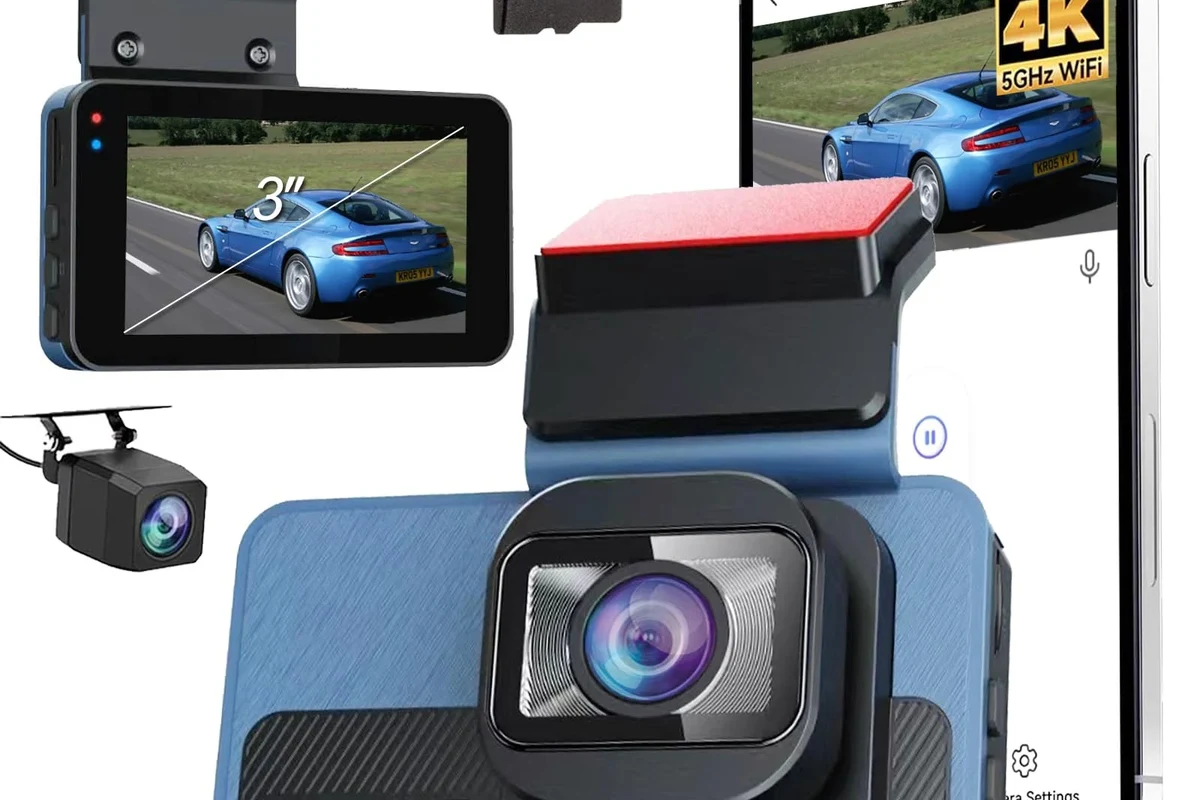
Dash cam front and rear wireless systems are worth considering if you want easier installation and dual-camera coverage. They are best for drivers who value convenience, but wired systems may still be better for maximum reliability and parking-mode use.
Dash cam front and rear wireless systems are a smart choice if you want coverage from both directions without running a long cable between cameras. In 2026, they make the most sense for drivers who value easier installation, app-based access, and a cleaner look, but they are not automatically better than wired systems for every vehicle or every use case.
- Best fit: Commuters, family vehicles, and rideshare drivers often get the most value from wireless front-and-rear.
- Key trade-off: Easier installation usually comes with more dependence on app quality, signal stability, and power.
- Must-check features: Night performance, parking mode, storage support, heat resistance, and rear-camera connection type matter most.
- Common mistake: Buying on resolution alone can lead to disappointing real-world footage and weak long-term reliability.
- Bottom line: Wireless is convenient, but wired may still be the smarter choice for heavy parking.
Dash Cam Front and Rear Wireless: What It Is and Whether It’s Worth Buying in 2026

A wireless front-and-rear dash cam usually means the rear camera connects to the front unit without a visible hardwired video cable, often through Wi-Fi or a dedicated wireless link. That can simplify installation and reduce clutter, but the trade-off is that wireless systems may depend more heavily on signal quality, app stability, and power consistency.
If you are comparing options, it helps to separate marketing language from actual function. Some models are “wireless” only between the front and rear cameras, while others still need a power wire to the vehicle. For a broader overview of core features and use cases, see what a dash cam is and whether it’s worth it and our front-and-rear dash cam guide.
Who a Wireless Front-and-Rear Dash Cam Fits Best
The best buyers are usually people who want dual-camera coverage but do not want the hassle of a complicated install. That includes drivers who lease vehicles, switch cars often, or want a cleaner cabin without visible wiring.
Daily commuters, rideshare drivers, and family vehicles
Commuters benefit from front-and-rear coverage because many incidents happen in stop-and-go traffic, parking lots, and neighborhood streets. Rideshare drivers and family vehicles also gain value from capturing what happens behind the car, which can matter in rear-end collisions or passenger disputes.
For drivers who spend a lot of time on the road, a wireless setup can be appealing because it may be easier to move between vehicles or replace later. If you are shopping for a more general fit, the best dash cam for car guide can help narrow the field by vehicle type and budget.
Parking-heavy drivers, road-trippers, and fleet use
Parking-heavy drivers often want both front and rear coverage because hit-and-run damage frequently happens when the vehicle is unattended. Road-trippers may also appreciate a simpler setup, especially if they do not want to spend time routing cables before a trip.
Fleet operators and business owners should be more cautious. A wireless connection can be convenient, but fleet use often demands consistent uptime, easier retrieval of footage, and predictable power behavior. In those cases, a wired or hardwired setup may be more dependable, especially when paired with fleet-focused dash cam options.
Good fit if you want easy installation and basic incident coverage without a complicated setup.
Helpful for rear-end evidence and parking-lot protection, especially in shared vehicles.
Worth considering if you value convenience, but compare app quality and storage needs carefully.
Key Features to Look For Before You Buy
The right wireless front-and-rear dash cam is less about the word “wireless” and more about how well the whole system handles video, power, storage, and day-to-day use. Focus on the features that affect evidence quality first, then convenience.
Video quality, night vision, and field of view
Look for clear front and rear video, not just a high marketing number. Resolution matters, but so do lens quality, image processing, and how the camera handles glare, headlights, and low light.
Night vision is especially important if you drive early, late, or often park on dim streets. A wide field of view can capture more of the scene, but extremely wide lenses may distort edges, so balance coverage with clarity.
Wireless setup, app reliability, and connectivity range
Wireless setup should be easy enough that you can pair the cameras without guesswork. The companion app matters just as much as the hardware because it is often how you review clips, change settings, and download footage.
Check whether the connection is stable after startup, during longer drives, and after the car sits overnight. If the rear camera loses sync or the app disconnects often, the convenience advantage disappears quickly.
Parking mode, loop recording, GPS, and G-sensor protection
Parking mode can be one of the biggest reasons to buy a dash cam, but it may require special power support. Some systems use motion detection, while others record in time-lapse or low-power standby modes.
Loop recording helps the camera overwrite old footage when storage fills up, and a G-sensor can lock clips after a sudden impact. GPS can add location and speed context to footage, which may be useful for insurance claims or dispute resolution.
Many dash cams keep recording by overwriting older files, so memory card quality matters as much as camera resolution.
Storage support, power options, and heat resistance
Confirm what type of memory card the camera supports and whether it can handle high-endurance storage. Regular cards may wear out faster in constant recording use.
Power options also matter. Some wireless systems still need a 12V adapter, while others can be hardwired for parking mode. Heat resistance is important in hot climates because a camera parked in direct sun can fail early if it is not designed for high cabin temperatures.
How Wireless Front-and-Rear Dash Cams Compare to Wired Systems
Wireless and wired systems can both be useful, but they solve different problems. Wireless usually wins on convenience, while wired systems often win on long-term consistency.
Installation convenience versus long-term reliability
Wireless systems are easier to set up because you usually do not need to route a visible cable from the front to the rear of the cabin. That makes them appealing for leased vehicles, new owners, and anyone who dislikes trim removal or complex installation.
Wired systems, however, often offer a more predictable connection. If you want a set-it-and-forget-it setup with fewer moving parts, a wired option may be better, especially for drivers who rely on the camera daily.
Image quality, power stability, and hidden wiring trade-offs
Wireless convenience can come with trade-offs in signal stability, app dependence, and occasional lag. In some systems, the rear camera may still need its own power source or a carefully placed connection, so “wireless” does not always mean cable-free.
Hidden wiring in a wired system can be neat and professional-looking, but it usually takes more effort to install. If you want a cleaner install without sacrificing reliability, you may want to compare wireless models with the guidance in how to connect a dash cam and how to install a dash cam without a cigarette lighter.
Real-World Benefits, Limitations, and Common Mistakes
A good dual-camera system can be very helpful after a crash, but it is not a magic shield. The value comes from capturing clear, usable evidence in the moments that matter most.
Accident evidence, theft deterrence, and insurance support
Front-and-rear coverage can help document lane changes, rear-end impacts, parking lot damage, and suspicious behavior around the vehicle. That footage may support an insurance claim or help clarify what happened when stories conflict.
Some drivers also use dash cams as a theft deterrent. While a camera cannot prevent every crime, visible recording equipment may discourage opportunistic behavior and can provide helpful footage if an incident occurs.
Common buying mistakes to avoid
One common mistake is choosing a camera based only on resolution. A 4K label does not guarantee better evidence if the app is unstable, the rear unit loses signal, or the camera overheats.
Another mistake is ignoring storage and power needs. If you want parking mode but do not plan for the right power setup, you may end up with a system that records only while driving. Also avoid assuming every “wireless” model supports the same features; some are better for convenience than for full-time protection.
- Confirm whether the rear camera is truly wireless or just easier to install than a fully wired setup.
- Choose high-endurance storage if the camera records continuously.
- Check app reviews and update history before buying.
- Match parking mode to your actual parking habits, not just the spec sheet.
Evidence limitations and when wireless may not be enough
Wireless systems are not always the best choice for commercial use, long-haul driving, or vehicles that sit for long periods in extreme heat or cold. If you need maximum uptime and minimal troubleshooting, a wired or hardwired system may be a better fit.
For truck, fleet, and work-vehicle readers, more specialized coverage may be helpful, such as dash cams for truckers or commercial vehicle dash cams.
Setup and Safe Use Guide for First-Time Buyers
Setup is where many buyers either get the full benefit of a wireless system or run into avoidable problems. A careful first setup improves reliability and makes it easier to trust the footage later.
Mounting, pairing, and positioning both cameras correctly
Mount the front camera where it has a clear road view without blocking your line of sight. The rear camera should be centered and positioned so it captures traffic behind the vehicle rather than just the headliner or cargo area.
Pair the cameras before finalizing the mount if the manufacturer recommends it. That makes it easier to confirm the rear unit is connected and recording before you commit to adhesive placement.
Confirm the camera supports your vehicle’s power setup, memory card type, and app platform.
Place both cameras where they have stable sightlines and will not interfere with airbags or driving visibility.
Make sure both views save properly before you rely on the system for daily driving.
Powering the system safely and checking recording status
Use the power method recommended by the manufacturer, especially if you want parking mode. If you are not sure whether to use a 12V plug, fuse tap, or battery pack, confirm the instructions for your specific model before installation.
After setup, check that the front and rear feeds are both recording, the date and time are correct, and the memory card is recognized. If the camera app supports status alerts, turn them on so you can catch recording problems sooner.
Safe driving habits, privacy considerations, and legal awareness
A dash cam should never distract you from driving. Set it up before you leave, not while moving, and avoid using the screen or app in a way that pulls your attention from the road.
Also be aware of local privacy and recording laws. Rules can vary by state or region, especially for audio recording and commercial use, so check local requirements before recording inside the cabin or sharing footage publicly.
Do not mount a dash cam where it blocks your view, interferes with airbags, or creates a loose cable that could become a hazard.
Care, Cleaning, and Maintenance for Long-Term Reliability
Wireless dash cams usually need light but regular care. Small maintenance habits can make a big difference in whether the system keeps recording clearly months later.
Lens cleaning, firmware updates, and memory card care
Clean the lenses gently with a soft microfiber cloth so dust and fingerprints do not soften the image. Check for firmware updates from the manufacturer because updates can improve stability, app behavior, and compatibility.
Memory cards also need attention. If footage becomes corrupted or the camera starts warning about storage, format the card using the manufacturer’s recommended method and replace aging cards before they fail.
Heat, battery health, and seasonal storage tips
Heat is one of the biggest threats to dash cam longevity. If you live in a hot climate or park outside often, look for models designed for high cabin temperatures and avoid leaving a battery-based unit in extreme conditions longer than necessary.
If the vehicle will sit unused for a long period, remove the camera or follow the manufacturer’s storage guidance. For owners who worry about drain while parked, this related guide on preventing dash cam battery drain can help you plan ahead.
- Confirm the rear camera connection type
- Check app ratings and update support
- Verify parking mode power requirements
- Choose high-endurance storage
- Review heat tolerance for your climate
Value Breakdown and Final Recommendation
The value of a wireless front-and-rear dash cam depends on how much you care about convenience versus absolute consistency. For many everyday drivers, the clean install and easy setup are worth it, but only if the system still performs well in real conditions.
Budget, midrange, and premium buying priorities
In the budget range, prioritize reliable recording, decent night performance, and a stable app over flashy extras. Midrange buyers should look for stronger parking mode support, better rear-camera quality, and more dependable connectivity.
Premium buyers should focus on heat resistance, advanced parking protection, GPS, and stronger long-term app support. If you want to compare options by value rather than by marketing language, the best dash cam for the money guide is a useful next step.
Best overall choice by use case and transparent verdict
For most drivers in 2026, a wireless front-and-rear dash cam is worth buying if you want easier installation, a cleaner interior, and solid everyday evidence coverage. It is especially attractive for commuters, family vehicles, and drivers who may move the camera between cars.
If you need maximum reliability, long parking surveillance, or fleet-grade consistency, a wired or hardwired system may still be the better choice. The best decision is the one that matches your parking habits, climate, and tolerance for app-dependent setup—not just the one with the most features on the box.
Dash cam front and rear wireless systems are a strong fit for drivers who want simpler installation and dual-camera coverage, but they are only a smart buy if the app, storage, and power setup are dependable. If you need the most stable long-term recording or frequent parking-mode use, consider a wired alternative instead.
Common Questions
Usually it is easier than a fully wired system. The exact setup still depends on the brand and whether the rear camera needs its own power source.
Not always. Many models are wireless only between the front and rear units, but they still need vehicle power.
Strong low-light image quality and a reliable rear camera connection matter most. A wide lens alone is not enough.
Some models support parking mode, but power requirements vary. Check whether hardwiring or a battery pack is needed.
Choose wireless for convenience and easier installation. Choose wired if you want the most stable long-term recording.
Frequently Asked Questions
It is best for drivers who want easy installation and coverage from both directions. Commuters, family vehicles, and rideshare drivers often get the most practical value.
Focus on video quality, night vision, app reliability, storage support, and parking mode compatibility. Also confirm whether the rear camera is truly wireless or only wireless in part.
They can be, but reliability depends on the model and setup. A stable app, good power delivery, and proper mounting matter as much as the camera itself.
Clean the lenses, update firmware, and replace or format the memory card when needed. It also helps to confirm the cameras are still recording after weather changes or power interruptions.
The main limitation is that wireless convenience can come with more dependence on app performance and connection stability. For some drivers, a wired system is still more dependable.
Check local recording laws, mounting safety, and whether the camera blocks your view or interferes with airbags. If you want parking mode, confirm the power setup before relying on it.