
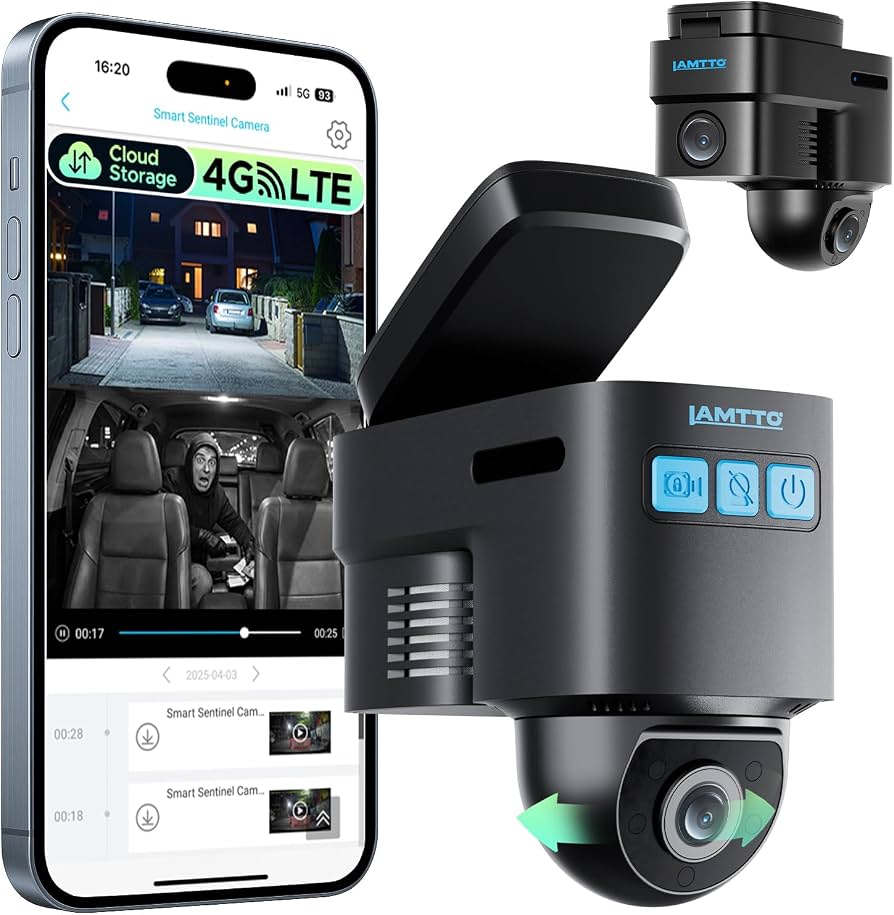
A car alarm with camera deters theft and records video evidence in real time.
If you park on the street, commute daily, or manage a busy household, a car alarm with camera can be a game changer. I’ve installed and tested these systems for years, from budget dash cams to full LTE alarms. In this guide, I’ll break down how a car alarm with camera works, what to buy, how to set it up, and how to avoid common mistakes. You’ll get clear steps, proven tips, and simple checks that keep your car safer every day.

What is a car alarm with camera?
A car alarm with camera blends a classic alarm’s siren and sensors with an onboard video camera. It can record events, send alerts to your phone, and save clips to local storage or the cloud. Many models also add GPS, two-way paging, and remote controls.
The system has a brain unit, a siren, motion and shock sensors, and one or more cameras. The cameras may face the road, the cabin, or both. Some kits add a rear camera or a 360-degree view. Most use a smartphone app to arm, view clips, and change settings.
How a car alarm with camera works
When sensors detect a hit, glass break, or entry, the siren sounds. The camera tags the time and saves video before and after the event. If the unit has LTE or Wi‑Fi, it can push a clip and alert to your phone.
Parking mode keeps watch while the car is off. It uses motion or impact triggers to start recording. Some models add time-lapse to reduce storage. Many units log GPS for speed and route data. That helps after a theft or hit-and-run.
Key features to compare
Pick a car alarm with camera that fits your needs, not just a spec sheet. Focus on these core items.
- Sensors and accuracy. Look for shock, motion, tilt, and glass-break options with fine tuning to reduce false alerts.
- Video quality. Aim for 2K or 4K if you want plate-level detail. A 140–160° field of view with HDR helps in bright sun and at night.
- Night vision. True low-light sensors or IR help in dark lots.
- Power and parking guard. A hardwire kit with low-voltage cut-off protects your battery during long parking.
- Storage. A high-endurance microSD card (256 GB or more) with loop recording is ideal. Cloud backup adds a safety net.
- Connectivity. LTE or Wi‑Fi offers real-time alerts. Check data cost and coverage.
- App and alerts. You want fast push alerts, easy clip sharing, and clear event logs.
- Build and heat rating. High heat kills cheap cams. Aim for a 140°F or higher rating if you live in hot areas.
- Siren and deterrence. A loud siren (100–120 dB) and visible LED deter crime.
- Extras. GPS, geofencing, valet mode, and remote start integration can help daily use.
Benefits and real-world outcomes
A car alarm with camera does more than make noise. It records proof. That helps with police reports and claims. Video speeds up fault calls after bumps and hit-and-runs. It also protects you from staged crashes or false claims.
I once tested a car alarm with camera on a busy city block. The system caught a van scraping my bumper at 2 a.m. The clip showed the plate and time. The claim got approved fast. In rideshare work, video keeps both driver and passenger honest. For teen drivers, it adds peace of mind and better habits.
Limitations, privacy, and legal notes
A car alarm with camera is not magic. It draws power in parking mode. Heat can cause shutdowns. Data plans add cost. False alerts can happen if sensors are too sensitive. You must place and route wires right for stable power.
Know your local laws. In many places, recording video in public is legal, but audio rules can differ. Post a small notice if you record inside the cabin. Do not block airbags or your view. Do not point a camera into private homes or yards.
Installation options and wiring
You can install a car alarm with camera in an hour if you keep it simple. Hardwiring takes more time but gives the best results.
- Easiest: Plug into the 12V socket. Good for quick use. Limited parking mode.
- Better: Use an OBD-II power cable. Cleaner look. Still easy to remove.
- Best: Hardwire to the fuse box with an add‑a‑circuit kit. Get constant and accessory power plus ground. Use the included low-voltage cut-off.
- Place the camera high and center behind the mirror. Tuck cables under trim. Leave room for airbag paths.
- Mount the siren away from heat and water. Secure all grounds. Test before you close panels.
Setup checklist and app tips
Set your car alarm with camera the right way on day one. It avoids false alerts and saves battery.
- Update firmware and format your SD card in the app.
- Calibrate shock and motion. Start low. Bump up until it catches real hits, not passing trucks.
- Turn on parking triggers and set a parking timer. Enable low-voltage cut-off at a safe point.
- Set alert types. I use push alerts for impact and tilt only. I leave motion as recording only.
- Create a geofence for work and home. That cuts noise in safe spots.
Best use cases and who should buy
A car alarm with camera fits anyone who parks in open lots or on the street. It is also great for high-mile drivers.
- City and apartment parking. Catch door dings, break-ins, and hit-and-runs.
- Rideshare and delivery. Capture cabin events and disputes.
- Fleet and small business. Log routes and driver behavior.
- Teen drivers. Review trips and build safe habits.
- High-risk areas. Visible cameras and LEDs reduce attempts.
Costs, data plans, and ROI
Expect to pay more than a basic alarm, but the value can be clear. A solid car alarm with camera runs from $200 to $700 for hardware. Pro install can add $150 to $400. LTE plans range from $5 to $20 per month based on data.
Storage and power parts are low cost. A good SD card is $20 to $40. Over time, one saved claim or theft recovery can pay for the system. I have seen insurance deductibles avoided due to clear video and plates. That is real ROI.
Product landscape and example picks
The market has three main styles. Pick based on features and budget.
- Integrated alarm-cam with LTE. All-in-one brain, siren, sensors, and camera with live alerts. Best for real-time needs and fleets.
- Dash cam plus alarm add-on. Use a top dash cam with hardwire kit and link to an alarm brain. Flexible and powerful, but more parts.
- Smart cam with OBD-II. Fast install and clean power. Great for renters and leases.
Look for trusted brands with heat-rated parts and long warranty. Check app reviews for alert speed and reliability. Avoid unknown clones. A car alarm with camera is only as good as its app and power system.
Maintenance and troubleshooting
Keep your car alarm with camera in top shape with a few habits. It will last longer and perform better.
- Update firmware every few months. Fix bugs and add features.
- Reformat the SD card monthly in the camera. Cards wear out; replace yearly if you park often.
- Clean the lens with a soft cloth. Dirt ruins night shots.
- Test the siren and triggers monthly. Nudge a tire to check tilt. Tap glass lightly to check sensitivity.
- Reduce false alerts by lowering sensitivity and turning on smart motion zones.
Security best practices beyond the device
A car alarm with camera is one layer. Stack other simple steps to cut risk.
- Park near lights and cameras. Face out for fast exits.
- Use a steering lock and hide all cables. Thieves skip hard targets.
- Keep keys in a Faraday pouch at home to block relay theft.
- Do not leave bags or boxes in view. Even empty ones invite trouble.
- Turn off app live view sharing when not in use. Use strong passwords and two-factor login.
Frequently Asked Questions of car alarm with camera
Is a car alarm with camera worth it?
Yes, if you park outside or in busy areas. It deters theft and gives video proof for claims and police reports.
Will it drain my car battery?
Parking mode draws power, but a proper hardwire kit has low-voltage cut-off. Set it right, and most cars are fine for several days.
Do I need LTE for alerts?
LTE gives the fastest alerts, but Wi‑Fi can work at home or work. If you want always-on alerts, LTE is best.
Can I install it myself?
Many people can do a basic install. For hardwiring or remote start ties, a pro can save time and prevent wiring errors.
What video quality should I choose?
2K is a sweet spot for plates and faces. 4K is great if you drive at night or want more detail, but it uses more storage.
Is recording inside the car legal?
Video is often fine, but audio laws vary by state or country. Post a notice and check local rules if you record the cabin.
How do I stop false alarms?
Lower sensor levels and use smart motion zones. Set alerts to trigger on impact and tilt, and record-only for motion.
Conclusion
A car alarm with camera adds eyes and ears to your car’s defense. It warns you in real time, records what matters, and helps close claims fast. Pair it with smart setup, clean wiring, and a few street-smart habits, and your car will be safer every day.
If you are ready, start with a clear checklist and pick the features you need most. Set it up right, test it, and review clips the first week to fine-tune. Want more deep dives and picks? Subscribe, share your setup questions, or drop a comment with your use case.