
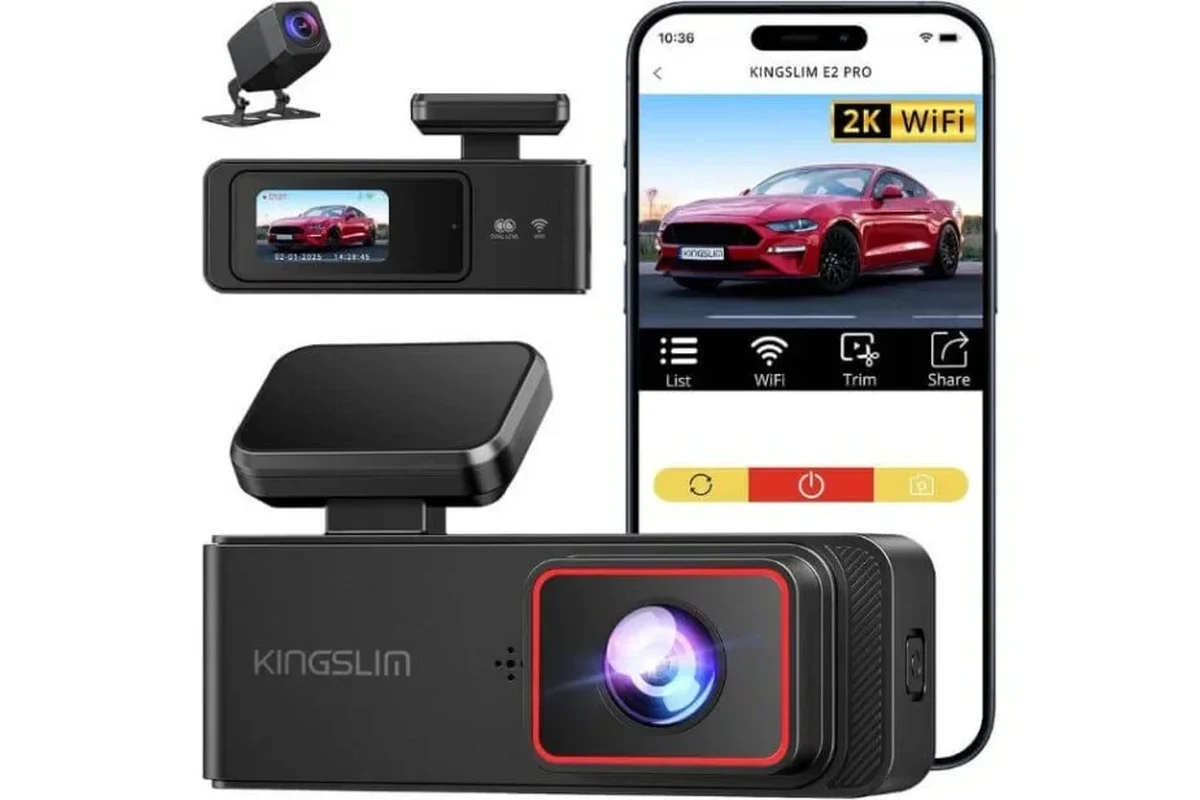
A battery powered dash cam no wires is best for drivers who want a cleaner install and portable protection. If you need long parking coverage, look for an external battery pack or a hardwired solution instead.
If you want a battery powered dash cam no wires setup, the short answer is this: it can be a great fit for drivers who want a cleaner cabin, easier installation, and some protection when the car is parked. The tradeoff is that “wire-free” usually means fewer installation hassles, not unlimited runtime, so the best choice depends on how much parking coverage you actually need.
- Best fit: Clean-cabin drivers, commuters, and people who switch vehicles often.
- Main limit: Built-in battery runtime is usually shorter than hardwired or battery-pack setups.
- Most important feature: Parking mode quality matters more than the “wire-free” label.
- Watch for: Heat resistance, night video quality, and microSD reliability.
Battery Powered Dash Cam No Wires: What It Is and Whether It’s Worth Buying in 2026

A battery powered dash cam can be appealing in 2026 because more drivers want simple, portable protection without a complicated install. That said, the right setup depends on whether you care most about everyday driving footage, parking surveillance, or moving the camera between vehicles.
Quick answer: the best no-wire dash cams solve parking coverage, messy installs, and short-trip recording limits
These cameras are most useful when you want to avoid visible cables, use the camera in more than one car, or capture incidents while parked. They are less ideal if you expect long unattended parking coverage without any charging plan.
Who this guide is for: drivers who want a cleaner setup, easier installation, and portable protection
This guide is for commuters, parents, rideshare drivers, city parkers, and anyone who changes vehicles often. It is also useful if you are comparing a battery-only camera with a model that uses a separate power source, such as a battery pack or hardwire kit. For a broader look at installation options, see how to install a dash cam without a cigarette lighter.
How Battery Powered Dash Cams Work Without Wires
“Without wires” can mean different things. Some cameras have a built-in battery, some use a supercapacitor for shutdown support, and some rely on an external battery pack that keeps the camera running after the car is off.
Internal battery vs supercapacitor vs external battery pack: what actually powers the camera
An internal battery is the simplest concept: the camera stores power inside the device itself. A supercapacitor is different; it is better understood as a short-term power reserve that helps the camera finish saving files safely when power is interrupted. If you need longer parked recording, an external battery pack is often the more practical choice because it can supply power beyond what a tiny internal battery can manage.
For readers comparing add-on power solutions, the difference between a built-in battery and a dedicated accessory matters a lot. A helpful place to start is Dash Cam Battery Pack or the newer Dash Cam Battery Pack 2 overview, especially if your goal is parking coverage rather than just a tidy cabin.
How recording continues when the car is off, parked, or unplugged
When the engine turns off, the camera either keeps recording from its own stored power or switches into a low-power parking mode. Parking mode may use motion detection, impact detection, or time-lapse recording depending on the model. If the camera has only a small internal battery, that parked recording window may be very short.
Manufacturer claims about battery runtime can look impressive on paper, but real-world runtime depends on resolution, temperature, parking mode settings, and how often the camera wakes up to record.
What “no wires” really means in real-world use
In practice, “no wires” usually means no visible permanent wiring in the cabin. It does not always mean zero charging cables, zero setup, or zero power management. Many drivers still need to recharge the camera, remove it occasionally, or use a hidden power source if they want reliable parking protection.
Supercapacitor-based dash cams are often favored in hot climates because they generally tolerate heat better than many small lithium batteries.
Key Features to Look for Before You Buy
Before you buy, focus on the features that affect daily use more than the marketing language. The best camera for you is the one that records clearly, stays powered long enough, and is easy to live with.
Battery life, charging method, and standby duration
Battery life matters in two different ways: how long the camera can record actively and how long it can sit in standby. A camera that charges quickly but drains quickly may still be frustrating if you park for long stretches. Check whether it charges through USB-C, a dock, or a dedicated battery pack, and confirm how long it can remain ready between drives.
Video quality, night performance, and wide-angle coverage
Resolution is only part of the story. Good low-light clarity, controlled glare, and a wide enough field of view matter just as much. A camera that looks sharp in daylight can still miss plate numbers or lane details at night if the sensor and lens are weak.
- Look for clear night footage, not just high resolution on the box.
- Check whether the lens angle is wide enough to cover adjacent lanes.
- Prefer models with strong HDR or low-light processing if you drive after dark.
Parking mode, motion detection, and impact detection
If you want protection while parked, look closely at how the camera handles parking mode. Motion detection can save storage, but it may miss slow or subtle events. Impact detection can capture hits, but sensitivity needs to be tuned so the camera does not trigger constantly from harmless vibrations.
Storage support, loop recording, and file protection
Most dash cams use loop recording, which overwrites old clips when the card fills up. That makes storage management important. You want a model that supports reliable microSD cards, protects incident clips automatically, and gives you an easy way to format or review files. If you are new to memory card setup, review how to format an SD card for a dash cam.
App control, GPS, voice control, and smart alerts
App control can make it easier to review clips and update settings, though app quality varies widely. GPS can add location and speed data to recordings, which may help with context after an incident. Voice control and smart alerts are convenient, but they should not replace simple, reliable recording performance.
- Battery type and expected parking runtime
- Night video quality and parking mode features
- MicroSD compatibility and loop recording behavior
- App quality, GPS support, and file protection
Best Use Cases and Who a No-Wire Dash Cam Fits Best
A battery powered dash cam no wires setup is not for every driver, but it is a strong match for several common situations. The key is matching the camera’s strengths to your routine.
Daily commuters, rideshare drivers, and city parkers
Commuters often want fast, simple setup and a camera that does not clutter the windshield. Rideshare drivers may value portability and the ability to move the camera between vehicles. City parkers often care most about parking incidents, which makes a no-wire setup appealing if the runtime is long enough.
Parents, road-trippers, and drivers who switch vehicles often
Parents may like the cleaner cabin and easy removal when a vehicle is shared. Road-trippers may appreciate the flexibility of a portable camera that can be moved between a daily driver and a travel vehicle. Drivers who frequently switch cars should pay special attention to mounting convenience and charging workflow.
Good fit if you want a tidy cabin and simple recording without a permanent wiring job.
Good fit if the camera will be shared between vehicles and easy removal matters.
Good fit if you want basic coverage, but runtime and app quality should be checked carefully.
When a battery powered dash cam is less ideal
If you need all-night parking coverage, live in extreme heat, or want the most dependable always-on protection, a battery-only camera may not be enough. In those cases, a hardwired setup or a separate battery pack may be a better long-term choice. For drivers focused on parking protection, how to hardwire a dash cam for parking mode explains the tradeoff clearly.
Real-World Benefits, Limitations, and Common Buying Mistakes
The appeal of a wire-free dash cam is obvious, but the limitations matter just as much. Understanding both sides helps you avoid disappointment after purchase.
Benefits: simpler installation, cleaner cabin, portable protection
The biggest benefit is convenience. You usually get a cleaner interior, less cable management, and a setup that can be moved from one vehicle to another more easily. That is especially helpful for leased vehicles, shared cars, or drivers who do not want visible wiring.
- Cleaner look inside the vehicle
- Easier setup for many drivers
- Portable between vehicles
- Shorter runtime than wired solutions
- Battery performance can drop in heat
- Parking coverage may be limited
Limitations: shorter runtime, heat sensitivity, and battery aging
Small batteries do not age gracefully if they are constantly charged, drained, and exposed to heat. Over time, that can reduce runtime and reliability. This is one reason many owners prefer supercapacitor models or external battery packs when parking coverage matters more than portability.
Common mistakes: ignoring parking-mode needs, overestimating battery life, and buying poor night vision
A common mistake is buying a camera because it is wire-free, then expecting it to record for hours after parking. Another mistake is focusing only on resolution and ignoring night performance. A third is forgetting that parking mode settings, motion sensitivity, and storage capacity all affect how useful the camera really is.
Evidence limits: why specs can look better than everyday performance
Product pages often emphasize peak resolution, maximum battery claims, or ideal charging times. Those numbers may not reflect your commute length, climate, or parking habits. For that reason, compare claims carefully and confirm details through the manufacturer, retailer, or recognized owner feedback before making a final choice.
If a camera is meant to protect a parked vehicle, make sure it can do so safely without creating a battery drain problem or obstructing the driver’s view.
Top Comparison Criteria for Choosing the Right Model
Instead of shopping by brand name alone, compare models by how they actually fit your routine. The best option balances performance, ease of use, and long-term reliability.
Performance: resolution, frame rate, low-light clarity, and reliability
Choose a camera that records smoothly and remains dependable in changing light. A stable frame rate and good low-light processing often matter more than chasing the highest resolution number. Reliability includes how well the camera saves clips, handles heat, and powers back on when needed.
Ease of ownership: mounting, charging, app setup, and daily use
A good dash cam should be easy to mount, simple to charge, and straightforward to review. If the app is confusing or the mount is weak, the camera becomes annoying even if the image quality is decent. Ease of ownership matters because the best dash cam is the one you will keep using correctly.
Build quality and safety notes: heat resistance, battery protection, and materials
Heat resistance is especially important for windshield-mounted electronics. Look for materials and power designs that are meant to handle cabin temperature swings. If the product uses a battery, check for built-in protection features and avoid leaving it in extreme conditions for long periods.
Value: balancing price, features, and long-term durability
Value is not the lowest price; it is the best mix of useful features and durability for your situation. A cheaper model may be fine for occasional use, while a more capable model may be worth it if you park in busy areas or rely on the camera daily. For budget shoppers, best dash cam for under 100 can help frame expectations without overbuying.
Setup, Safe Use, and Maintenance Tips for Battery Powered Dash Cams
Even a good camera can underperform if it is positioned poorly or neglected over time. A few basic habits can improve reliability and extend battery health.
How to install and position the camera for the best field of view
Mount the camera where it captures the road clearly without blocking your view. Keep it centered enough to record lane position, but not so low that it reflects too much dashboard glare. If the camera includes a rear unit or external module, make sure it is positioned according to the manufacturer’s guidance.
Place the camera where it sees the road and does not interfere with driving visibility.
Adjust motion and impact sensitivity so the camera records real events without constant false triggers.
Make sure loop recording, file locking, and card formatting all work before you depend on the camera.
Safe charging habits and temperature care for battery health
Battery care matters because frequent heat and poor charging habits can shorten lifespan. Avoid leaving the camera baking in extreme temperatures for long periods when possible, and follow the maker’s charging guidance. If your region is very hot, a supercapacitor model or external battery pack may be a better long-term fit.
Cleaning the lens, checking mounts, and updating firmware
Clean the lens gently so dust and haze do not reduce image quality. Check the mount occasionally so vibration does not shift the viewing angle. Firmware updates can improve stability, app behavior, and file handling, so they are worth installing when available from the manufacturer.
Troubleshooting common issues: battery drain, missed clips, and app connection problems
If the battery drains too quickly, reduce parking mode use or reconsider whether the built-in battery is enough for your routine. If clips are missing, the problem may be the memory card, formatting, or sensitivity settings rather than the camera itself. If the app will not connect, restart both devices and confirm compatibility before assuming the camera is defective. For more on protecting vehicle power, see how to prevent a dash cam from draining the battery.
- Format the memory card periodically to reduce file errors.
- Keep the lens clean for better night performance.
- Check the mount after hot weather or rough roads.
Final Verdict: The Best Battery Powered Dash Cam No Wires for Different Drivers
The best battery powered dash cam no wires is the one that matches your parking needs, climate, and tolerance for charging. If you want the cleanest setup and only need short-term protection, a built-in battery model can work well. If you want better parked coverage, a dedicated battery pack or a more robust power solution is usually the smarter long-term move.
Best for drivers who want simple installation, portable use, and a tidy cabin. The main limitation is shorter parking runtime, so it fits short stops and daily commuting better than long overnight coverage.
Best for city parkers and drivers who leave vehicles unattended for longer periods. It is less minimalist, but it is usually more practical when parked recording really matters.
Best for buyers who want basic front-camera coverage without a complicated install. Be careful not to overestimate battery life or expect premium night performance at a low price.
Choose a battery powered dash cam no wires if you value a cleaner cabin, easy installation, and occasional portable protection. Choose a wired, hardwired, or external-battery setup instead if you need longer parking coverage, stronger heat tolerance, or more dependable all-day recording.
Common Questions
Usually it means no permanent visible wiring in the cabin. Many models still need charging or a separate power source.
Some do, but parked runtime is often limited. Check the parking mode and battery capacity before buying.
Some are, but heat can shorten battery life. Supercapacitor designs often handle heat better.
Assuming the battery will last much longer than it really does. Parking mode needs to match your driving and parking habits.
If you need longer parked recording, often yes. A battery pack usually gives more usable runtime than a small built-in battery.
Frequently Asked Questions
A built-in battery stores more usable runtime for short periods, while a supercapacitor mainly helps the camera shut down safely and save files. Supercapacitors often handle heat better, which can matter in hot climates.
If you mostly want cleaner installation, portability, and short parking coverage, it can be a good fit. If you need long unattended parking recording, it may be the wrong tool unless paired with a battery pack.
Check battery life, parking mode, low-light performance, storage support, and heat resistance. Also confirm app compatibility and microSD card requirements.
Avoid unnecessary heat exposure, follow the charging instructions, and do not leave the camera in extreme conditions for long periods when possible. If your climate is harsh, consider a supercapacitor or external battery pack solution.
Common causes include a bad memory card, incorrect formatting, weak settings, or power interruptions. Reformatting the card and checking the manufacturer’s storage guidance often helps.
Confirm how long the camera can record while parked and whether it uses motion or impact detection. If you need longer protection, compare it with a hardwired or external battery pack setup.