
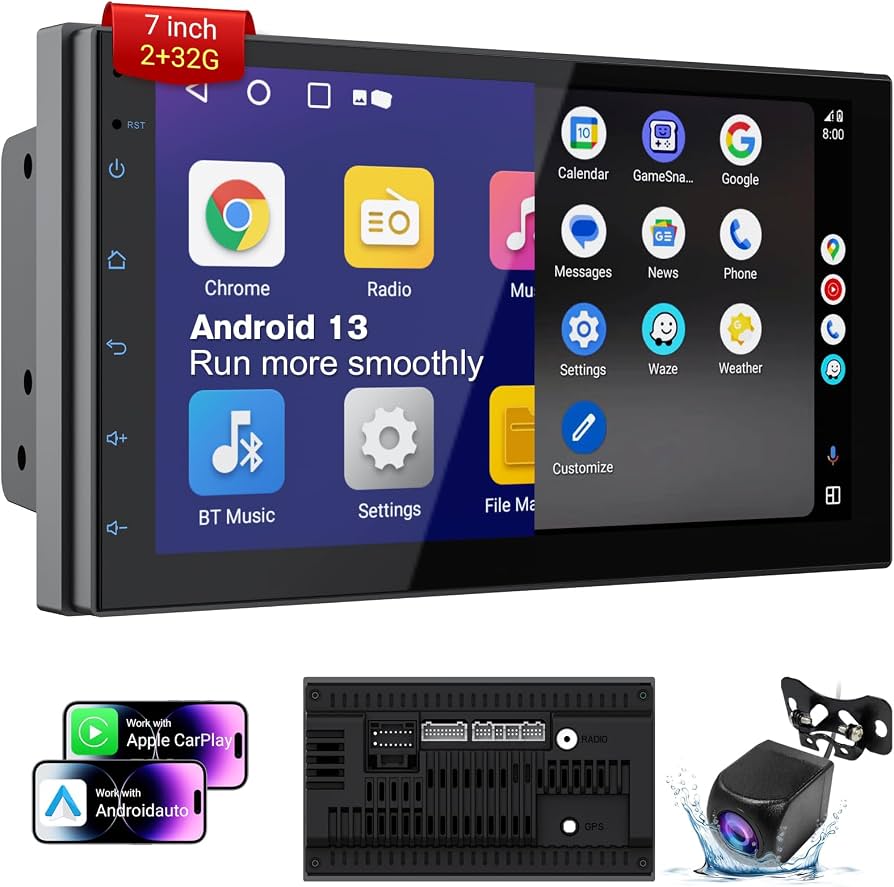
An Android car radio turns your vehicle into a smart, connected multimedia hub instantly.
I’ve worked with car audio and infotainment systems for over a decade, installing and testing dozens of Android car radios across many makes and models. This guide breaks down what an Android car radio is, how it works, what to look for, real-world pros and cons, and step-by-step tips to choose and install one the right way. Read on to learn practical advice and avoid common mistakes when upgrading your car’s head unit.

What is an Android car radio?
An Android car radio is a vehicle head unit that runs the Android operating system. It replaces or upgrades your stock radio to give you apps, maps, media streaming, and smart features in the dash. These units vary from simple touchscreens with Bluetooth to full-featured systems with GPS, Wi-Fi, voice assistants, and vehicle integration like CAN-bus support.
Android car radios come from OEMs and aftermarket brands. Some units use Android Auto (phone-driven) while others run a standalone Android build. Standalone units let you install apps, update firmware, and run third-party software directly on the head unit.
Why people pick an Android car radio:
- Familiar interface for Android phone users.
- Wide app support for music, navigation, and utilities.
- Customizable audio tuning and hardware options.
Common trade-offs include variable software quality across brands and potential installation complexity in some cars.
Common quick questions
Is an Android car radio the same as Android Auto?
No. Android Auto mirrors apps from your phone onto the car screen. A standalone Android car radio runs apps natively on the head unit without relying on your phone.
Will my phone still connect?
Yes. Most Android car radios support Bluetooth, Wi-Fi, and USB connections for Android and iOS phones. You can use phone apps, wireless mirroring, or wired integration like Android Auto.
Do they support steering wheel controls?
Many do. Look for CAN-bus or steering control adapters to preserve factory button functions and radio presets.
Key features to look for in an Android car radio
Choosing the right android car radio means matching features to your needs. Below are the essentials and why they matter.
- Operating system and version
- Newer Android versions mean better app compatibility and security.
- Processor, RAM, and storage
- Faster CPUs and 2+ GB RAM offer smooth navigation and multitasking.
- Screen size and resolution
- Clear, responsive touchscreens improve maps and media use.
- Connectivity
- Bluetooth 5.0 for stable audio, Wi-Fi for updates and streaming, and USB ports for charging and playback.
- Android Auto and Apple CarPlay
- Wired or wireless Android Auto helps if you want phone-based apps on-screen.
- GPS and offline navigation support
- Built-in GPS chip enables reliable navigation without a phone.
- CAN-bus and steering wheel control support
- Keeps factory features working after swap.
- Camera inputs and parking sensors
- Rear camera and front camera support improve safety.
- DSP and EQ
- Digital signal processing and parametric EQ let you tune car audio precisely.
- Firmware updates and OTA
- Easier updates from the manufacturer or community improve longevity.
- Expandability
- Support for backup cameras, subwoofer outputs, and external amplifiers.
- Safety features
- Speed-sensing behavior, voice control, and driver distraction safeguards.
Real-life tip: prioritize a stable OS and a manufacturer that delivers firmware updates. I once installed a promising unit with frequent app crashes; after switching to a unit with better support, reliability improved dramatically.
Types and form factors
Not all android car radio units are the same. Here are the common types and when to choose each.
- Double DIN head unit
- Standard for modern cars; larger screens and more features.
- Single DIN with pop-out screen
- Fits narrow dash openings while keeping a full-length radio chassis.
- OEM-replacement units
- Designed to match factory fit and aesthetic for a seamless look.
- Universal aftermarket units
- More features and lower cost but may need dash kits and adapters.
- Android TV style or mini PC boxes
- Add Android features to existing screens via HDMI or AV inputs; good for certain factory screens.
- Wireless Android Auto head units
- Prioritize phone mirroring for users who want minimal on-device apps.
Choosing the right form factor reduces installation headaches. If you want a clean fit and preserved factory controls, OEM-style or vehicle-specific kits are best. For hobbyists who want maximum features, universal double DIN units offer value.
How to choose the right Android car radio
Follow these steps to pick the best android car radio for your vehicle and budget.
- Confirm dash space and size
- Measure the opening to choose single or double DIN or confirm a direct-fit model.
- Check compatibility with steering controls and safety systems
- Verify CAN-bus adapters or harnesses are available for your car.
- Prioritize core features you will use daily
- Maps, music apps, hands-free calling, and rear camera input are common essentials.
- Set a budget and compare value
- Mid-range units often offer the best balance of performance and reliability.
- Read recent user reviews and firmware update history
- Frequent updates and active support signal a better product.
- Decide professional install vs DIY
- Complex vehicles with airbags and factory amps may need a pro to avoid faults.
From my installs, spending a bit more on a unit with reliable updates and a known user community saves time and frustration.
Installation and setup basics
A smooth android car radio install follows planning and the right tools.
- Tools and parts you need
- Trim tools, screwdrivers, wiring harness adapter, dash kit, antenna adapter, and CAN-bus module if needed.
- Step-by-step overview
- Disconnect battery, remove trim, unbolt stock unit, plug in harness adapter, secure new head unit, reconnect battery, and test functions.
- Wiring tips
- Use vehicle-specific wiring harnesses. Match color codes and test all connections before final reassembly.
- Software setup
- Connect Wi-Fi, sign into your Google account if required, update firmware, and install preferred apps.
- Common issues and fixes
- No power: check ignition accessory wire and fuses. No sound: verify RCA outputs and amp remote wire. Camera not showing: check reverse signal and camera input settings.
A personal note: I once had a unit fail to power up due to a blown inline fuse hidden in the wiring kit. Always check fuses and ground connections first.
Top use cases and real-life examples
Android car radios shine in everyday driving. Here are practical scenarios.
- Navigation on long trips
- Offline maps plus speed camera alerts keep routes smooth and safe.
- Music and podcast streaming
- Apps like Spotify run on-device and stream over Wi-Fi or tethered data.
- Hands-free calling and voice control
- Bluetooth calls and voice assistants reduce distraction.
- Backup camera and parking assist
- Instant camera feed when reversing improves safety.
- Vehicle diagnostics and monitoring
- OBD2 apps and dongles connected via Bluetooth provide real-time data.
Example: On a weekend road trip, a standalone android car radio downloaded offline maps straight to the unit, saving phone battery and keeping navigation accurate in low-signal areas.
Benefits and limitations
Knowing pros and cons helps set expectations for an android car radio.
Benefits
- Modern interface and app ecosystem
- Better media and navigation options than many stock radios
- Custom audio tuning and hardware flexibility
- Potential for ongoing improvements via updates
Limitations
- Software quality varies by manufacturer
- Some units may lack long-term firmware support
- Installation can be complex in newer cars with integrated systems
- Security and privacy considerations with app permissions
Be realistic: choose a unit with good support over one with flashy but unreliable features.
Maintenance, security, and firmware updates
Keep your android car radio healthy and secure with routine care.
- Regular firmware updates
- Install official updates for stability and security patches.
- App management
- Remove unused apps and restrict app permissions to protect privacy.
- Backups
- Export settings and backups when possible before major updates.
- Security best practices
- Use secure Wi-Fi, avoid unknown APKs, and reset the unit before selling the car.
- Troubleshooting routine
- Reboot the unit for odd behavior, check logs if available, and factory reset when needed.
I advise setting aside time quarterly to check for updates and clean up apps. It keeps the unit responsive and reduces bugs.
Cost, brands, and value
Prices vary based on features, build, and brand reputation.
- Entry-level
- Basic android car radio units start low and cover essentials like Bluetooth and simple GPS.
- Mid-range
- Better screens, faster CPUs, and more connectivity. This is often the best value.
- High-end
- OEM-style fit, premium DSP, and robust support cost more but offer reliability.
Brand notes: Established brands and units with active firmware support often outlast cheaper alternatives. Factor warranty, return policy, and community support into the decision.
PAA-style questions (short answers)
What is the main difference between Android Auto and an Android car radio?
- Android Auto mirrors phone apps and relies on the phone for processing. An android car radio runs apps natively on the head unit without a constant phone connection.
Can I install an Android car radio myself?
- Yes for many cars if you have basic tools and the right dash kit and harness. Complex modern cars may require a professional to preserve safety systems and factory features.
Do Android car radios need a data plan?
- They can use your phone’s hotspot or local Wi-Fi for streaming and updates. Some features like offline maps do not need data after download.
Frequently Asked Questions of android car radio
What is the lifespan of an Android car radio?
Most units last 5–10 years with proper care and updates. Longevity depends on build quality, software support, and exposure to heat and power cycles.
Can I use my Android car radio without a smartphone?
Yes. Standalone android car radio units can run apps, play offline music, and navigate without a phone. A phone is still useful for data-heavy streaming or calls.
Will an Android car radio void my car warranty?
Installing an aftermarket android car radio does not usually void the car's main warranty, but tampering with factory wiring or safety systems could affect certain claims. Check your vehicle warranty terms and use professional help when unsure.
How do I keep my android car radio secure?
Keep firmware up to date, install apps from trusted sources, restrict permissions, and avoid installing unfamiliar APK files. Reset the unit before selling or disposing of the car.
Can I connect multiple devices to an android car radio?
Yes. Many units support multiple Bluetooth pairings and can switch between phone, tablet, and streaming dongles. For simultaneous connections, check the unit’s Bluetooth profile support.
Is wireless Android Auto reliable on these units?
Wireless Android Auto works well on many modern android car radio units but can be sensitive to phone and unit firmware versions. Wired connection is often more stable for long trips.
Will an Android car radio improve audio quality?
An Android car radio with a quality DAC and DSP can significantly improve audio quality versus stock units. Proper installation and tuning are crucial to unlock the best sound.
Conclusion
Upgrading to an android car radio can modernize your drive and add lasting value to your vehicle. Choose a unit that balances reliable software, compatible hardware, and thoughtful installation support. Start by confirming fit and compatibility, prioritize firmware support, and plan for a clean install or professional help if needed. Take action: compare models, read recent user feedback, and pick a unit that matches how you drive. If you’ve already upgraded, share your experience or questions below — your insights help others make smarter choices.