
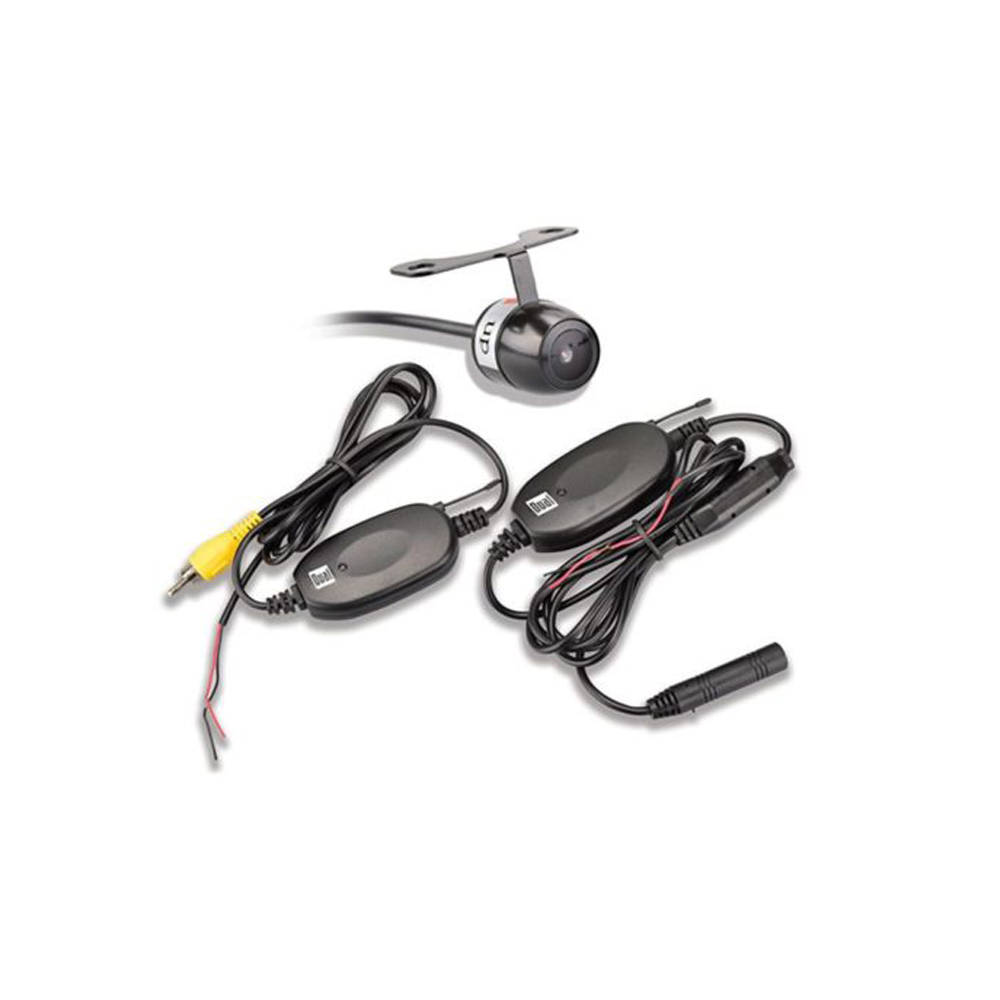
A wireless backup camera for car improves rear visibility, helps parking, and installs fast without wires.
If you want safer parking without tearing your dash apart, you are in the right place. I test and install these systems on daily drivers, trucks, and RVs. Below, I break down how a wireless backup camera for car works, what to buy, how to install it, and the trade-offs to know before you spend a dollar.

What is a wireless backup camera for car?
A wireless backup camera for car is a rear-facing camera that sends video to a screen without a long video cable. The camera sits near the license plate or tailgate. It draws power from the reverse light circuit or a small battery pack. The screen can be a dash monitor, a mirror monitor, or your head unit.
New cars sold in the US must have a backup camera by rule since 2018. But many older cars do not. A wireless kit gives you that view with less work than a wired setup. It helps you spot kids, pets, curbs, and poles that mirrors can miss.
Compared to a wired system, a wireless kit is faster to install and easier to move between cars. It can be ideal for renters, lessees, and fleet owners who need speed and scale.
How it works and signal basics
Most systems send video over 2.4 GHz using a digital link. Some use Wi‑Fi Direct to stream to a monitor or app. Digital links handle noise better than old analog kits. They also support higher resolution and lower delay.
Delay matters when you are backing near a wall. Good kits keep delay under 200 ms, which feels near real time. Antenna design, distance, and the car body shape all affect signal strength. Metal and thick panels can block weak radios, so placement counts.
Many cameras include night vision with IR LEDs. Look for a sharp lens, wide dynamic range, and a field of view of 120–150 degrees. A very wide view can warp lines, but it shows more of the scene. For rain and snow, check for sealed housings and hydrophobic lens coatings.
Will a wireless backup camera for car work without internet?
Yes. These systems link camera to monitor over a local radio link. They do not use your home Wi‑Fi or a data plan.
Does a wireless backup camera drain the battery?
If you wire it to the reverse light, it is off when you are not backing up. Battery-powered or always-on parking modes draw a small load, so use sleep timers.
Benefits and limitations
Benefits:
- Faster install. No need to run video cable from bumper to dash in most cars.
- Safer parking. A wireless backup camera for car cuts blind spots and helps align to curbs and trailers.
- Flexible screen options. Use a clip-on mirror screen, a dash monitor, or a compatible head unit.
- Great for trucks, vans, and RVs. You can add side or trailer cams to cover long bodies.
Limitations:
- Signal limits. Very long vehicles or thick metal can weaken the link.
- Possible lag. Low-cost radios can add delay in tight spots or near strong Wi‑Fi.
- Power wiring still needed. Most cameras still need 12V from a reverse light or a fused source.
- Weather risk. Cheap housings can fog or leak. Look for real IP ratings.
Key features to compare
- Resolution and sensor. Aim for 720p or 1080p with a modern sensor for clear detail.
- Field of view. 120–150 degrees is a good sweet spot for coverage and depth.
- HDR and low light. Helps with glare, shadows, and night scenes.
- Waterproof rating. IP67 or higher blocks dust and water. Check the gasket quality.
- Operating temperature. Important for hot summers and cold winters.
- Transmission range. For sedans, most kits work fine. For RVs and trailers, look for strong antennas.
- Display type. Dash monitor, clip-on mirror, or head unit integration.
- Parking lines. Fixed or adjustable guidelines help with distance.
- Trigger options. Auto-on in reverse, manual on, or both.
- Add-on cameras. Support for split-screen and hitch or side views.
- Recording. Some monitors include DVR with microSD for parking or incident clips.
A strong feature set makes a wireless backup camera for car feel like a factory system. It should wake fast, show a bright picture in sun, and hold signal through real-world use.
Choosing the right wireless backup camera for car
Start with your vehicle:
- Sedans and hatchbacks. Most kits work well. Focus on image quality and an easy mount.
- SUVs and minivans. Look for wider lenses and bright screens that beat glare.
- Pickups and trailers. You need more range and stronger antennas. A hitch view helps.
- RVs and box trucks. Go with high-power transmitters, external antennas, and big, bright monitors.
Match the screen:
- If your head unit supports a video input, pick a kit with a compatible receiver. Note that Apple CarPlay does not accept third-party video feeds. Many Android head units do accept camera inputs.
- If you lack a head unit input, use a dash or mirror monitor. A clip-on mirror looks clean and frees dash space.
Set a budget:
- Entry level. Basic 720p, fixed lines, smaller screen.
- Mid tier. 1080p, HDR, better night vision, adjustable lines.
- Premium. Strong radios, big IPS screens, split views, and recording.
Think about how you use the car. If you parallel park a lot, fast wake and low lag matter. If you tow, go for long range and a hitch view. If you street park at night, get strong low-light and a clean lens hood.
A good wireless backup camera for car should feel invisible in daily use. You shift into reverse, the view appears fast, and you trust what you see.
Installation guide: simple, safe steps
Tools:
- Plastic trim tool and a small screwdriver.
- Test light or multimeter.
- Wire stripper and crimp connectors.
- Zip ties and electrical tape.
Steps:
- Plan the mount. Most people use the top of the plate or the tailgate handle. Check that the lens is level.
- Tap power. Use the reverse light positive for the red wire and a bare metal ground for black. Confirm with a test light.
- Mount the camera. Tighten screws and route the short power lead through a grommet if you can.
- Place the monitor. A mirror clip-on looks clean. A dash monitor should not block airbags or vents.
- Pair the units. Follow the kit steps to link the camera and monitor. Some auto-pair once powered.
- Test and tidy. Shift to reverse and check the image. Adjust tilt and guidelines. Then zip tie the wires.
Mistakes to avoid:
- Do not pierce the main harness. Use the reverse bulb wires near the tail light instead.
- Do not ground to paint. Scrape to bare metal or use a known ground bolt.
- Do not crush the antenna cable. A kink can kill range.
Troubleshooting and maintenance
Common issues:
- No image. Check power to the camera in reverse. Verify the pairing. Try a closer antenna position.
- Choppy or laggy video. Re-route the antenna away from metal. Reduce distance. Check for 2.4 GHz crowding.
- Lines or noise. Ensure a solid ground. Avoid sharing ground with high-load accessories.
- Mirrored view wrong. Most cameras have a small loop wire to switch mirror/normal view. Cut or connect as marked.
- Water or fog. Replace the gasket or add a foam seal. Aim the lens down slightly to shed water.
Upkeep tips:
- Clean the lens often, like you clean mirrors. A drop of glass sealant can help with rain.
- Update firmware if your monitor supports it. Some kits allow updates from a microSD card.
- Re-check mounts after the first week. Vibration can loosen small screws.
A well-set wireless backup camera for car should be near set-and-forget. Small care keeps it sharp and ready.
Legal, privacy, and safety tips
Know your state rules. Some states ban plate obstruction. Others set rules for screens in view of the driver while moving. If your kit records audio, consent laws can apply. Use common sense and read your manual.
Safety first. Cameras help, but they do not replace a full check. Use mirrors, look over your shoulder, and go slow. Calibrate your on-screen lines in an empty lot so you learn true distances.
If you share the car, show other drivers how the system works. A two-minute walk-through can prevent a fender tap.
Real-world results: my experience testing five setups
I set up five kits on a compact car, a midsize SUV, and a crew-cab pickup. The best units woke in under one second after shifting to reverse. Lag stayed low in busy parking decks. Plate-mount cameras were easiest to fit in under 30 minutes.
In the rain test, cameras with real HDR and better lenses kept detail on wet nights. The cheapest kit fogged after a pressure wash. Range mattered on the pickup with a steel bumper and a bed cap. Moving the antenna up the pillar fixed dropouts at once.
A wireless backup camera for car will not turn a tight alley into a highway. But it will cut stress, catch low posts, and save your bumper. It pays for itself the first time it avoids a scrape.
Frequently Asked Questions of wireless backup camera for car
Do I need internet for a wireless backup camera for car?
No. The camera and monitor link over a local radio signal. Internet is not used or needed.
Can I install a wireless backup camera for car myself?
Yes, if you can tap a reverse light and mount a screen. Most DIY installs take 30–60 minutes.
Will a wireless backup camera for car work with tinted windows?
Yes. The signal does not pass through the glass from front to back. Tints do not affect the radio link.
Can I use a wireless backup camera for car while driving forward?
Many monitors allow manual view. Use it with care and follow local laws on screens in view of the driver.
How long does a battery-powered wireless backup camera last?
Many last weeks per charge with light use. Choose sleep modes and motion triggers to save power.
Can I add more than one camera to the same monitor?
Some kits support two to four cameras. Check for split-screen or cycle view features before you buy.
Will it integrate with Apple CarPlay or Android Auto?
CarPlay does not accept third-party video feeds. Many Android head units support a camera input directly.
Conclusion
A smart, well-chosen wireless backup camera for car adds safety and peace of mind without a big install. Pick clear video, low lag, solid weather sealing, and a screen that fits your cabin. Plan your wiring, mount with care, and test before you tidy.
Ready to park with confidence? Use this guide to choose your kit, set it up this weekend, and share your results. Have a question or a tip from your own install? Drop a comment so we can learn together.