
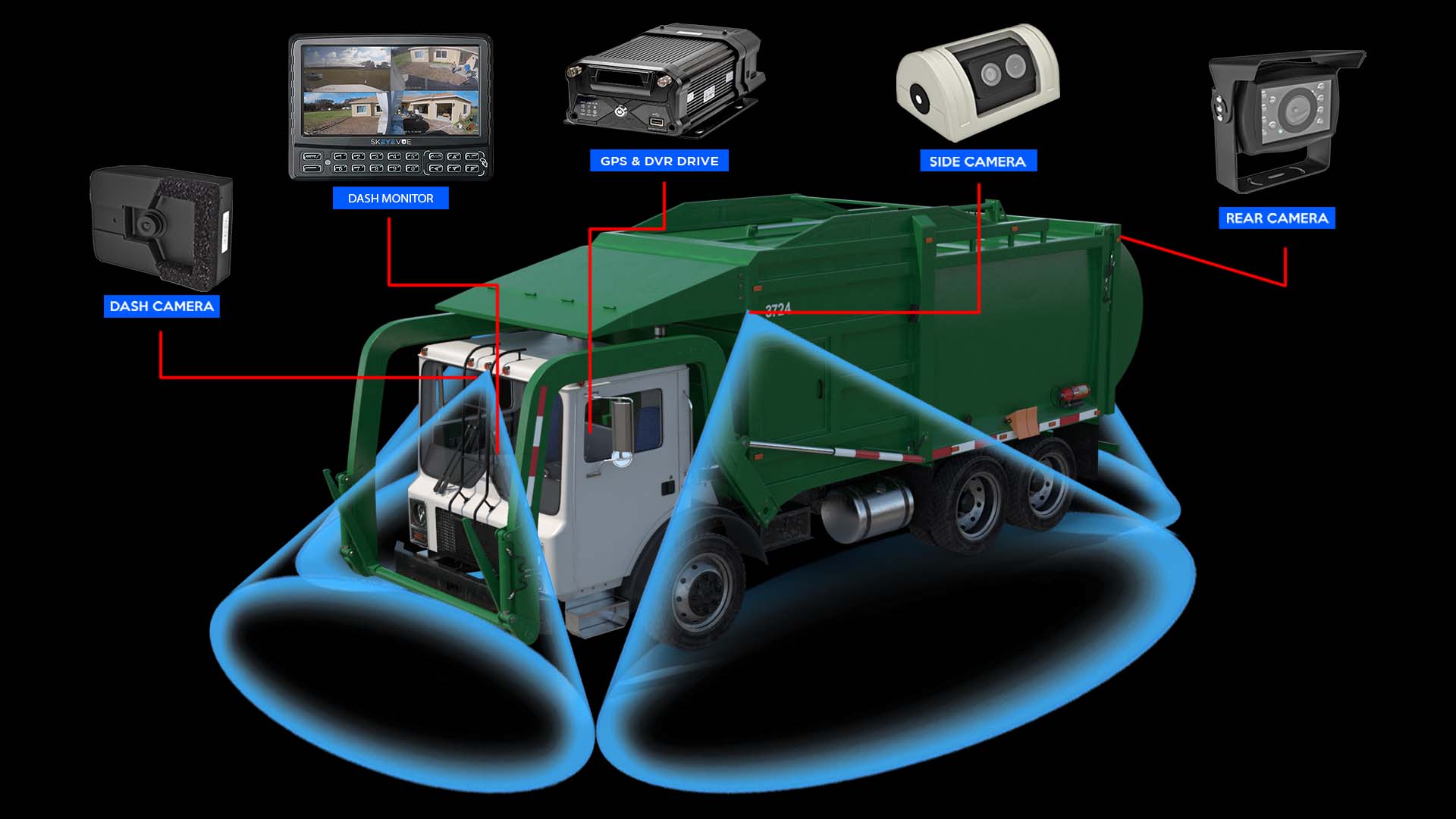
A truck camera is a video system that records the road, cabin, and blind spots.
If you drive or manage trucks, you know safety is not a guess. A truck camera gives proof, lowers risk, and helps every mile pay off. I have installed and tested many systems on harsh routes. In this guide, I break down how a truck camera works, what to buy, and how to use it well. You will walk away ready to pick the right truck camera and make it work for you.

What is a truck camera and why it matters
A truck camera is a set of cameras and a recorder. It watches the road, the sides, the rear, and often the cab. Many units sync with GPS and sensors. Some connect to the cloud.
Why it matters is simple. A truck camera cuts guesswork in a crash. It proves what happened. It protects drivers from false claims. It also helps you coach safe habits. That means fewer tickets, fewer losses, and less stress.
From my fleet work, one truck camera clip cleared a driver in minutes. A car cut in and braked hard. The video showed it. The claim went away. The driver kept a clean record. That is the power of a good truck camera.
How a truck camera works
A truck camera setup has three main parts:
- Cameras capture video in front, inside, rear, and sides.
- A DVR or dash cam body stores video on SD, SSD, or cloud.
- A link uses Wi‑Fi, LTE, or Bluetooth to upload events.
Most systems use loop recording. Old clips delete as new clips write. A G‑sensor locks clips in a hard brake or crash. Some truck camera models add AI. They spot tailgating, phone use, or lane drift. The system flags these events for review.
Video files get time, GPS, and speed tags. You can search by date, route, or event. Many fleet portals send alerts at once. You can share a link with an insurer or a client in seconds.
Types of truck camera systems
Not all setups fit all jobs. Here are common types of truck camera units:
- Front dash cam Single forward view. Good for owner‑operators.
- Dual‑facing dash cam Road and driver view in one unit. Helps with coaching and claim defense.
- Multi‑channel DVR Four to eight cameras. Covers sides, rear, trailer, and cargo.
- 360 bird’s‑eye system Stitches views for parking and tight yards.
- Backup camera Rear view with night vision and grid lines.
- Side view and blind spot camera Linked to turn signals to show the lane.
- Cloud dash cam Streams key events with LTE for live alerts and remote download.
- ADAS and DMS camera Adds collision warnings and driver monitor features.
Pick the truck camera type by route risk, cargo, and budget. Heavy urban routes need side and rear views. Long haul at night needs good low‑light and a steady mount.
Key features to compare
Use this checklist when you pick a truck camera:
- Resolution Aim for 1080p or higher. 1440p helps read plates.
- HDR and night vision Helps with glare, tunnels, and dark lots.
- Field of view 140–170 degrees is ideal for the front. Too wide can distort.
- Storage Choose high‑endurance SD or SSD. Check write life specs.
- Cloud and LTE Useful for real‑time claims. Adds a monthly fee.
- GPS and speed stamps Needed to support reports and defend claims.
- G‑sensor and event tags Lock key clips at impact or harsh maneuvers.
- Audio and privacy Audio is useful, but know consent rules in your state.
- ADAS and alerts Lane, collision, and following distance can cut risk.
- Driver coaching Live voice prompts guide safer habits.
- Build and rating Look for wide temp range and vibration tests.
- Power options Hardwire with fuse tap. Some use OBD or J1939 for data.
- Firmware and support Regular updates matter for long life.
A balanced truck camera setup blends clear video, stable storage, and simple use. Do not chase features you will not use.
Installation and setup guide
You can install a basic truck camera in under an hour. Multi‑cam rigs take longer. Here is a simple flow:
- Plan views Sit in the cab. Mark blind spots. Pick safe cable paths.
- Mount the front unit Place behind the mirror, high and center.
- Route cables Tuck along headliner and A‑pillar. Avoid airbag paths.
- Power the unit Use an add‑a‑fuse to a switched circuit. Ground to bare metal.
- Add rear and side cams Use grommets. Seal with silicone. Protect with loom.
- Pair and test Check live view, GPS lock, and audio. Trigger an event to test.
- Set policies Pick clip length, retention days, speed alerts, and driver privacy.
Tips from the field:
- Clean glass with alcohol. Adhesive pads stick best above 60°F.
- Use dielectric grease on outdoor plugs. Winter salt will creep in.
- Label every cable. You will thank yourself six months later.
- Keep spare SD cards. Rotate them to reduce wear.
A sound install gives you clear video and less downtime. It also keeps the truck camera stable on rough roads.
Real‑world benefits and ROI
A truck camera can pay for itself fast. Here is where I see wins:
- Claim defense Video proves facts. Many fleets report faster claim closure and fewer payouts.
- Safety coaching Event clips help spot risky habits. Gentle coaching works best.
- Fewer false tickets Video and speed tags help contest citations.
- Training and onboarding New drivers learn from real clips, not just slides.
- Customer service Time‑stamped proof of arrival, load, and delivery.
One of my clients cut rear‑end claims by a third in one year. They used a dual‑facing truck camera and monthly review. Results vary, but the trend is clear. Proof and coaching reduce risk.
Legal, privacy, and compliance
Know the rules before you roll out a truck camera at scale.
- Audio consent Some states need all‑party consent to record audio.
- Driver notice Post a clear policy. Explain what is recorded and why.
- Data retention Keep clips only as long as needed. Purge on a set schedule.
- Access control Limit who can view and share video. Use logs and roles.
- Union rules If you have union shops, align with agreements.
- Insurance terms Ask your insurer about discounts and claim steps.
Be clear with drivers. A truck camera is there to protect, not to spy. Share wins. Show how the camera cleared a driver. Trust grows when proof helps the person behind the wheel.
Common mistakes and maintenance tips
Avoid these common pitfalls with any truck camera:
- Loose mounts Shaky video is useless. Use solid brackets and clean glass.
- Cheap SD cards High‑endurance cards are worth it.
- Ignoring firmware Updates fix bugs and add features.
- Wrong angle Hood or sky eats the frame. Aim mid‑horizon.
- No policy If you do not define use and access, trust erodes.
Do basic upkeep:
- Wipe lenses at fuel stops. Dust and bugs add blur.
- Check cable strain after rough roads.
- Review alerts weekly. Tune sensitivity to cut noise.
- Swap SD cards on a schedule based on hours written.
A little care keeps your truck camera sharp and ready when it counts.
Buying guide and recommendations
Match the truck camera to your use case:
- Owner‑operator on a budget Pick a 1080p front cam with GPS and G‑sensor. Add a wired backup cam.
- Regional fleet Choose dual‑facing cloud units. Use LTE for instant claims and coaching.
- Heavy haul and vocational Go with a multi‑channel DVR, rear, side, and boom or trailer cams. Look for IP67 and wide temperature support.
- High‑risk urban routes Add 360 bird’s‑eye and turn‑signal linked side cams. Set strong night vision.
Key price drivers:
- Channels and resolution More lenses and higher res cost more.
- Cloud plans LTE fees vary by data use and retention.
- Install labor Multi‑cam rigs add hours and parts.
Before you buy, test two models on the same route. Pull clips at dawn, noon, and night. Check plate read, audio, GPS, and alert quality. Pick the truck camera that makes review easy. If it is hard to use, you will not use it.
Frequently Asked Questions of truck camera
How long does a truck camera store video?
Most record in loops for 7 to 30 days based on card size and settings. Critical events lock and will not overwrite until you delete them.
Can a truck camera reduce insurance costs?
Many insurers offer discounts when you use a truck camera with coaching. Always ask your carrier for current programs and proof needs.
Do I need a driver‑facing camera?
It helps with coaching and claim defense, but it is a policy choice. If you use it, set clear privacy rules and turn audio on only with consent.
Is a cloud truck camera worth it?
Cloud saves time on claims and coaching with instant access. If you handle many incidents or run a large fleet, the ROI is strong.
What resolution is best for night driving?
Look for 1080p or higher with HDR and good low‑light specs. A wide aperture lens and infrared help in dark yards.
Can I install a truck camera myself?
Yes for simple front units. Multi‑channel systems need careful routing and power work, so consider a pro for those.
How do AI alerts work on a truck camera?
The camera analyzes patterns like lane drift or tailgating and flags clips. You can tune sensitivity to reduce false alerts.
Will a truck camera drain my battery when parked?
Use switched power or a low‑voltage cutoff. Parking mode is fine if set to protect the battery.
Are there laws against recording the road?
Road video is generally allowed. Follow audio consent laws and company policy for cabin recording.
How do I keep lenses clear in winter?
Use a hydrophobic wipe and check after de‑icing. Add hoods or shields on rear and side units to block slush.
Conclusion
A truck camera is more than a gadget. It is proof when you need it, and a guide when you want to grow. Start with clear goals, pick the right views, and set simple rules. Install it well, keep it clean, and review clips on a set rhythm.
Take one step this week. Test a truck camera on your toughest route, then refine. If this guide helped, subscribe for more field‑tested tips or drop a comment with your setup and wins.