
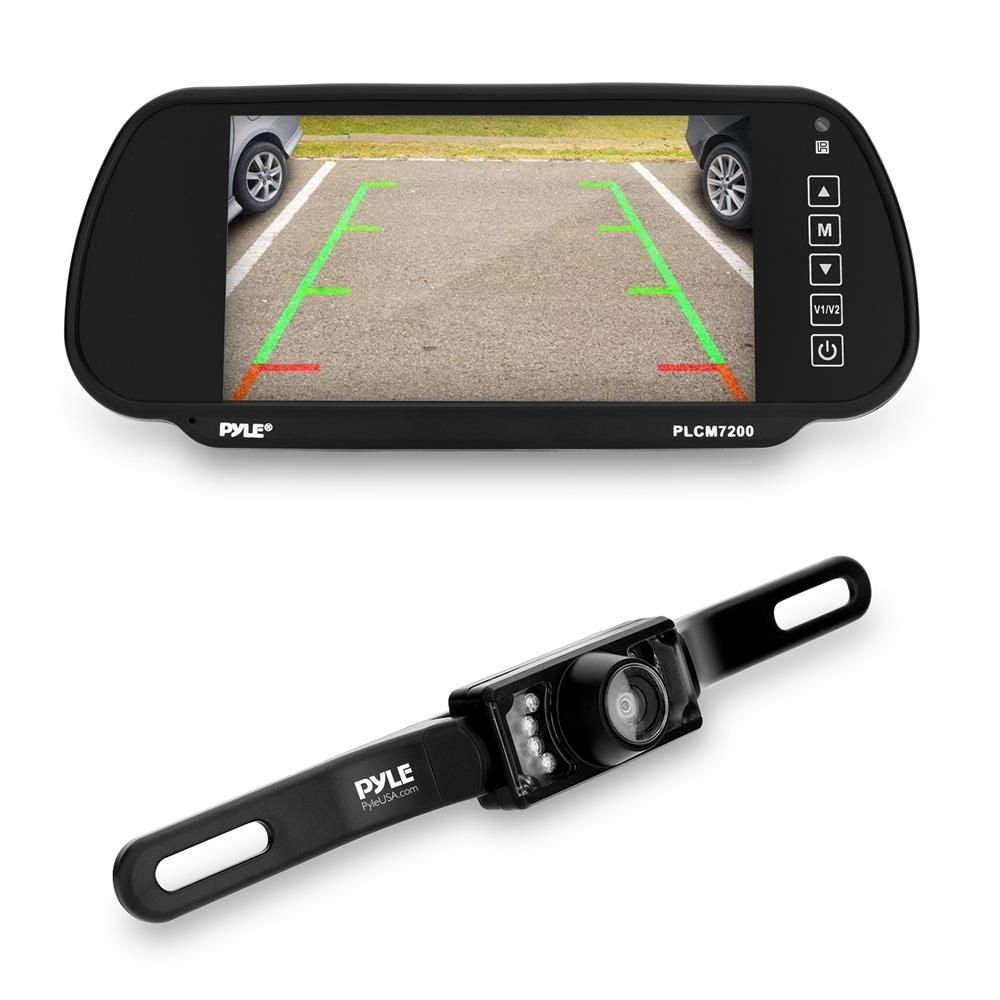
A rear view backup camera helps you see behind your car and avoid collisions.
If you drive, you need clear eyes behind you. In this guide, I break down the rear view backup camera with practical tips from years of installs and testing. You will learn how it works, what to buy, how to install it right, and the small habits that make a big safety difference.

What is a rear view backup camera and how it works
A rear view backup camera is a small camera that shows the area behind your car when you shift into reverse. It cuts blind spots near the bumper and gives you a live view on a screen. Most systems switch on automatically, so you do not need to tap a button.
Core parts include:
- Camera module The lens and image sensor mounted near the license plate or tailgate.
- Video link A wire or wireless link that sends the image to the display.
- Display An in-dash screen, a mirror monitor, or a stand-alone screen.
- Power and trigger Wires that power the system and tell it to turn on in reverse.
When you go into reverse, the reverse light circuit sends a trigger. The rear view backup camera powers up. The video reaches the display in under a second. Many units add parking lines to help you judge distance. Some show dynamic lines that bend as you turn the wheel.
Benefits and safety impact
A rear view backup camera reduces low-speed crashes and helps you park with less stress. It also protects kids, pets, and objects in low zones you cannot see with mirrors alone. New cars sold in the US have rear visibility tech as standard since 2018, because it works.
Real-world payoffs I have seen:
- Fewer bumper dings The camera shows curbs and posts before you hit them.
- Faster parking You can aim the center line where you want the car to end up.
- Better hitching You can line up a trailer by yourself in one try.
- Night help Good low-light cams reveal people or bikes in dim lots.
From my installs, drivers who added a rear view backup camera said they backed with more care and fewer guesses. Less guesswork means fewer mistakes.
Types of rear view backup camera systems
There is no one-size-fits-all. Pick a rear view backup camera that fits your car, your skills, and your budget.
Common setups:
- Wired kits Stable image and no delay. Best for trucks, SUVs, RVs, and long runs.
- Wireless kits Faster to install. Great for older sedans or lease cars. Watch for Wi‑Fi or 2.4 GHz interference.
- License plate mount Easy fit and neat look. Works on most cars.
- Flush mount Clean, factory look. Needs drilling and careful sealing.
- OEM integration Uses the factory screen and steering wheel controls.
- Mirror monitor Replaces or clips on your rearview mirror. Simple and tidy.
If you tow, consider a multi-cam kit with a second camera for the hitch or trailer. If you commute in tight cities, a compact license plate camera is often enough.
Key features to look for
A rear view backup camera should be clear, fast, and tough. Here is how to choose one that lasts.
Image and visibility:
- Resolution Aim for 720p or 1080p. It keeps lines and objects sharp.
- Low light Look for a low lux rating or HDR. You want clean night shots without glare.
- Field of view 120 to 150 degrees is a sweet spot. Wider can warp edges.
- Frame rate 25 to 30 fps reduces blur while backing.
Usability:
- Parking lines Static lines are fine. Dynamic lines that steer with you are better.
- Mirror image The view should flip so it matches what you expect in reverse.
- Instant on Less than one second from shift to image is ideal.
Durability:
- Weather rating IP67 or IP69K handles rain, washes, and dust.
- Operating temps Check for cold and heat tolerance if you live in harsh climates.
- Cable quality Shielded video cables lower noise on long runs.
Compatibility:
- Works with your head unit Check RCA or digital inputs. Many modern radios support a rear view backup camera by default.
- Wireless stability Good antennas and strong pairing help near crowded Wi‑Fi.
Mistakes to avoid:
- Chasing the widest lens Wider is not always better. Too wide can make distance hard to judge.
- Ignoring glare A hood over the lens or HDR helps with bright sun.
- Skipping the ground Use a clean metal ground to avoid flicker.
Installation and compatibility
You can install a rear view backup camera in an afternoon with basic tools. If wiring makes you nervous, a shop can do it in about an hour.
DIY overview:
- Plan the route Trace a cable path from trunk or tailgate to the dash. Use factory grommets when you can.
- Mount the camera Center it above the plate or near the handle. Keep it level and tight.
- Power and trigger Tap the reverse light positive for the trigger. Ground to bare metal. Use a fuse tap for clean power if needed.
- Run video cable Keep it away from high-power lines to cut noise.
- Connect to the display Plug into the camera input. Turn on camera mode in the head unit settings.
- Test before closing panels Check image, lines, and night view. Adjust the tilt so you see the bumper edge.
Wireless tips:
- Pair near the car, not in the house.
- Place the transmitter away from metal blocks and near the rear light access.
- If you see dropouts, reseat grounds and try a shielded power lead.
Costs:
- DIY kits range from budget to premium. You can get a decent rear view backup camera package without breaking the bank.
- Pro install adds labor but saves time and risk, especially on newer cars with sensitive trim or airbags.
Maintenance, troubleshooting, and common fixes
Keep the lens clean. Road film and salt blur the image fast. A quick wipe with glass cleaner and a soft cloth works well.
Fast fixes I use:
- Fog or moisture Dry the housing. Add a thin bead of sealant around the mount.
- Flicker or lines Recheck ground points. Try a better ground or a noise filter.
- No image Verify the reverse trigger wire. Test with a multimeter.
- Crooked lines Loosen the mount, level the camera, and retighten.
- Winter woes Some lenses ice up. A hydrophobic coating can help.
Update your head unit firmware if the image lags or flips. Many bugs are software, not the camera.
Legal, privacy, and insurance notes
In the US, new cars must include rear visibility tech on models built since 2018. Your older car does not have to, but adding a rear view backup camera improves safety and may lower small-claim risks.
Keep in mind:
- Plate rules Do not block the plate or lights with the camera or bracket.
- Recording laws If your system records audio or video, know your state rules on consent and dashcam use.
- Dealer warranty Aftermarket wiring should not void your car warranty, but poor installs can cause issues. Use proper taps and fuses.
Some insurers view backup cameras as a safety upgrade. Ask if your policy offers a discount after you add a rear view backup camera.
Buying guide and picks by use case
Match the rear view backup camera to your daily drive and parking style.
Good, better, best:
- Older sedan or hatch A basic wireless kit with a plate mount and 720p sensor is fine. Look for IP67 and clear lines.
- Truck or SUV Choose a wired 1080p camera with HDR and a long cable. Add dynamic lines and a mirror monitor if you lack a screen.
- Towing and RV Go multi-cam with a hitch view and a high mount. A larger screen helps spot tall obstacles.
- City street parker Pick a compact license plate camera with strong low-light and fast wake time.
Budget ranges and what to expect:
- Entry Clear image, fixed lines, weather sealing.
- Mid-tier Better night view, dynamic lines, stronger mounts.
- Premium 1080p or better, HDR, low latency, and OEM-style fit.
If you plan to upgrade your radio soon, buy a head unit with a rear camera input now. It makes the rear view backup camera feel factory-made.
Driving tips and everyday use
A rear view backup camera is a tool, not a replacement for awareness. Use it with mirrors and a slow roll.
Practical habits:
- Pause before moving Let the image appear, then scan the whole screen.
- Check corners Use mirrors for cross traffic and the camera for low zones.
- Trust but verify Lines guide you, but curbs and bikes move. Keep your foot ready.
- At night Tap the brakes to light up the scene before you back.
I teach drivers to set the camera so the bumper edge sits at the bottom of the screen. You get a stable frame of reference every time you park.
Frequently Asked Questions of rear view backup camera
Do I still need to check mirrors if I have a rear view backup camera?
Yes. Use the camera for low, close zones and mirrors for wider views. Together, they cut blind spots.
Is a wireless rear view backup camera reliable?
Many are reliable if installed well and paired right. If you tow or have a long vehicle, a wired system is more stable.
Can I add a rear view backup camera to any car?
Almost any car can use one. You only need power, a place to mount the camera, and a screen or mirror monitor.
What field of view should I choose?
Aim for 120 to 150 degrees for a natural look and good coverage. Wider lenses can distort distance near the edges.
Why is my image flickering in reverse?
It is often a bad ground or noisy power feed. Clean the ground point and try a noise filter or a direct fuse tap.
Do parking lines show true distance?
Lines are guides, not exact measures. Test in an empty lot to learn what each color band means on your setup.
Will a rear view backup camera help with trailer hitching?
Yes, it makes solo hitching fast and precise. A centered camera with a narrow tilt works best for this task.
Conclusion
A rear view backup camera adds a clear, steady view where you need it most. Pick the right type, focus on image quality and durability, and install with care. Then practice with the lines until the view feels natural.
If you are ready, choose a kit that suits your car and skill, and set aside a weekend to install it. Share your questions or wins, and subscribe for more practical car-tech guides.