
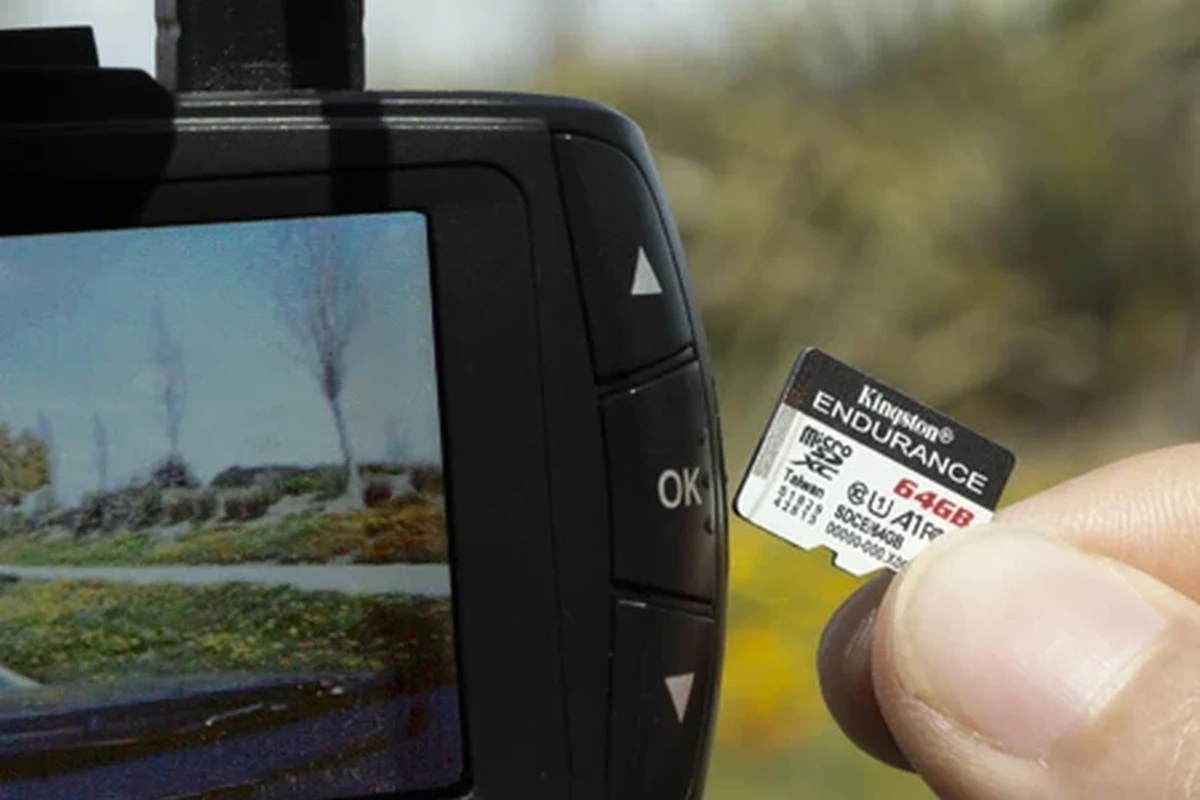
Choose a high-endurance micro SD card that matches your dash cam’s speed and capacity limits. For most drivers in 2026, 128GB with U3/V30 support is the safest all-around starting point.
If you want reliable dash cam recording in 2026, the safest answer is simple: choose a high-endurance micro SD card that matches your camera’s speed and capacity limits. For most drivers, that means prioritizing endurance, heat resistance, and compatibility over the biggest number on the package.
- Endurance first: Dash cams overwrite constantly, so standard cards wear out faster.
- 128GB is the sweet spot: It fits most daily driving needs without overbuying capacity.
- Write speed matters most: U3 and V30 are more important than fast read speed.
- Heat resistance matters: Windshield mounting can shorten card life in hot weather.
Micro SD Card for Dash Cam: The Short Answer and Why It Matters in 2026

A dash cam micro SD card is not just storage; it is the part that has to survive constant recording, frequent overwriting, heat, and power interruptions. That is why the best card for a dash cam is usually an endurance-focused model rather than a standard phone or camera card.
In practical terms, the right card helps your dash cam save footage when it matters most, especially during commuting, parking incidents, or long highway drives. If you are also choosing a camera itself, our guide to the best dash cam for car can help you match storage to the kind of recording you need.
What a Dash Cam Micro SD Card Does and Who It’s Best For
A dash cam writes video continuously, often in short loops. When the card fills up, the camera overwrites the oldest files unless something is locked by impact detection or manual protection. Because of that workload, the card has to handle far more write cycles than a typical memory card used for photos.
Daily commuters, rideshare drivers, road-trippers, and parked-car security users
This kind of storage is especially important for drivers who spend a lot of time on the road. Daily commuters want dependable incident coverage, rideshare drivers need consistent evidence of passenger interactions, road-trippers may record for hours at a time, and parked-car security users need a card that can handle parking mode without wearing out too quickly.
If your vehicle is parked in hot weather, or if you use parking mode often, the storage choice becomes even more important. For drivers who want a camera setup built around this use case, see our guide to the best dash cam for car with parking mode.
Why dash cams need endurance-focused storage, not just any memory card
Standard cards can work for a while, but they are not designed for the repeated overwrite pattern that dash cams create. Over time, that can lead to corrupted files, recording pauses, or cards that fail sooner than expected.
Think of dash cam storage as a wear item, similar to brake pads in the sense that it is expected to age and eventually needs replacement.
How to Choose the Right Micro SD Card for a Dash Cam
The best way to choose is to start with your dash cam’s manual. Manufacturers usually specify the supported capacity, card type, and minimum speed class. If you go beyond those limits, the camera may not recognize the card or may record unreliably.
Capacity: 64GB vs 128GB vs 256GB and when each makes sense
Capacity affects how much footage your camera can store before it starts overwriting older clips. A 64GB card can be enough for basic commuting and short daily drives, while 128GB is often the most balanced choice for many drivers who want a longer buffer of footage. A 256GB card may make sense for higher-resolution recording, long parking mode use, or drivers who want more time before files are overwritten.
Capacity alone does not guarantee better reliability. A larger card still needs the right speed class and endurance rating to perform well in a dash cam.
Speed ratings explained: U3, V30, and why write speed matters more than read speed
Dash cams care most about write speed, because they are constantly saving video. U3 and V30 are common labels that indicate the card can sustain the kind of recording many modern dash cams need. Read speed matters more when you are transferring files to a computer, but it is not the main factor for recording stability.
If a card is too slow, the camera may drop frames, stop recording, or produce errors during high-bitrate video capture. That risk increases with 2K and 4K dash cams, front-and-rear systems, and parking mode.
Endurance and heat resistance: the most important features for dash cams
Endurance means the card is built for many more write-and-rewrite cycles than a standard card. Heat resistance matters because dash cams often sit behind a windshield, where temperatures can climb quickly. In 2026, those two features are still the most important things to prioritize for long-term reliability.
Heat can shorten card life quickly in windshield-mounted setups. If your vehicle regularly bakes in the sun, choose a card made for high-temperature use and replace it at the first sign of instability.
Compatibility checks: card type, file system, and dash cam limits
Not every micro SD card works in every dash cam. Some cameras only support certain capacities, some require microSDXC instead of microSDHC, and many recommend a specific file system such as exFAT or FAT32 depending on size and firmware. Before buying, check the manual and confirm the maximum supported card size.
Also keep in mind that some dash cams behave better with cards from recognized brands that publish endurance ratings and warranty information. If you are shopping for a vehicle setup used in work or commercial driving, our related guide to the best dash cam for fleet vehicles can help you think through heavier-duty use.
Best Features to Look For Before You Buy
Once compatibility is confirmed, focus on features that improve real-world reliability. The goal is not to buy the most expensive card. The goal is to buy the card least likely to fail when the camera is looping, parked, or exposed to heat.
Loop recording support and reliable overwrite performance
Loop recording is the normal operating pattern for a dash cam, so the card needs to handle constant overwriting without degrading too quickly. A card with weak overwrite performance may work at first and then become unreliable after months of use.
- Buy a card rated for high endurance, not just high capacity.
- Match the card to the dash cam’s supported speed class and size limit.
- Use the manufacturer’s recommended format before first use.
- Replace the card if recording errors become more frequent.
High-temperature durability for summer parking and windshield mounting
Dash cams often live in one of the harshest places in a vehicle: the upper windshield. That location gets direct sun, which can stress both the camera and the card. A high-temperature endurance card is more likely to remain stable during long summer parking periods and stop-and-go urban driving.
Drivers in especially hot climates may also want to look at camera placement and parking-mode settings. If that is your situation, the guide to the best dash cam for Texas heat is a useful companion read.
Brand reliability, warranty, and counterfeit-risk reduction
Well-known brands are not automatically perfect, but they usually provide clearer specifications, better support, and lower counterfeit risk than unknown listings. Counterfeit cards are a real problem because they may look legitimate while failing early or reporting fake capacity.
- Buy from reputable retailers or the brand’s official store when possible.
- Check packaging, labeling, and return policies carefully.
- Avoid unusually cheap cards with no clear endurance rating.
- Avoid listings that promise unrealistic capacity or speed.
Value considerations: premium endurance cards vs budget options
Budget cards can be tempting, especially if you only need basic recording. But the cheapest option is often the most expensive over time if it fails early or causes missed footage. Premium endurance cards usually cost more, yet they may offer better long-term value because they are designed for repeated overwriting and heat exposure.
For buyers trying to keep overall dash cam costs in check, our guide to the best dash cam for the money can help you balance camera price and storage quality.
Real-World Benefits and Limitations of Using the Right Card
The right micro SD card improves day-to-day reliability, but it is not magic. It cannot fix a bad camera, outdated firmware, or poor setup. Still, choosing the right card is one of the easiest ways to reduce recording headaches.
Better video retention, fewer recording errors, and smoother incident capture
A good card helps the camera keep recording smoothly, which means fewer skipped files and less chance of losing the moment before or after an incident. That matters whether you are documenting a hit-and-run, a parking scrape, or a traffic dispute.
Where even a great card can fall short: firmware issues, formatting, and wear
Even a top-tier card can act up if the dash cam firmware is outdated or if the card is not formatted correctly. Over time, all flash storage wears out. That means you should expect to replace a dash cam card eventually, even if it is a premium model.
For a step-by-step setup reference, see our guide on how to format an SD card for a dash cam.
Common mistakes that shorten card life or reduce recording quality
The most common mistakes are using a card that is not rated for endurance, ignoring the camera’s capacity limit, and never formatting the card. Another frequent issue is pulling the card out without properly powering down the camera first.
- More reliable loop recording
- Lower chance of corrupted files
- Better performance in heat
- Higher upfront cost for endurance cards
- All cards eventually wear out
- Compatibility still depends on the dash cam
Setup Guide: How to Install, Format, and Configure a Dash Cam Micro SD Card
Correct setup is just as important as the card itself. A properly installed and formatted card is more likely to record reliably from the start.
First-time setup steps for reliable recording
Confirm the supported card type, maximum size, and format requirements in the dash cam manual.
Power the camera off first, then insert the card until it seats fully.
Use the dash cam’s own format function so the file structure matches the device.
Check that the camera saves clips normally before relying on it for daily use.
How often to format the card and why it helps
Regular formatting helps clear file-system issues and can reduce corruption over time. Many dash cam owners format the card periodically, especially after extended use or before long trips. The exact interval varies by camera and usage pattern, so follow the manufacturer’s guidance when available.
Safe removal, replacement, and data backup habits
Before removing the card, power down the dash cam properly. If a clip matters, back it up quickly to a phone or computer so it is not overwritten by loop recording. If you are using parking mode or commercial-style recording, consider checking clips more often so important footage is not lost.
Care, Safety, and Maintenance Tips for Longer Card Life
Micro SD cards are small, but they need a little attention to stay dependable. Good habits can extend service life and reduce the odds of losing footage when you need it most.
Heat management, cleaning, and storage best practices
Keep the card and camera out of unnecessary heat whenever possible. If you store the car for long periods, remove the card only after the camera is fully powered off. Handle the card gently and keep it in a clean case when not installed.
Signs the card is failing and when to replace it
Watch for warning signs such as missing clips, repeated formatting prompts, recording errors, or footage that stops unexpectedly. If those issues start happening, replace the card rather than waiting for a total failure.
Many dash cam problems blamed on the camera are actually caused by worn or incompatible storage.
How to avoid data loss during crashes, power loss, or sudden shutdowns
Choose a dash cam with a buffered save or emergency lock feature if possible, because that can help preserve footage around an impact. Also make sure the camera’s power connection is stable, since sudden shutdowns can interrupt file writing.
If your dash cam repeatedly fails to save clips, do not assume the card is fine. Check the camera firmware, card compatibility, and power supply before relying on it again.
Final Recommendation: The Best Micro SD Card for Dash Cam Buyers in 2026
The best micro SD card for dash cam buyers in 2026 is a high-endurance, temperature-resistant card that matches the camera’s supported capacity and speed class. For most everyday drivers, 128GB is the most practical starting point, while 64GB can work for lighter use and 256GB is better for heavier recording needs.
Best choice by use case: budget, everyday driving, and heavy-duty recording
Lower-cost endurance card from a reputable brand
Best for drivers who want basic reliability without paying for extra capacity they may not use. The trade-off is shorter retention and fewer premium features.
128GB high-endurance U3/V30 card
Best for commuters and family vehicles that need dependable loop recording and a good balance of cost and storage.
256GB high-endurance card with strong heat tolerance
Best for parking mode, long-distance driving, and higher-resolution cameras, as long as the dash cam supports that size.
Transparent buying verdict and what to prioritize over price alone
Prioritize endurance first, compatibility second, and capacity third. If a card is cheap but not built for dash cam workloads, it is usually a poor value even if the packaging looks impressive. The safest buy is the card that matches your camera, your climate, and how often you actually drive.
For drivers who want a dash cam setup that handles more demanding recording patterns, our related guide to the best dash cam for truckers may also be helpful.
Common Questions
Buy a high-endurance card that matches your dash cam’s supported size and speed class. For most drivers, 128GB is a practical starting point.
Not safely. Some cards are too slow, too fragile for constant overwriting, or unsupported by the camera.
Only if the camera needs that speed to record reliably. Write speed matters more than read speed for dash cams.
It depends on heat, use, and card quality. Endurance cards usually last longer than standard cards, but all flash storage eventually wears out.
Yes. Formatting it in the camera helps set the correct file structure and can reduce early recording issues.
Frequently Asked Questions
For many drivers, 128GB is the most useful middle ground. It usually offers enough room for daily driving without paying for more capacity than you need.
In most cases, yes. Dash cams write and overwrite files constantly, so endurance-rated cards are better suited to the workload than standard cards.
Speed class helps indicate whether the card can keep up with recording. If the write speed is too low, the camera may drop footage or produce errors.
Use a compatible endurance card, format it periodically, and avoid exposing it to unnecessary heat. Replacing it at the first sign of errors can also prevent data loss.
Common signs include missing clips, repeated formatting prompts, corrupted files, and recording interruptions. Those issues often mean the card is nearing the end of its life.
Check the camera’s supported capacity, speed class, and file system requirements. It is also smart to buy from a reputable seller to reduce counterfeit risk.