
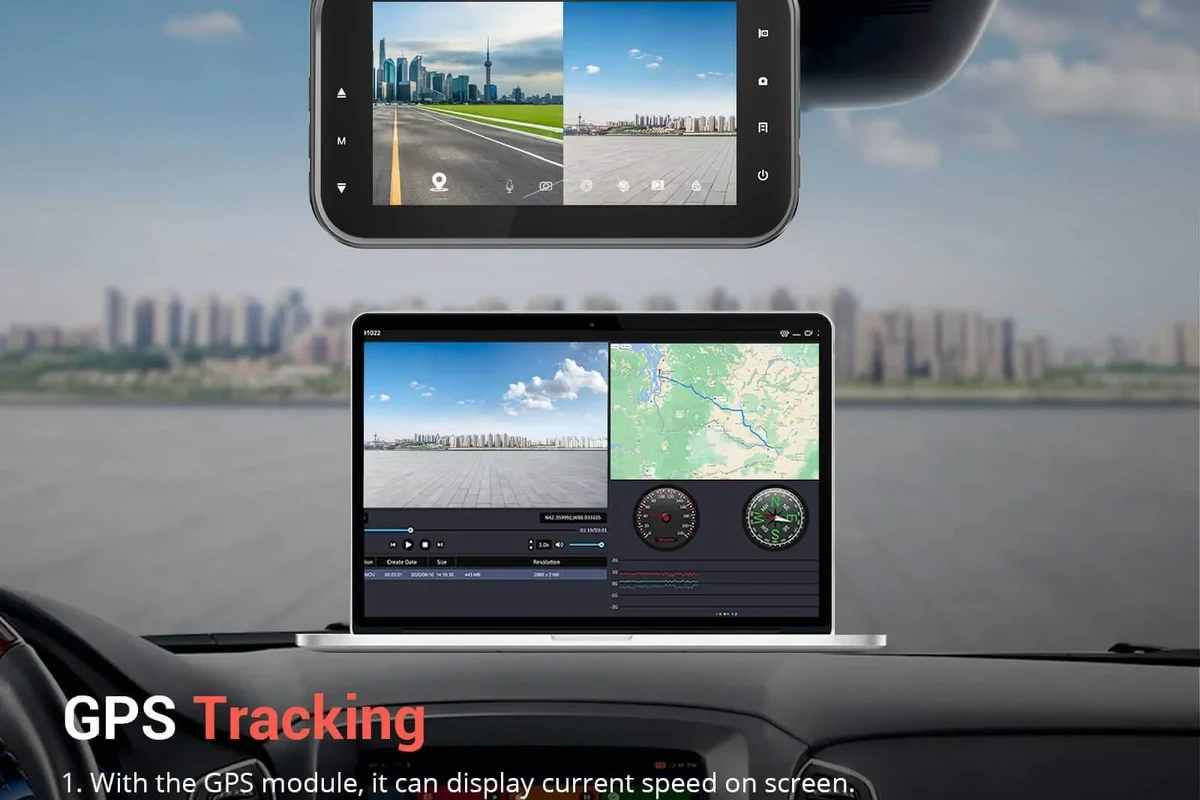
A dash cam with GPS adds location and speed context to your footage, which can make accident evidence and trip logs more useful. It is most worthwhile for commuters, rideshare drivers, fleets, and anyone who wants stronger documentation than basic video alone.
A dash cam with GPS adds location and speed data to your video, which can make accident records, trip logs, and insurance claims easier to understand. In 2026, that extra context is often the difference between “I have footage” and “I have useful evidence.”
- GPS adds context: It can show where an event happened and how fast the car was moving.
- Best for frequent drivers: Commuters, rideshare users, and fleets benefit most from route and incident records.
- Video quality still matters most: Clear footage, low-light performance, and good parking mode should come before extras.
- Setup affects reliability: Mounting, wiring, card choice, and heat resistance can make or break performance.
Dash Cam with GPS: What It Is and Why It Matters in 2026

A GPS-enabled dash cam records where your vehicle was, how fast it was moving, and sometimes the route you took. That information can be embedded in the video or saved in the app, depending on the model.
Quick answer: who benefits most from GPS-enabled dash cams
Drivers who commute daily, use rideshare or delivery apps, manage a work vehicle, or want stronger accident documentation usually benefit the most. If you mainly want basic front-facing recording for occasional driving, a non-GPS model may be enough.
How GPS changes video evidence, trip logging, and incident context
Video alone shows what happened. GPS helps show where it happened, how fast the vehicle was moving, and sometimes which direction it was traveling, which can be useful when a crash report, witness statement, or insurance review is being built.
Many GPS dash cams can also support trip history and route review, which is helpful for mileage tracking and business driving records.
Who Should Buy a Dash Cam with GPS?
The right buyer is usually someone who wants more than basic footage. A GPS unit is most useful when driving patterns, route history, or speed context matter after the fact.
Daily commuters, rideshare drivers, families, and road-trippers
Daily commuters may want GPS for collision documentation and traffic dispute support. Rideshare drivers and delivery drivers often value route logs and incident records, while families and road-trippers may like the added context during long-distance travel or multi-driver vehicle use.
Good fit if you want stronger proof during crashes, lane-change disputes, or parking-lot incidents.
Useful if multiple drivers use the car and you want route and speed context for accountability.
May be more than you need unless you specifically want trip logging or evidence support.
When GPS is useful versus when a basic dash cam is enough
If you only want a simple record of front-road events, a basic camera can do the job. GPS becomes more valuable when you want to document speed, location, or route data, or when you drive professionally and need cleaner records.
Key Features to Compare Before You Buy
Not all GPS dash cams are equal. The best choice depends on image clarity, location accuracy, parking protection, storage behavior, and how easy the system is to live with every day.
Video quality: resolution, low-light performance, and field of view
Resolution matters, but it is not the only thing that matters. A sharp image in daylight can still struggle at night, so look for strong low-light performance, a balanced field of view, and video processing that preserves readable plates and road signs when conditions are imperfect.
Higher resolution does not automatically mean better real-world footage. Sensor quality, lens design, and image processing often matter just as much as the headline number.
GPS accuracy, speed overlay, and route tracking
Good GPS should lock quickly, stay stable, and avoid frequent dropouts. Speed overlays can help explain what the vehicle was doing at the time of an incident, but they are not a substitute for official evidence or a police report.
Parking mode, motion detection, and impact alerts
Parking mode can record when the car is off, while motion detection and impact alerts can help capture hit-and-run events or suspicious activity. For many owners, this is one of the biggest reasons to choose a dash cam with GPS, especially if the car sits outside overnight.
If parking protection matters, our guide to the best dash cam for car with parking mode can help you compare the setup choices that support 24/7 monitoring.
Storage, loop recording, and file protection
Loop recording lets the camera overwrite old footage when storage is full, which is normal and useful. The best systems also protect event files automatically so a collision clip is not erased during routine recording.
For day-to-day reliability, it also helps to understand how long dash cam footage lasts and when files are likely to be overwritten.
App connectivity, screen size, voice control, and ease of use
App support can make it easier to review clips, change settings, and download files without removing the memory card. A larger screen may help with setup, but voice control and a clean menu system matter more once the camera is installed and you need it to work without distraction.
- Prioritize image quality and parking behavior before paying extra for advanced app features.
- Choose a memory card that is rated for dash cam use, not just any cheap card.
- Check whether GPS is built in or requires a separate mount or module.
Best Use Cases and Real-World Benefits
GPS is not just a tech add-on. In the right situation, it can make footage more useful to a driver, an insurer, or a fleet manager.
Accident documentation and insurance claims
When an incident happens, a video clip with location and speed context can help explain timeline and direction of travel. That can be especially valuable when two drivers tell different stories or when a crash occurs in an area with confusing traffic patterns.
Dash cam footage can support a claim, but it does not replace a police report, medical care, or required insurance steps after a collision.
Fleet tracking, mileage logs, and trip organization
For business drivers, GPS can support mileage records, route review, and driver accountability. If you manage multiple vehicles, this can help organize trips and spot patterns without relying only on memory or handwritten logs.
Fleet buyers may also want to compare options in best dash cam for fleet vehicles and fleet telematics-focused dash cams if they need more than a consumer-grade setup.
Deterring theft, fraud, and false accident claims
Visible recording equipment can discourage opportunistic behavior, and GPS data can help confirm where a vehicle was when a claim is disputed. It will not stop every scam or theft attempt, but it can improve the quality of the evidence you have afterward.
Limitations, Trade-Offs, and Common Buying Mistakes
GPS is useful, but it is not magic. Buyers sometimes pay extra for features they never use or overlook the parts that actually determine whether the camera works well over time.
Overpaying for features you may not use
Some models bundle GPS with large displays, cloud features, or multi-channel recording that may be unnecessary for a simple commuter car. If your main goal is front-road evidence, it may be smarter to spend more on clarity and reliability than on extras.
Poor placement, weak wiring choices, and inaccurate GPS expectations
Bad mount placement can block the view or cause vibration that hurts image quality. Weak wiring choices can create power problems, while a poor GPS signal can lead to delayed location lock or occasional tracking gaps, especially in dense urban areas or under heavy tint and roof structures.
If you are planning a clean installation, our guide on how to install a dash cam with a cigarette lighter is a useful starting point for simpler power setups.
Ignoring heat resistance, capacitor quality, and memory card compatibility
Heat resistance matters because dash cams live in hot cabins for long periods. Capacitors are often preferred over small internal batteries for durability in heat, and memory card compatibility matters because not every card handles constant rewriting well.
Do not rely on a dash cam setup with an incompatible card, unstable power source, or poor heat tolerance if you expect it to protect important footage in summer conditions.
Setup and Safe Use: How to Install and Operate It Properly
A good dash cam can still disappoint if it is installed badly. Safe placement, stable power, and sensible parking settings are just as important as the camera itself.
Mounting position, power options, and cable routing
Mount the camera where it has a clear view of the road and does not interfere with driver visibility. Power can come from a 12V outlet, a hardwire kit, or a battery pack, and the best option depends on whether you want simple installation or parking mode support.
If you need a cleaner hidden-wire setup, see how to hide dash cam wires in the headliner for routing ideas that keep the cabin tidy.
Using parking mode safely without draining the battery
Parking mode is helpful, but it can draw power when the vehicle is off. That is why many owners use a hardwire kit with low-voltage protection or a dedicated battery pack, especially if the car sits for long periods.
For more detail on off-car operation, you may also want to read how a dash cam works when the car is off and how to prevent a dash cam from draining the battery.
Legal and privacy considerations for recording in public and private spaces
Recording rules can vary by state and country, especially around audio recording and privacy expectations. In general, public-road recording is common, but you should still check local laws and avoid placing the camera where it blocks the windshield or creates a safety issue.
Care, Cleaning, and Long-Term Maintenance
Dash cams are low-maintenance, but they are not maintenance-free. A few small habits can keep the camera dependable for years.
Lens cleaning, firmware updates, and memory card upkeep
Keep the lens clean with a soft microfiber cloth so dirt and haze do not reduce clarity. Firmware updates may improve stability or app behavior, and memory cards should be formatted or replaced according to the manufacturer’s guidance to reduce file corruption risk.
If you are not sure about card maintenance, our guide to formatting an SD card for a dash cam explains the basics in plain English.
Checking mounts, power cables, and GPS signal performance over time
Heat and vibration can loosen mounts over time, so it is smart to inspect them periodically. If GPS lock becomes slow or route data looks inconsistent, check the mount, cable, and software settings before assuming the camera is failing.
Review a few recent clips every month so you can catch problems with the card, GPS lock, or power before you need the footage in an emergency.
Final Verdict: How to Choose the Right Dash Cam with GPS for Your Budget
The right dash cam with GPS depends on how you drive and what kind of proof you want. For many buyers, the best choice is not the model with the most features, but the one with the clearest footage, dependable GPS, and a parking setup that fits daily use.
Best value features for budget, mid-range, and premium buyers
Budget buyers should focus on dependable recording, acceptable low-light performance, and basic GPS logging. Mid-range buyers usually get the best balance of video quality, app support, and parking protection, while premium buyers may want dual-channel recording, stronger parking features, and better heat tolerance for long-term use.
| Buyer type | What to prioritize | Main trade-off |
|---|---|---|
| Budget | Reliable video and basic GPS | Fewer parking and app features |
| Mid-range | Balanced image quality and usability | May still need a hardwire kit |
| Premium | Top-tier recording and parking support | Higher cost and more setup complexity |
Transparent recommendation based on driving habits and priorities
If you commute often, drive for work, or want stronger insurance documentation, a dash cam with GPS is usually worth considering. If you only need occasional front-facing recording, a simpler model may be the smarter purchase, especially if you would rather put the budget toward better video quality or a more reliable memory card.
Choose a dash cam with GPS if route history, speed context, or driving accountability matters in your day-to-day use. Skip the GPS premium if you will not use trip data and instead invest in clearer video, better parking mode, and a heat-resistant design.
Common Questions
Drivers who want location and speed context for crashes, route logs, or business driving usually benefit most.
They do different jobs. GPS tracks location and speed, while Wi-Fi helps you view and download clips on a phone.
Not always, but it is helpful if you want recording while the car is parked. GPS alone does not provide parking protection.
Use a card that is rated for continuous recording and compatible with the camera. Cheap cards often fail sooner.
Yes, it can add useful context to a claim. It does not replace a police report or insurer requirements.
Frequently Asked Questions
A GPS dash cam adds location and speed data to the video. That extra context can help explain where and how an event happened.
It is usually worth it for commuters, rideshare drivers, fleets, and road-trippers. If you only want occasional video coverage, a basic model may be enough.
Video clarity, low-light performance, parking mode, storage behavior, and heat resistance matter more than flashy extras. Those features determine how reliable the camera is in everyday use.
Clean the lens, check the mount, update firmware, and use a compatible memory card. Review clips from time to time so you can catch problems early.
Confirm the power method, cable routing, and whether parking mode needs hardwiring or a battery pack. Also check local recording and privacy rules.
Probably not unless you specifically want trip logs or stronger evidence support. A simpler camera may be a better value for occasional drivers.