
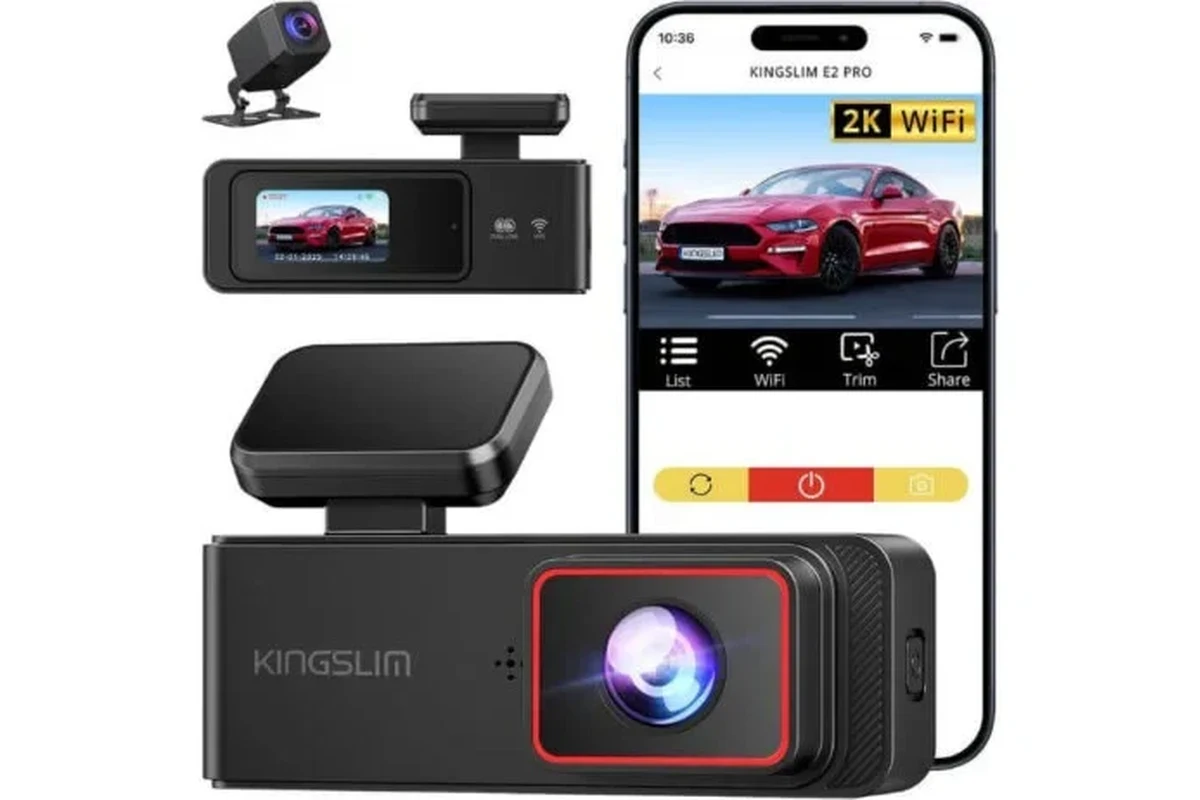
A battery powered dash cam is a good fit if you want easier installation and parking protection without heavily relying on the car battery. It is less ideal for long-duration surveillance, where a hardwired setup or external battery pack usually performs better.
A battery powered dash cam is best for drivers who want parking protection without tying the camera to the car’s electrical system. It can make sense for commuters, rideshare drivers, fleet managers, and anyone who parks in public spaces often.
- Best use: Parking mode and short-trip convenience are the main reasons to buy one.
- Key checks: Compare battery runtime, low-light video quality, storage support, and heat resistance.
- Important limit: Internal batteries usually cannot match a hardwired system for long parked surveillance.
- Ownership tip: Use a compatible memory card and keep firmware updated for more reliable recording.
Battery Powered Dash Cam: What It Is and Whether You Actually Need One

A battery powered dash cam uses its own internal battery or a connected battery pack to keep recording when the engine is off. That makes it different from cameras that rely mainly on a hardwired connection or a simple capacitor design for short shutdown protection.
How a battery powered dash cam differs from hardwired and capacitor models
The biggest difference is how the camera handles power after the ignition turns off. A hardwired setup usually draws from the vehicle’s fuse box and may support parking mode, while a capacitor-based camera is generally designed to save the last file and shut down safely rather than run for long periods.
A true battery powered dash cam can record for a longer stretch while parked, but runtime depends on battery size, temperature, video settings, and whether features like Wi-Fi or GPS stay active. If you want a deeper look at backup power options, our guide to a dash cam battery pack explains why many drivers choose an external pack instead of relying only on the camera’s internal battery.
Who it fits best: parked-car security, short trips, rideshare, and fleet use
This type of camera fits drivers who care most about incident recording when the vehicle is unattended. It also works well for short-trip drivers who do not want a long hardwire project, plus rideshare and fleet users who need a cleaner install and fewer battery-drain concerns.
Good if you park in shared lots and want basic parking coverage.
Useful for school lots, shopping centers, and parked-car protection.
Works if you want simpler setup, but battery runtime may be limited.
Best Uses in 2026: When Battery Power Makes More Sense
In 2026, battery power makes the most sense when convenience and parked-car monitoring matter more than maximum runtime. It is especially appealing if you want a cleaner install, fewer wiring changes, or less risk of draining the vehicle battery.
Parking mode protection without draining your vehicle battery
Parking mode is the main reason many shoppers consider a battery powered dash cam. Instead of pulling steady power from the car battery, the camera or battery pack can continue recording motion or impact events after you lock the doors.
Daily commuting, road trips, and vehicles that sit for long periods
For daily commuting, a battery powered dash cam can be helpful if you want automatic recording on every trip and a little extra protection in parking lots. For road trips, it can reduce the need for constant wiring changes across rental cars, second vehicles, or temporary setups.
Vehicles that sit for long periods can also benefit, especially if you do not want a hardwired system drawing from the car while it is parked. If you are comparing camera behavior when the ignition is off, our article on how a dash cam works when the car is off is a useful companion guide.
Use cases where a battery powered dash cam is not the best choice
This is not the best option if you need all-day parking surveillance, fleet telematics, or heavy-duty commercial use. In those cases, a hardwired system with a dedicated battery pack or a fleet-focused setup may be more practical.
It is also a weaker fit if you live in extreme heat or cold and need the most stable long-term power source possible. Internal batteries can age faster in harsh temperatures, so drivers in hot climates should pay close attention to storage conditions and heat resistance.
Key Features to Compare Before You Buy
Not every battery powered dash cam is built the same. Before you buy, compare the power system, image quality, storage behavior, and reliability features that matter most in your climate and driving routine.
Battery capacity, runtime, and charging speed
Battery capacity affects how long the camera can stay active while parked, but real runtime depends on resolution, screen use, and parking mode settings. Faster charging is helpful if you make many short trips and want the camera ready again quickly.
Video quality, low-light performance, and field of view
Resolution matters, but it is not the only thing that affects usable footage. Low-light performance, lens quality, and a balanced field of view can matter more than a big spec number when you need to read plates or capture an incident at night.
Storage support, loop recording, and event locking
Look for reliable loop recording so the camera can overwrite older footage automatically when storage fills up. Event locking is equally important because it keeps important clips from being erased after a hard brake, collision, or motion trigger.
Memory card compatibility varies by brand and model. Before buying, check the manufacturer’s approved card type and capacity range.
If you are unsure about card setup, our guide on how to format an SD card for a dash cam can help you avoid common storage problems.
App connectivity, GPS, voice control, and driver alerts
Wi-Fi or app connectivity makes it easier to review clips without removing the card, while GPS can add speed and location data to footage. Voice control and driver alerts are helpful convenience features, but they should not be the main reason you buy.
Build quality, heat resistance, and cold-weather reliability
Battery powered models need strong enclosure quality and stable thermal design because heat and cold both affect battery life. If your car sits outside for long hours, look for a model designed to tolerate your local climate rather than assuming every battery camera will behave the same.
Do not assume an internal battery will perform well in extreme temperatures. Check the manufacturer’s operating range and storage guidance before leaving the camera in a parked vehicle for long periods.
Top Buying Criteria: Value, Installation, and Ownership Costs
The right camera is not always the one with the longest spec sheet. Value comes from how well the unit fits your parking habits, how much effort it takes to install, and how expensive it is to maintain over time.
Budget ranges and what you should expect at each price point
Lower-priced models usually cover the basics: front recording, basic parking mode, and simple app access. Midrange options often improve image processing, storage support, and mounting quality, while premium units may add stronger battery management, better low-light performance, and more polished software.
Because pricing changes often, confirm current availability and features with the retailer or manufacturer before you buy.
New vs. used dash cams: when saving money is worth the risk
Buying used can save money, but it also increases the risk of worn batteries, outdated firmware, missing accessories, or hidden heat damage. A new camera is usually safer if you depend on parking mode or want warranty protection.
Practical Tip
If you compare used options, ask for the exact model number, included accessories, battery age, and whether the seller can demonstrate that the camera still holds charge normally.
Installation complexity, accessory costs, and hidden expenses
Some battery powered dash cams are easy to mount and charge through a USB port, while others work better with extra accessories like adhesive mounts, long cables, or a dedicated battery pack. Hidden costs can include higher-capacity memory cards, spare mounts, and replacement adhesive pads.
Warranty coverage, support quality, and long-term value
Warranty length is helpful, but support quality matters just as much. A camera with responsive customer service, clear firmware updates, and easy-to-find replacement parts often delivers better long-term value than a cheaper model that becomes frustrating after a few months.
- Confirm battery runtime expectations for your parking habits
- Check memory card support and firmware update policy
- Review warranty terms and accessory replacement options
How to Set Up a Battery Powered Dash Cam Safely
Setup is usually simple, but the details matter. A clean installation improves footage quality, reduces distraction, and helps the camera stay secure in hot or cold weather.
Step-by-step mounting, charging, and initial configuration
Charge the camera fully or connect the approved battery pack before final mounting.
Use the supplied bracket or adhesive mount and let it bond properly before driving.
Adjust resolution, parking mode, loop length, and event sensitivity before regular use.
Where to place the camera for the best view and least obstruction
Most drivers place the dash cam near the top of the windshield, behind the rearview mirror if local rules and vehicle design allow it. That location usually gives a wide view while keeping the camera out of the driver’s direct line of sight.
Safe cable routing and avoiding interference with airbags or controls
Route cables so they do not block airbags, steering controls, pedals, or visibility. If you are unsure about trim panels or wiring paths, use a professional installer or follow the manufacturer’s instructions carefully rather than forcing the cable into place.
For readers who want a cleaner install, our guide on how to hide dash cam wires in the headliner covers safer cable management ideas.
Common Mistakes That Reduce Performance or Cause Problems
Many dash cam complaints come from setup errors, not from the camera itself. A few small mistakes can shorten battery life, corrupt footage, or make parking mode unreliable.
Ignoring battery health, temperature limits, and charging habits
Leaving a battery powered dash cam in extreme heat or cold can reduce lifespan and cause unpredictable runtime. It is also a mistake to keep charging habits sloppy, because repeated partial charging or deep discharging can wear the battery faster.
Using the wrong memory card or formatting it incorrectly
Dash cams are picky about memory cards because they write and overwrite video constantly. A low-quality or incompatible card can cause skipped recordings, freezing, or file corruption.
Overlooking parking mode settings and sensitivity calibration
If motion or impact sensitivity is too high, the camera may lock too many false events. If it is too low, it may miss the incident you actually care about, so take time to calibrate the settings for your parking environment.
Misunderstanding legal limits for audio recording and privacy
Audio recording laws vary by state and country, and some locations require consent before recording conversations. Before relying on in-cabin audio, check local privacy rules and the camera’s audio settings.
- Check local recording and privacy laws
- Format the card the way the manufacturer recommends
- Review parking mode sensitivity after installation
- Using random memory cards without compatibility checks
- Leaving the camera in extreme heat for long periods
- Assuming default settings will work for every parking lot
Care, Cleaning, and Maintenance for Reliable Long-Term Use
Good maintenance keeps footage clearer and helps the battery system last longer. It also reduces the chance of a camera failure when you need evidence most.
Lens cleaning, screen care, and keeping mounts secure
Clean the lens gently with a microfiber cloth and keep the screen free of dust and fingerprints. Check the mount periodically, especially after hot weather, because adhesive and suction-style mounts can loosen over time.
Battery care tips to extend lifespan and maintain safe operation
Avoid storing the camera in extreme temperatures when possible, and do not ignore signs of swelling, unusual heat, or rapid battery drain. If the battery performance changes noticeably, replace or service the unit instead of pushing it to keep running.
Updating firmware, checking footage, and replacing worn accessories
Firmware updates can improve stability, app compatibility, and recording behavior. It is also smart to review a few clips regularly so you know the camera is still saving files correctly and the card has not started to fail.
If you want a broader look at installation and power management, our article on how to prevent a dash cam from draining a battery is useful even if you plan to use a battery-powered setup.
Final Verdict: Is a Battery Powered Dash Cam Worth It in 2026?
For many drivers, yes—if your main goal is parking protection with less wiring and less risk to the vehicle battery. It is especially sensible for commuters, rideshare drivers, and anyone who wants a simpler install than a permanent hardwired system.
Best-fit recommendation by driver type and budget
Choose a battery powered dash cam if you want convenience first, moderate parking coverage, and a setup that is easier to move between vehicles. Budget shoppers should focus on reliable storage support and stable mounting, while higher-budget buyers should look for stronger low-light performance and better thermal design.
Clear limitations, realistic expectations, and the smartest overall pick
The trade-off is runtime: battery-powered models usually cannot match the constant vigilance of a hardwired system with a dedicated external battery solution. If you need long-duration parking surveillance or fleet-level monitoring, a more robust power setup is usually the smarter pick.
A battery powered dash cam is worth considering in 2026 if you want straightforward installation, parking protection, and less stress on the vehicle battery. For drivers who need maximum overnight or all-day coverage, a hardwired camera with a dedicated battery pack is often the better long-term answer.
Common Questions
Yes, if you want easier setup and some parked-car protection. It is less compelling if you need long-duration monitoring.
Usually less than a hardwired setup, because it relies on its own power source. Still, charging habits and temperature can affect performance.
Many models can, but runtime varies by battery size and settings. Check the parking mode details before buying.
Use a card the manufacturer approves for dash cam use. A cheap or incompatible card can cause recording failures.
Not always, but both can improve convenience and footage data. They are useful extras, not substitutes for good video quality.
Frequently Asked Questions
The main advantage is convenience. It can provide parking protection and easy installation without depending as heavily on the vehicle’s electrical system.
Focus on battery runtime, video quality, low-light performance, storage support, and heat resistance. Then check whether the mounting and app features match your daily driving habits.
Avoid using an incompatible memory card, blocking airbags with cables, or assuming the default parking mode settings will work perfectly. Also avoid leaving the camera in extreme temperatures for long periods when possible.
Yes, especially if the car spends time in school lots, shopping centers, or public parking areas. It can add peace of mind without requiring a complicated install.
Clean the lens, check the mount, update firmware, and review footage periodically. Battery care matters too, so follow the manufacturer’s temperature and charging guidance.
Ask about battery health, included accessories, firmware status, and whether the unit still records reliably. If possible, verify the model’s warranty and return policy as well.