
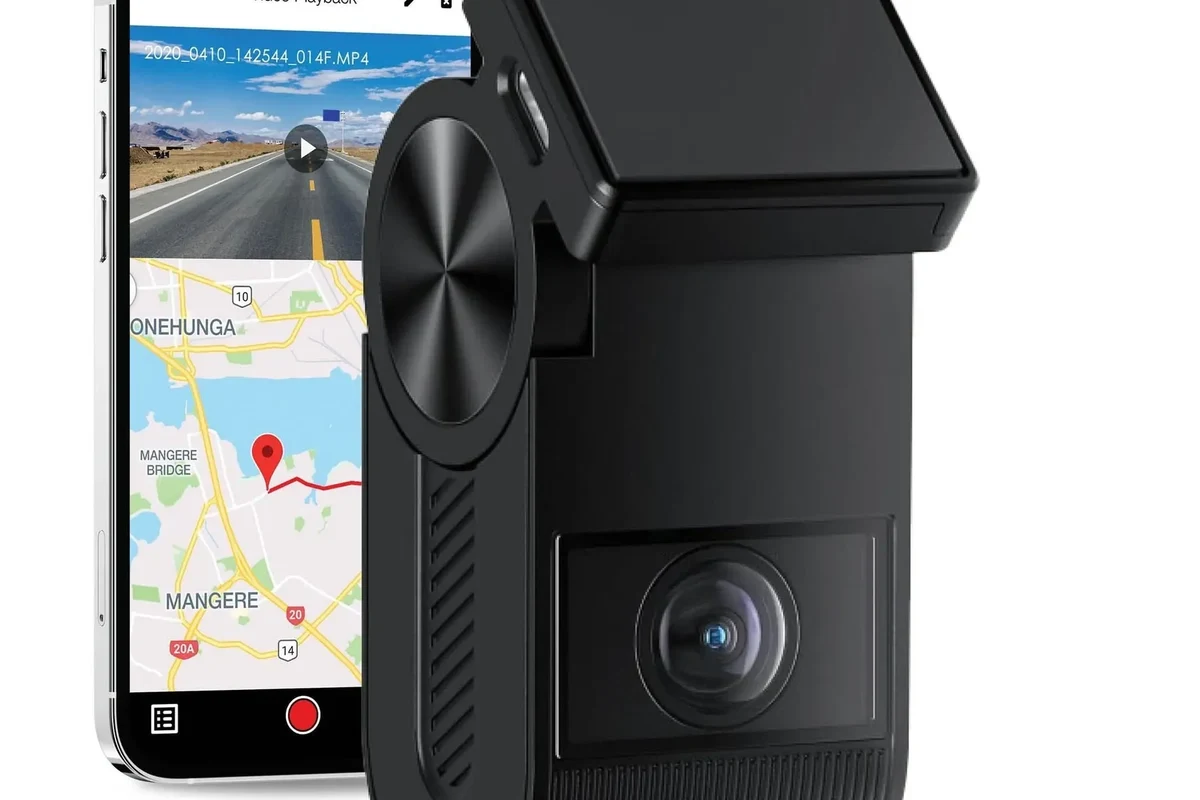
A wireless dashcam is worth buying if you want easier installation, app-based access, and cleaner cable management. The best one is the model that records clearly, connects reliably, and supports the parking features you need.
A wireless dashcam can be a smart buy in 2026 if you want simpler installation, cleaner cable management, and easier access to footage through an app. The best choice is usually the one that records clearly, connects reliably, and still supports the parking features you actually need.
- Wireless usually means app-connected: Most models still need a power cable or hardwire connection.
- Video quality matters most: Prioritize night clarity, HDR, and a reliable sensor over flashy extras.
- Parking mode is useful but power-hungry: Confirm battery protection or hardwire support before relying on it.
- App stability is a dealbreaker: A weak app can make an otherwise good camera frustrating to use.
Wireless Dashcam: What It Is and Whether It’s Worth Buying in 2026

For most drivers, “wireless” does not mean cable-free. It usually means the camera can connect to your phone, cloud account, or rear camera without a messy data cable running across the cabin.
Quick answer: the best wireless dashcam is the one that balances reliable connectivity, clear video, easy installation, and parking protection
If you want the simplest ownership experience, prioritize stable app performance and strong night video before chasing extra features. A model with weak connectivity can be more frustrating than a basic camera that records consistently.
Who a wireless dashcam fits best: commuters, rideshare drivers, road-trippers, and drivers who want simpler installation
Wireless models make the most sense for people who value convenience and quick clip access. They are also appealing for leased vehicles, shared family cars, and drivers who do not want a complicated hardwire setup.
Wireless dashcams are less about “no cables at all” and more about easier setup, faster sharing, and app-based control.
How Wireless Dashcams Work and What Makes Them Different
The big difference is connectivity. A wireless dashcam may use Wi‑Fi, Bluetooth, cloud syncing, or a companion app to let you view footage, change settings, or download clips without removing the memory card every time.
Wi‑Fi, Bluetooth, cloud, and app-based control: what “wireless” usually means
Wi‑Fi is common for transferring video to a phone after a drive. Bluetooth is usually used for quick pairing or basic control, while cloud features may upload clips automatically if the camera has an active data connection or hotspot support.
Power options: battery, hardwire, USB-C, and rear-camera connectivity
Most wireless dashcams still need a power source. Some plug into USB-C, some use a 12V outlet, and some are hardwired for parking mode and cleaner wiring. If you are considering a permanent install, a dashcam hardwire kit is often the cleanest way to support always-on features.
What wireless does not mean: why most models still need power cables
Even a wireless dashcam usually needs a cable for power and sometimes for the rear camera. The “wireless” label mainly refers to how the device communicates, not how it runs without electricity.
Some brands use “wireless” to describe rear-camera links, while others mean app connectivity. Read the product description carefully so you know what is actually wireless.
Key Features to Compare Before You Buy
Specs matter more than marketing language. A wireless dashcam should be judged by image quality, app stability, storage behavior, and whether it works well in your parking situation.
Video quality and night performance: resolution, HDR, sensor quality, and low-light clarity
Resolution matters, but it is not the whole story. Sensor quality, HDR (high dynamic range), and low-light tuning often make a bigger difference when headlights, rain, or dark roads are involved.
Look for clear license plates in normal driving conditions, but be realistic: no dashcam captures every plate perfectly in every situation. Night performance is especially important if you often drive after dark or park on dim streets.
Field of view, lens coverage, and number of channels: front-only vs dual-channel vs 360 setups
Front-only cameras are simpler and cheaper. Dual-channel systems add a rear camera for more complete coverage, while 360-style setups can help capture side activity, parking lot incidents, or rideshare interactions.
Connectivity and app reliability: pairing speed, live view, downloads, and firmware updates
A wireless dashcam is only as good as its app. Check whether the app pairs quickly, downloads clips without repeated disconnects, and receives firmware updates that fix bugs instead of creating new ones.
Parking mode, motion detection, and impact alerts
Parking mode can be one of the biggest reasons to buy a wireless dashcam. The best systems record motion or impacts while your car is parked, but they often need hardwiring or a dedicated battery solution to avoid draining the car battery.
Storage, loop recording, heat resistance, and build quality
Loop recording overwrites older files when the card fills up, so storage size and card quality matter. In hot climates, heat resistance is especially important because dashcams live behind glass and can fail early if the hardware is not built for cabin temperatures.
- Buy a high-endurance microSD card instead of a bargain card meant for phones.
- Check whether the app supports easy clip export before you commit.
- Confirm that parking mode works the way you expect, especially if your car sits for long periods.
Best Use Cases: Which Drivers Benefit Most from a Wireless Dashcam
Wireless dashcams are not for everyone, but they fit several common driving patterns very well. The key is matching the feature set to how and where you drive.
Daily commuters and highway drivers
Commuters benefit from quick incident documentation and easier access to footage after a minor crash or road-rage event. Highway drivers should pay close attention to night clarity, stabilization, and how well the camera handles fast-moving traffic.
Families, teen drivers, and shared vehicles
In shared vehicles, app access can make it easier to review clips without removing the card. Parents may also appreciate parking alerts and simple setup if the car moves between different drivers.
Rideshare, delivery, and business-use drivers
For rideshare and delivery drivers, fast clip retrieval and interior or dual-channel coverage can be useful. A wireless dashcam can also reduce downtime because drivers can review footage on a phone instead of swapping memory cards between shifts.
Drivers in hot climates, cold climates, or frequent stop-and-go traffic
Extreme temperatures are hard on electronics, so build quality matters. Stop-and-go traffic also makes parking and low-speed impact recording more valuable, especially in crowded lots or city streets.
Good fit if you want easy incident evidence and simple app access.
Good fit if several people share the car and setup needs to stay simple.
Good fit only if the camera is straightforward and the app does not add frustration.
Real-World Benefits, Limits, and Common Buying Mistakes
The biggest benefit of a wireless dashcam is convenience, but convenience only helps if the camera remains dependable. That is why it is worth looking past the feature list and focusing on ownership experience.
Benefits: easier installation, cleaner cabin setup, faster clip access, and better incident documentation
Wireless models often reduce the clutter that comes with long visible cables. They can also make it easier to save and share footage quickly after a parking-lot hit, a traffic dispute, or a fender bender.
Limitations: app dependence, signal dropouts, battery drain, and hidden subscription costs
The main downside is that app-based systems can be annoying if the connection is unstable. Some cloud features may also require subscriptions, and parking mode can drain the battery if the camera is not powered correctly.
Common mistakes: buying for brand name alone, ignoring storage needs, and skipping parking-mode compatibility
Brand recognition does not guarantee strong app support or reliable firmware. A lot of buyers also underestimate how quickly high-resolution video fills storage, especially if the camera records continuously or in dual-channel mode.
Evidence limitations: why specs matter more than marketing claims
Because there is no universal testing standard that proves every claim in every driving condition, compare the actual specifications and feature support. Manufacturer claims are useful, but they should be treated as starting points rather than guarantees.
Do not rely on parking mode alone to protect a vehicle. If you need around-the-clock recording, confirm power management and battery protection before installation.
Safety, Legal, and Maintenance Considerations
A dashcam should help you document driving, not create new problems. Safe mounting, legal compliance, and routine maintenance all matter more than most shoppers realize.
Safe mounting, cable routing, and avoiding windshield obstruction
Mount the camera where it does not block your view of the road. Keep cables tucked away so they do not interfere with airbags, pedals, or driving controls.
Privacy, audio recording, and local dashcam laws to check before use
Some places have rules about recording audio, placing devices on the windshield, or using cameras in certain vehicles. Check your local laws before recording passengers, and be especially careful with rideshare or business use.
Care and cleaning: lens maintenance, memory card formatting, and heat/cold protection
Clean the lens gently so dust and fingerprints do not soften the image. It also helps to format the memory card periodically using the camera’s own menu, since that can reduce file corruption over time.
Troubleshooting basics: pairing issues, recording failures, and corrupted files
If pairing fails, restart the camera, phone, and app before assuming the hardware is broken. If clips go missing, check the memory card health, firmware version, and whether the camera is set to overwrite old files correctly.
- Check the camera app, storage support, and parking mode before installation.
- Use a quality memory card rated for continuous recording.
- Verify local recording and audio laws if the camera captures passengers.
- Mounting the dashcam where it blocks your view or interferes with airbags.
- Assuming cloud features are free forever.
- Ignoring power draw if you plan to use parking mode.
Value Guide: Budget, Features, and Final Recommendation
Price alone does not tell you whether a wireless dashcam is a good value. The real question is whether the camera gives you the features you will actually use without creating maintenance headaches.
Budget tiers: entry-level, midrange, and premium wireless dashcam options
Entry-level models usually focus on basic app connectivity and front recording. Midrange cameras often add better sensors, dual-channel support, or improved parking features, while premium options may include cloud access, stronger night performance, and more polished software.
What deserves extra spending and what you can skip
Spend more on video quality, app reliability, and parking support if you drive often in traffic or leave the car parked in public. You can usually skip flashy extras that do not improve core recording performance or daily usability.
New vs used considerations, warranty coverage, and return policies
Buying new is usually safer for electronics because battery health, firmware support, and memory-card compatibility matter. If you do consider used, confirm that the unit powers on correctly, includes the necessary mounts and cables, and still has a return option or warranty coverage from the seller.
Transparent verdict: the best wireless dashcam is the one that fits your driving habits, parking needs, and app reliability expectations
For most buyers, the right choice in 2026 is a wireless dashcam with dependable app support, strong low-light recording, and parking features that match how the vehicle is stored. If you want the cleanest install and the best always-on protection, compare wireless convenience with hardwire support before you decide.
Choose a wireless dashcam for convenience, easy clip access, and a cleaner cabin, but only if the app and parking features are dependable. If your car spends long hours parked or you need the most stable always-on setup, a model with hardwire support may be the better long-term fit.
Common Questions
Usually not completely. It normally still needs power, but it can connect to your phone or rear camera without a data cable.
Drivers who want easier installation, simple clip access, and a cleaner cabin often like them most.
Some do, but night performance depends on the sensor, HDR, and tuning more than the wireless feature.
Yes, but you should confirm the power setup first. Parking mode often needs hardwiring or a dedicated battery solution.
Buying based on the wireless label alone. App reliability and storage support matter just as much.
Frequently Asked Questions
It records driving like a normal dashcam, but it also adds wireless connectivity for app access, downloads, or cloud features. That makes it easier to review footage without removing the memory card every time.
Focus on video quality, night performance, app reliability, storage compatibility, and parking mode support. Those features affect daily use more than marketing claims.
Yes. Clean the lens, format the memory card periodically, and keep firmware updated when needed. That helps reduce recording errors and corrupted files.
They can be, especially if multiple drivers share the car. App access makes it easier to review clips without moving hardware between vehicles.
Check local dashcam laws, mounting rules, and whether the power setup supports your parking-mode goals. Also make sure the camera will not block your view or interfere with airbags.
If you want dependable parking mode or the cleanest possible install, hardwiring is often the better choice. A wireless camera can still be useful, but power planning becomes more important.