
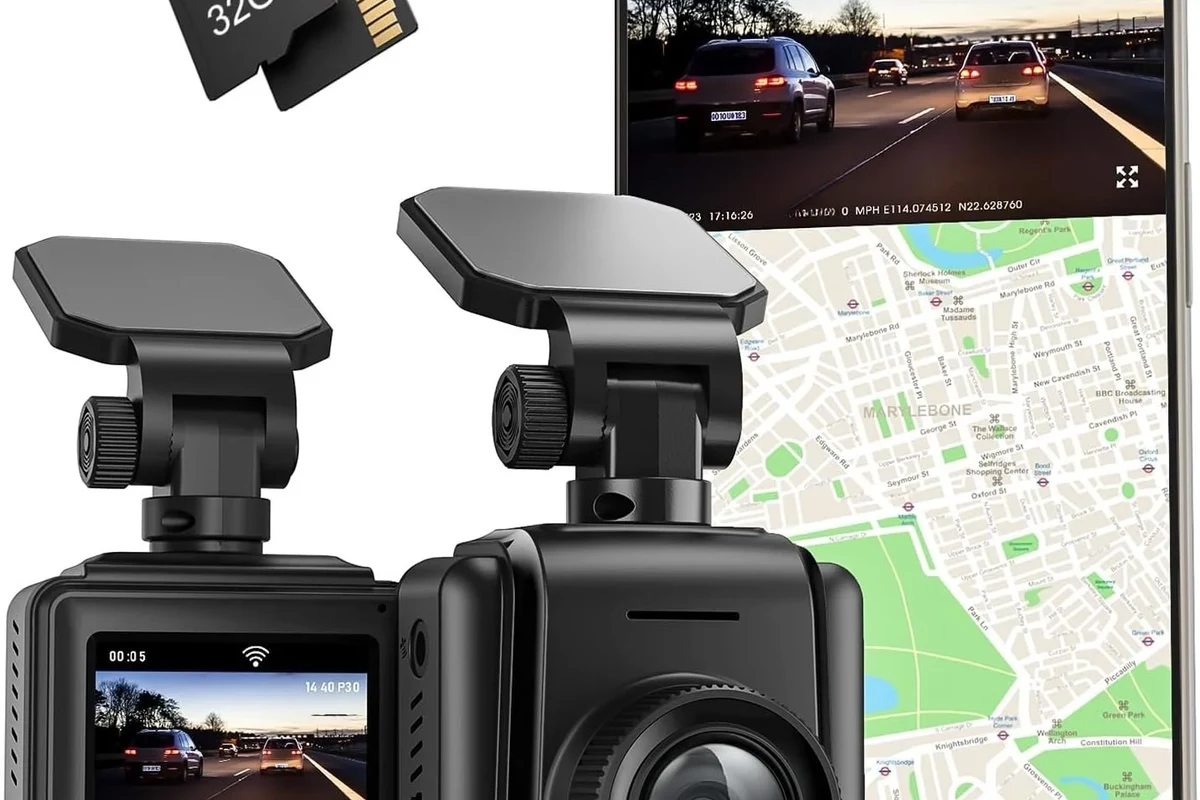
A dash cam GPS adds location, speed, and route data to your footage, which can make incidents easier to document and review. It is most useful for commuters, rideshare drivers, and fleet users who want more context than video alone provides.
A dash cam GPS adds location, speed, and route data to your video, which can make footage easier to understand after an accident or dispute. For many drivers, that extra context is helpful, but it is not essential if you only want basic video recording.
- GPS adds context: It records location, speed, and route details alongside video.
- Video quality still matters most: Clear day and night footage is more important than extra features.
- Parking mode may need extra power: Hardwiring or a battery pack is often required.
- Setup affects usefulness: Wrong time settings, poor placement, or weak cards can reduce value.
What a Dash Cam GPS Is and Whether You Actually Need One

A dash cam with GPS is still a normal dashboard camera at its core, but it records more than just what happens in front of the car. The GPS module tags clips with coordinates, time, speed, and sometimes direction of travel, which can make a recording more useful when you need to explain where and when something happened.
How dash cam GPS works for location, speed, and route data
Most systems use a built-in GPS receiver or a separate GPS mount that connects to the camera. That data is then embedded into the video file or stored in the companion app, so you can review the route and speed context later.
In practice, that means a clip can show not only the collision or traffic event, but also whether the vehicle was moving, where it was traveling, and what time the event occurred. That can be especially useful if you need to compare the footage with an insurance report, police statement, or delivery log.
Who this setup fits best: commuters, rideshare drivers, road-trippers, and fleet users
Daily commuters often like GPS because it adds a simple record of the drive without much extra effort. Rideshare drivers and delivery drivers may value it even more because route and time context can help document passenger pickups, stops, and disputed incidents.
Road-trippers may appreciate the trip-history side of the feature, while fleet users often want GPS for accountability and route review. If you are shopping for a broader setup, it can also make sense to compare a GPS model with options covered in our best dash cam for car guide or a dash cam for fleet vehicles if you manage multiple drivers.
Quick answer: the real-world value of adding GPS to a dash cam
GPS is most valuable when you want proof-style context, not just video. If you only want a basic record of traffic incidents, it is nice to have rather than mandatory.
Top Buying Criteria for a Dash Cam GPS in 2026
The best dash cam GPS for 2026 is not automatically the one with the most features. It is the one that balances clear video, dependable GPS logging, practical storage, and easy file export for your daily driving needs.
Video quality: resolution, sensor performance, HDR, and night visibility
Video quality still matters more than almost anything else. A camera can have excellent GPS logging, but if the footage is blurry, overexposed, or hard to read at night, the evidence value drops quickly.
Look for a modern sensor, good low-light performance, and HDR or similar processing that helps balance bright headlights and dark roads. Resolution is only one piece of the puzzle; a sharp 1080p camera with a strong sensor can be more useful than a poorly tuned higher-resolution model.
GPS accuracy, speed logging, and timestamp reliability
GPS should lock quickly and keep accurate speed and location data without drifting. The timestamp also needs to stay correct, because a wrong date or time can create confusion when you try to match footage to a police report or insurance claim.
Did You Know? GPS data can be especially helpful when two drivers give different accounts of the same event, because it adds an objective route and speed reference to the footage.
Field of view, lens quality, and front/rear coverage options
Field of view tells you how much of the road the camera sees. A wider view can capture more surrounding traffic, but if it is too wide, the image may stretch objects at the edges and make details harder to read.
For many buyers, a front-and-rear setup is the most practical upgrade because it documents both what happened in front of the car and what followed behind. If that is on your list, our front and rear dash cam guide can help you think through the coverage trade-off.
Storage, loop recording, parking mode, and file protection
Dash cams usually record in a loop, meaning old footage is overwritten when the card fills up. That is useful for everyday driving, but you also want event protection so important clips are locked and not erased.
Parking mode can be valuable if you want the camera to watch for impacts while the car is off, but it usually requires a proper power setup. If you are planning to leave the camera active after shutdown, it is worth reading about a dash cam battery pack or checking how a camera behaves when the car is off.
App support, Wi-Fi, cloud features, and ease of exporting evidence
Good app support can save time when you need to pull a clip quickly. Wi-Fi makes it easier to review footage on a phone, while some models also offer cloud features, though those can add subscription costs or require a stronger data connection.
For most buyers, the most important thing is simple export. If a camera makes it difficult to save a file, share it, or preserve metadata, the GPS feature becomes less useful in a real claim situation.
- Prioritize image clarity and night performance before paying extra for advanced app features.
- Make sure the camera stores speed and time data in a format you can actually export.
- Use a high-endurance memory card from a reputable brand, not the cheapest card you can find.
- Confirm whether parking mode needs a hardwire kit or battery pack before you buy.
Best Use Cases and Setup Choices
Different drivers need different dash cam setups. The right choice depends on how much coverage you want, how you power the camera, and whether you care more about convenience or long-term parking protection.
Single-channel vs dual-channel vs cabin-facing systems
A single-channel camera records only the front view, which is enough for many commuters. A dual-channel setup adds rear coverage, which can help in rear-end collisions, parking disputes, and hit-and-run situations.
Cabin-facing systems are often used by rideshare, taxi, and fleet drivers who want interior coverage as well. If you are comparing work-focused options, our guide to the best dash cam for truckers is a useful starting point because it covers heavier-duty use cases and long hours on the road.
Hardwire kit vs cigarette-lighter power for everyday driving
A cigarette-lighter plug is usually the easiest way to power a dash cam. It is simple, removable, and good for drivers who want a low-effort setup.
A hardwire kit connects the camera to the vehicle’s fuse box and is usually the better choice if you want parking mode or a cleaner installation. If you want a more detailed walkthrough, see our guide on how to hardwire a dash cam for parking mode.
Best fit for family vehicles, commuters, delivery drivers, and new drivers
Family vehicles often benefit from a simple front-and-rear setup that is easy to manage and does not distract the driver. Commuters may prefer a compact camera with solid GPS logging and quick app access.
Delivery drivers and new drivers can benefit from the accountability that comes with route and speed data, especially when there is a need to explain stops, delays, or traffic incidents. A cleaner installation can also help keep the windshield uncluttered, and our guide on hiding dash cam wires in the headliner may help if appearance matters to you.
Good fit if you want reliable incident records and simple trip context.
Useful if you want extra evidence for parking lot bumps or rear-end claims.
Worth it only if GPS and evidence export matter more than saving every dollar.
Real-World Benefits of a Dash Cam GPS
GPS does not make a dash cam magical, but it can make footage easier to trust and easier to use. That is the main reason many buyers consider it a worthwhile upgrade.
Stronger insurance claims and accident documentation
When an accident happens, the combination of video, time, speed, and location can help support your version of events. That does not guarantee a claim outcome, but it can reduce ambiguity when an adjuster or officer reviews the footage.
Safety Note: A dash cam is not a substitute for safe driving, a valid insurance policy, or proper documentation after a crash. If an incident occurs, follow local laws, exchange information safely, and contact your insurer as appropriate.
Better route tracking, trip records, and speed context
Some drivers like GPS because it turns a camera into a lightweight trip log. That can be useful for mileage records, route review, or simply remembering where a particular event happened.
For fleet or business use, that added context can also help supervisors review patterns, verify routes, or resolve disputes about stops and travel times. If that is your use case, you may also want to look at dash cam fleet telematics options for a more connected setup.
Added peace of mind for parking incidents and hit-and-runs
Parking lot damage is one of the most frustrating ownership problems because it often happens when no one is around. A GPS-enabled camera with parking mode can help document when the event occurred and where the car was parked.
That said, parking mode is only as good as the installation and power source behind it. If you are relying on it, make sure the setup is stable and that the memory card is designed for continuous recording.
Limitations, Trade-Offs, and Common Mistakes to Avoid
GPS is useful, but it is not a cure-all. A smart buyer should understand what the feature can do and where it falls short before spending more money on it.
Why GPS does not replace safe driving or legal proof in every case
GPS can support a claim, but it does not automatically prove fault. Video can be interpreted differently depending on the angle, lighting, and what happened just before the clip started.
It also does not replace police reports, witness statements, or official documentation when those are needed. Think of GPS as a helpful layer of evidence, not the final word.
Common setup mistakes: poor placement, wrong time settings, and weak memory cards
One of the most common mistakes is mounting the camera too low or too high, which can block the driver’s view or reduce coverage. Another common issue is failing to set the correct time zone or leaving the clock unsynchronized.
Weak memory cards are another problem because dash cams write and rewrite files constantly. If you want to avoid storage headaches, our guide on how to format an SD card for a dash cam is a practical companion read.
- Mount the camera where it does not block your line of sight.
- Set the correct time, date, and time zone before relying on footage.
- Use a high-endurance card and format it as recommended by the manufacturer.
- Using a random low-quality memory card.
- Assuming GPS proves fault by itself.
- Letting cables hang in a way that distracts the driver.
When premium features are unnecessary and can inflate the budget
Some cameras bundle cloud storage, advanced driver alerts, voice control, and extra accessories that sound impressive but may not matter for your use case. If you mainly want reliable footage and GPS metadata, a simpler model may be the smarter buy.
That is especially true for budget-conscious shoppers. Spending more on features you will not use can be less practical than putting that money toward better video quality, a hardwire kit, or a more durable memory card.
Feature names and app quality vary by brand, model year, and region. Before buying, confirm that GPS data can be exported in a format you can actually use.
How to Set Up, Use, and Maintain a Dash Cam GPS Safely
A good dash cam setup should be secure, discreet, and easy to live with. The goal is to gain useful evidence without making the car harder to drive or maintain.
Installation basics: mounting position, cable routing, and power connection
Start by mounting the camera high on the windshield, usually near the rearview mirror area, so it has a clear view of the road. Route the cable neatly along trim panels to keep the cabin tidy and reduce the chance of snagging.
If you are using a 12V outlet, verify that the plug stays powered when you want it to. If you are hardwiring, make sure the connection is done correctly and that the vehicle’s electrical system is protected as recommended by the camera maker or a qualified installer.
Pick a place with a clear road view that does not interfere with airbags, sensors, or the driver’s sightline.
Use the correct power source and follow the manufacturer’s instructions for parking mode or always-on recording.
Wait for a stable satellite lock, then check that the time zone and date are correct before regular use.
Safe use tips: privacy, windshield visibility, and local recording laws
Be mindful of privacy and local rules, especially if your camera records audio or interior activity. Recording laws can vary by state or country, so it is wise to confirm what is allowed where you drive.
Also keep the windshield as clear as possible. A dash cam should not become a distraction or create a visibility problem that defeats the purpose of safer driving.
Do not place the camera where it blocks the driver’s view, interferes with airbags, or violates local windshield obstruction rules.
Care and cleaning: lens maintenance, firmware updates, and card formatting
Dust, fingerprints, and heat can all affect performance over time. A quick lens cleaning and occasional firmware update can help the camera stay reliable.
It is also smart to format the memory card on a regular schedule, following the manufacturer’s guidance. That helps reduce file corruption and keeps the camera ready to record when you need it most.
Value, Budget Considerations, and Final Recommendation
For most shoppers, the right dash cam GPS is the one that fits the car, the climate, and the way the vehicle is actually used. The feature is most worthwhile when you want dependable evidence and not just a basic recording device.
What a fair price range looks like for entry-level, mid-range, and premium models
Pricing varies a lot by brand, channel count, sensor quality, and app features, so it is better to think in tiers than exact numbers. Entry-level models usually focus on core recording, mid-range models often add better image quality and GPS, and premium models may include cloud features, stronger parking mode, or multi-camera coverage.
If you are shopping on a tighter budget, you may want to compare GPS models with our best dash cam under $100 guide to see whether the added features are worth the step up.
New vs used buying considerations and when each makes sense
Buying new usually makes more sense for a dash cam because you get the latest firmware, a fresh memory card recommendation, and a clearer warranty path. Used cameras can be tempting, but wear, missing accessories, and unknown storage history can create problems.
If you do consider used, inspect the mount, cables, lens condition, and included GPS module carefully. Also verify that the seller can explain the model, accessories, and whether any subscriptions or app features still work.
- Confirm the camera supports accurate GPS logging and correct timestamp settings.
- Check whether you need front-only, front-and-rear, or cabin-facing coverage.
- Verify parking mode requirements, especially if you want hardwire power.
- Use a high-endurance memory card that matches the camera’s storage recommendations.
- Review local windshield and recording laws before installation.
Final verdict: the best buyer profile for a dash cam GPS and when to skip it
A dash cam GPS is a smart choice for commuters, rideshare drivers, fleet users, and anyone who wants stronger incident context than video alone can provide. It is less compelling for drivers who only need a simple front-facing camera and want to keep costs as low as possible.
Choose a dash cam GPS if you value trip records, speed context, and more useful evidence after an incident. Skip it if your budget is tight and you would rather spend on better video quality, a reliable memory card, or a cleaner power setup.
Common Questions
It adds location, speed, and route data to recorded video. That makes footage easier to interpret later.
Yes, if you want stronger evidence or trip tracking. If you only need basic video, it may be optional.
No, but GPS can help document where and when an incident happened. Parking mode itself usually depends on power setup.
Not by itself. It supports your case, but video, reports, and witness statements still matter.
Check video quality, GPS reliability, storage support, and export options. Also confirm whether you need front, rear, or cabin coverage.
Frequently Asked Questions
It is a strong fit for commuters, rideshare drivers, delivery drivers, and fleet users. These buyers often benefit from route records and extra incident context.
Clear video quality is the first priority, followed by reliable GPS logging and easy file export. Storage quality and app support also matter in daily use.
Not always. A 12V plug is fine for basic recording, but hardwiring is usually better if you want parking mode or a cleaner install.
Clean the lens when needed, update firmware when available, and format the memory card on the schedule recommended by the manufacturer. That helps reduce file errors.
Do not mount the camera where it blocks your view or interferes with airbags. Also avoid cheap memory cards that may fail under constant recording.
Check that the time, date, and GPS lock are correct. If possible, confirm the clip exports properly before you need it in an emergency.