
Car security camera systems record incidents, deter theft, and protect you on every drive.
If you want proof when things go wrong around your car, car security camera systems are a smart, low-cost shield. I’ve installed, tested, and lived with different setups in daily traffic, tight parking garages, and long highway trips. This guide breaks down what works, what to avoid, and how to pick, install, and use car security camera systems with confidence.

What are car security camera systems?
Car security camera systems are video devices that watch your car while driving and while parked. They use one or more cameras to capture what happens in front, behind, inside, or all around your vehicle. Good systems include sensors that detect motion and impact, and they save key clips so you do not lose them.
Most systems include a main unit, a lens or two, a power cable, and a memory card. Some add GPS, Wi‑Fi, cloud backup, and voice control. Many can switch into a parking mode to keep watch when the engine is off.
In simple terms, these systems act like a reliable witness you always carry. When paired with safe driving and smart habits, they greatly improve your odds after an incident.
Benefits and real-world value
Car security camera systems help in more ways than people expect. They give you proof for insurance claims, help fight fraud, and can scare off thieves. They also make it easier to hold drivers, teens, or valets accountable.
Here are the top benefits:
- Faster claims and fair payouts after a crash or hit-and-run
- Backup for parking lot bumps, door dings, and vandalism
- Evidence for theft attempts and catalytic converter crimes
- Peace of mind for rideshare, delivery, and fleet work
- Driver coaching with speed, route, and behavior logs
A quick story from my own use: my rear camera caught a hit-and-run in a grocery lot. The plate was clear, and the insurer closed the claim fast. That single clip paid for the entire setup and then some.
Key features that matter
Not all car security camera systems are equal. Focus on features that boost clarity, uptime, and useful proof.
Core video features
- Resolution: Aim for 1440p or 4K up front, and at least 1080p in the rear. Clear plates win cases.
- Sensor and night vision: Look for larger sensors with good low-light chops. Terms like “night vision” or “STARVIS” can help.
- Field of view: 130–160 degrees is a sweet spot. Wider can bend edges. Narrow can miss lanes.
- HDR: Balances bright skies and dark shadows, so plates do not blow out.
Parking protection
- Modes: Impact, motion, and buffered parking mode capture pre- and post-event seconds.
- Power: Hardwire kits with battery guards prevent a dead battery.
- Sensitivity: Tune G‑sensor and motion to reduce false clips.
Reliability and power
- Supercapacitors: More heat-safe than lithium batteries inside the cam.
- Loop recording: Records non-stop and overwrites old files, while locked clips stay safe.
- Endurance microSD: Use high-endurance cards. Replace them on a schedule.
Connectivity and extras
- Wi‑Fi/LTE: Uploads clips to the cloud, so thieves cannot steal your only copy.
- GPS: Stamps speed and route for context.
- Audio: Useful for road rage or instructions, but check local consent laws.
- CPL filter: Cuts glare on the windshield for sharper daytime plates.
Practical tip from experience: test your settings for a week. If you get too many parking alerts, dial motion down or aim the lens a bit higher. Small tweaks save card space and time.
Types of car security camera systems
Car security camera systems come in different forms, each with a job to do.
Common setups
- Single-channel: One front cam. Simple, low cost, great starter option.
- Dual-channel: Front and rear. Best balance for daily use and parking lots.
- Three-channel: Front, rear, and cabin. Ideal for rideshare or parents with teen drivers.
Specialty options
- Mirror cams: Screen in the mirror. Clean look, larger view, but mind glare.
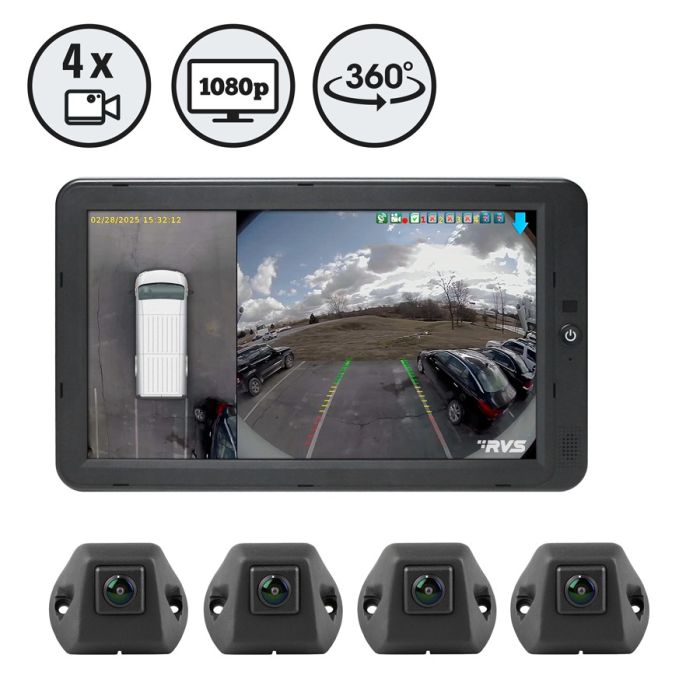
- 360 surround: Four cams for a bird’s-eye view. Often OEM or pro-installed.
- Cloud-first: Always-on LTE link. Great for fleets or city parking.
For most drivers, a dual-channel system hits the sweet spot on price and proof. If you park on busy streets or drive for work, consider three-channel or cloud.
Installation and wiring guide
You can install many car security camera systems at home. It takes patience and the right steps.
Planning
- Pick camera spots first. Place the front cam high, behind the mirror.
- Test power with the included cable before you hide wires.
- Map a cable path to the rear window. Tuck along the headliner and door trim.
Power options
- 12V socket: Easiest. Great for daily driving, limited for long parking mode.
- Hardwire: Use a fuse tap and a ground point. Choose one fused line that is always on, and one that is on with ignition. Add a battery cutoff.
- OBD-II: Simple plug, but can drain the car if left on without a cutoff.
Steps I follow
- Mount cameras with clean glass and a level view.
- Run rear cable away from side airbags. Do not block sensors or vents.
- Secure all slack. Loose wires create rattle noise and can snag.
- Power on and aim. Record a short clip and check plate clarity.
- Set date, time, GPS, and parking mode.
- Drive and fine-tune. Adjust G‑sensor and audio if needed.
If you are not sure about fuses or airbags, pay a pro. A clean install protects your car and the system.
Storage, data management, and privacy
Storage is the heart of any setup. Poor cards cause corrupt files and missed events.
Best practices
- Use high-endurance microSD. 128–256 GB fits most daily drivers.
- Replace cards every 12–18 months, or by the maker’s hours rating.
- Set loop length to 1–3 minutes. Shorter clips are easier to send.
Data habits
- Lock key files fast. Many cams have a button or auto-lock on impact.
- Back up big events to your phone, laptop, or cloud right away.
- Keep a simple folder system by date and event.
Privacy and control
- Use a PIN lock on the app and camera.
- Review audio laws if you record inside the cabin.
- Update firmware for security fixes.
- Avoid posting faces and plates online. Blur them first.
Tip: create a glove-box “incident card.” List how to export, the app steps, and your insurer’s contact. In stress, clear steps help.
Laws and compliance
Car security camera systems live at the edge of several rules. A little care keeps you safe.
Mounting and view
- Many states require the cam to be mounted low or behind the mirror.
- Do not block airbags, sensors, or large parts of the windshield.
Recording and consent
- Video in public is often allowed. Audio can require one- or two‑party consent.
- If in doubt, turn off audio or warn riders that recording is on.
Sharing and storage
- Use footage only for lawful reasons.
- Be careful with public posts. Respect privacy.
This guide is not legal advice. Laws change. Check your local rules before you install or share.
Buying guide and smart picks by budget
Car security camera systems should match your goals, car, and climate. Start with your must-haves, then set a budget.
Entry level (best value)
- Front 1440p or 1080p
- Basic parking mode
- Supercapacitor, Wi‑Fi, GPS optional
- Great for first-time users and daily commuters
Mid range (best balance)
- Dual-channel 1440p/1080p
- Buffered parking mode with hardwire
- GPS and Wi‑Fi for easy downloads
- Strong low-light performance
Premium (best proof and cloud)
- 4K front and 1080p or higher rear
- LTE cloud alerts, live view, and geo‑fence
- Advanced night vision and heat handling
- Ideal for city parking and fleets
Special cases
- Three-channel for rideshare or parents
- Mirror cam for a clean cabin look
- 360 or OEM surround for large SUVs and trucks
Personal note: in hot summers, I favor supercapacitor models with low-profile bodies. In freezing winters, I keep spare adhesive pads and check the mount every month. Reliability comes first.
Maintenance and troubleshooting
Small habits keep car security camera systems sharp and ready.
Simple care
- Clean the lens monthly with a microfiber cloth.
- Reformat the card in-camera every 1–2 months.
- Update firmware after you back up key files.
Fix common issues
- Blurry plates: adjust angle, add a CPL filter, or reduce exposure.
- Random reboots: try a new high-endurance card or check power.
- Parking misses: raise motion sensitivity or switch to buffered mode.
- Heat shutdowns: use a sunshade, park in shade, or pick a cooler-running model.
Once a quarter, test a full workflow. Record a clip, export it, and send it to your own email. You will spot gaps before a real event.
Integration and advanced setups
You can level up car security camera systems with a few add-ons.
Ideas to try
- LTE hotspot for cloud saves and live alerts
- External battery pack to extend parking mode without draining the car battery
- Smart rules with a home hub to send push alerts when events fire
- OBD tracker plus dash cam for location plus video proof
- Alarm trigger line (if supported) to mark video when the alarm goes off
For fleets, pair cameras with telematics. You can cut false claims, coach drivers, and improve safety policies over time.
Real-world scenarios and what to do
When something happens, speed and process matter.
What to do after an event
- Find and lock the clip. Mark 30–60 seconds before and after.
- Back it up to two places: cloud and a laptop or drive.
- Make notes: date, time, location, and what you saw.
- Share only the needed clip with your insurer or the police.
- Keep a copy. Cases can reopen.
I once had a valet joyride on camera. The speed and route stamps made the case simple. Clear proof turns “he said, she said” into facts.
Frequently Asked Questions
Are car security camera systems legal in my state?
Most states allow video recording in public places, but rules vary on mounting and audio. Check local laws on windshield placement and consent, and adjust your setup to comply.
Will a dash cam drain my car battery in parking mode?
It can, if it runs for many hours without a cutoff. Use a hardwire kit with low‑voltage protection or an external battery to protect your main battery.
Do I need 4K for plate capture?
4K helps, but lens quality, exposure, and motion blur matter as much. A sharp 1440p camera with good night settings can read plates in many cases.
How much storage do I need?
For daily driving, 128–256 GB is a sweet spot. Use high‑endurance cards and reformat in-camera often to prevent errors.
Can I use Wi‑Fi or LTE to view my car remotely?
Yes. Many car security camera systems offer Wi‑Fi for nearby downloads and LTE for cloud alerts and live view. LTE plans can add cost but give strong peace of mind.
Do insurers offer discounts for car security camera systems?
Some do, often as part of anti-theft or telematics programs. Ask your insurer, and keep proof of purchase and sample footage on hand.
Are cabin cameras worth it if I do not drive for rideshare?
They can help with break-ins, vandalism, and disputes inside the car. If privacy is a concern, use a physical lens cover or turn off audio.
Conclusion
Car security camera systems turn guesswork into facts, both on the road and in parking lots. With the right features, a clean install, and smart data habits, you get clear proof when you need it most. Start with your goals, choose a setup that fits your life, and test it until it is second nature.
If you are ready, pick a dual-channel kit, add a hardwire with battery guard, and set up cloud backup. Have questions or a story to share? Drop a comment, subscribe for more guides, and let me know what you want tested next.