
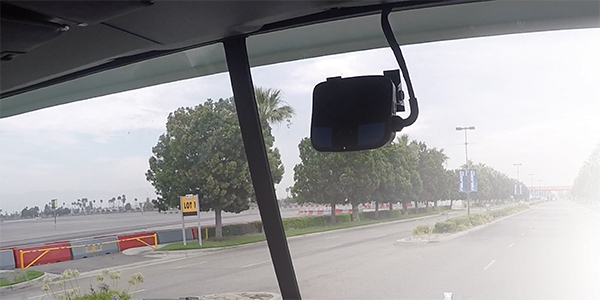
Truck cameras are video systems that boost safety, cut costs, and protect drivers.
I’ve spent years testing and deploying truck cameras on long-haul rigs, local delivery trucks, and vocational fleets. In this guide, I’ll break down truck cameras in plain English. You’ll learn how they work, what to buy, where to mount them, and how to get real ROI. If you run a fleet, drive for a living, or just love gear that works, this deep dive on truck cameras is for you.

What Are Truck Cameras?
Truck cameras are video devices that record the road, the cab, and the area around a truck. They help drivers see blind spots, capture proof after a crash, and deter fraud. Many truck cameras also link to the cloud and send alerts in real time.
A typical setup can include a forward road camera, a rear camera, side cameras, and a driver-facing camera. A multi-channel recorder stores video on an SD card or SSD and can stream clips to a portal. Modern truck cameras can add GPS, speed, and G-sensor data.
Why Truck Cameras Matter: Safety, Savings, and Compliance
Truck cameras are more than gadgets. They solve real problems on the road.
Benefits you can see:
- Fewer blind spots. Side and rear views help with tight turns and backing.
- Lower crash risk. Alerts can flag tailgating, lane drift, or phone use.
- Faster claims. Clear video resolves fault and stops fraud.
- Driver protection. Video proves safe driving when others point fingers.
- Compliance support. Some systems help with DVIR notes and policy checks.
- Training value. Short clips turn near-misses into quick coaching wins.
Across fleets I’ve worked with, truck cameras cut preventable incidents, reduce claim time, and often lower premiums. The savings can pay for the system in months, not years.
Types of Truck Cameras and How They Work
Dash and road-facing cameras
These truck cameras mount on the windshield and record the road. They often add GPS, speed, and event tagging.
Driver-facing cameras
These point at the cab. They can coach seatbelt use, drowsy signs, and distraction. Many fleets use privacy modes when off duty.
Side-view and blind-spot cameras
These mount near mirrors or mid-box. They help spot cars, bikes, and e-scooters in tight lanes.
Backup and rear cameras
These mount high on the rear. They help avoid dock hits and yard bumps. They are vital on trailers and box trucks.
360-degree camera systems
Four truck cameras stitch a bird’s-eye view. This helps with turns, curbs, and busy yards.
Multi-channel DVR/NVR
A recorder powers the cameras, stores clips, and handles LTE or Wi-Fi uploads. Good units tag harsh events with G-sensors.
Specialty options
Thermal or IR helps at night. HDR/WDR helps with glare, snow, and tunnels. Wide angles cover more, but too wide can distort.
Key Features to Look For
Focus on what makes truck cameras clear, tough, and easy to use.
Must-have basics:
- Resolution and frame rate. Aim for 1080p at 30 fps or better for plates and detail.
- HDR/WDR and low light. Keeps video clear in sun, rain, and dusk.
- Wide field of view. 120–150 degrees captures more without bending lines too much.
- Storage. Dual SD slots or SSD with locked access. Look for event-based clips.
- G-sensor and GPS. Tags speed, impact, and location for each clip.
- Connectivity. LTE or Wi-Fi for instant uploads and live support when needed.
- Cloud management. Search by date, driver, geofence, or event in seconds.
- Power protection. Safe shutdown, low-voltage cut-off, and parking mode.
- Durability. IP67 or better for exterior truck cameras; vibration-rated mounts.
- Security. Signed firmware, locked housings, and role-based access.
Nice-to-have extras:
- ADAS alerts. Tailgating, lane departure, and forward collision warnings.
- Driver monitoring. Eyes-off-road or yawns to catch drowsy moments.
- Audio. Useful for training, but check state laws and consent rules.
Source: evansdist.com
Installation and Placement Best Practices
Getting truck cameras right starts with smart placement and clean power.
Steps that work:
- Plan views first. Sit in the cab. Mark blind spots. Map wire runs.
- Mount with care. Use the black dots near the windshield top. Avoid airbag zones.
- Keep lenses clean. Wipe with a microfiber cloth. Avoid harsh sprays.
- Set angles. Frame the hood edge in lower third on road cams. Cover lane lines.
- Route cables. Use loom, grommets, and drip loops. Avoid pinch points.
- Power safely. Use a fused, switched circuit. Test ignition on/off behavior.
- Calibrate. Run ADAS/DMS calibration if offered. Test at night and in rain.
- Train drivers. Show sample clips. Explain benefits and privacy rules.
I like to record a 10-minute test drive. Check day and night clips before you roll out to the whole fleet.
Legal, Privacy, and Policy Considerations
Truck cameras sit at the edge of safety and privacy. Set clear rules.
What to know in the U.S.:
- Video is often allowed, but audio may need consent in some states.
- Post a notice in the cab if you record drivers.
- Limit who can view driver-facing clips. Use it for safety, not spying.
- Set retention rules. Keep crash events longer. Purge routine clips on schedule.
- Mask sensitive data where you can. Blur faces in public clips if shared.
- Keep change logs. Document who accessed what, and when.
Check company policy and union rules if they apply. Train managers to use video for coaching, not blame.
Real-World Lessons From the Field
A winter I will not forget: a box truck slid into our lane and clipped us. Our road-facing truck cameras proved our driver held lane and speed. The claim closed in a week. No premium hike.
Lessons that stuck with me:
- Don’t skimp on mounts. A cheap sticky pad will fail in summer heat.
- Angle matters. A 5-degree tilt can hide a lane line and kill ADAS value.
- Check SD cards. Bad cards cause “ghost” failures. Use high-endurance media.
- Teach the why. When drivers see the upside, they support truck cameras.
- Review often. Five-minute weekly reviews beat long monthly sessions.
Truck cameras work best when part of a simple, fair program with clear goals.
Data, Telematics, and AI: Turning Video Into Insights
Truck cameras shine when linked with telematics.
Smart uses:
- Triggered clips. Harsh brake, speed spike, or impact pulls the right 20 seconds.
- Live assist. Dispatch can ask for a clip when a driver needs help at a dock.
- Coaching. Short, timely notes change habits fast.
- Risk scoring. Focus on high-risk trends, not single events.
- Maintenance flags. Spot loose straps, door alarms, or fluid leaks on video.
AI can detect tailgating, phones, rolling stops, and yawns. Keep humans in the loop. Review context. Reward wins, not just call-outs.
ROI Calculator: Costs vs Benefits
You can estimate the payback of truck cameras with simple math.
Try this:
- Cost: $350 per camera channel, $25 per month for cloud, install $200.
- Savings: One avoided minor crash can save $5,000–$15,000 in repairs and downtime.
- Impact: A 20% drop in preventable events across a small fleet can cover the system within 3–6 months.
Track these KPIs:
- Preventable crash rate and cost per mile.
- Claim cycle time.
- Insurance premium trend.
- Coaching completion rate and score.
If numbers move the right way in 90 days, your plan is working.
Buying Guide: Best Truck Cameras For Different Needs
Owner-operators
- Two-channel road plus rear or in-cab, 1080p or better.
- SD storage with event lock, Wi-Fi offload at home base.
- Simple ADAS and sturdy mount that can handle heat and cold.
Small fleets
- Four-channel DVR with side and rear truck cameras.
- LTE for event uploads, role-based access in the cloud.
- Basic driver monitoring with privacy mode when off duty.
Enterprise fleets
- 360-degree views, AI ADAS and DMS, and automated coaching.
- API links to dispatch, maintenance, and HR tools.
- Full security stack with signed firmware and device health checks.
Tip: Buy for service, not only specs. Fast clip retrieval and strong support beat a small bump in resolution.
Maintenance, Troubleshooting, and Security
Keep truck cameras healthy with short, steady habits.
Simple routine:
- Weekly wipe of lenses and a 15-second clip check.
- Monthly check of mounts, cables, and firmware.
- Quarterly SD/SSD health scan and spare card test.
Common fixes:
- Glare or washout. Adjust angle, enable HDR, or add a hood.
- Dropped clips. Replace the SD card with high-endurance media.
- LTE dead zones. Cache locally and upload later on Wi-Fi.
Security musts:
- Change default passwords and lock housings.
- Use signed firmware and device whitelists.
- Limit data access and log all views and downloads.
Frequently Asked Questions of truck cameras
Are truck cameras legal in the U.S.?
Truck cameras are legal in most cases. Recording audio may need consent in some states, so confirm local laws and update your policy.
Do driver-facing truck cameras invade privacy?
They can if misused. Set clear rules, limit access, allow off-duty privacy modes, and use video for safety coaching.
Will truck cameras lower my insurance rates?
Many insurers offer credits for approved truck cameras. Even without a discount, faster claims and fewer crashes cut total costs.
How long should I keep video from truck cameras?
Keep routine clips for a short window, like 30–60 days. Save crash or complaint events longer based on legal advice.
What resolution do I need for truck cameras?
Aim for 1080p at 30 fps with HDR. That level usually captures plates, signals, and lane marks well.
Can truck cameras work without the cloud?
Yes. Many systems record locally to SD or SSD. Cloud helps with fast retrieval, alerts, and coaching at scale.
How many truck cameras do I need on a box truck?
Start with a front and rear camera. Add side cameras if you run in dense city lanes or tight docks.
Do truck cameras work at night and in bad weather?
Good ones do. Look for HDR/WDR, IR or low-light support, and weather-rated housings.
Can I install truck cameras myself?
Yes, if you are handy and follow safety steps. For multi-channel setups, pro install is often faster and cleaner.
What is the best field of view for truck cameras?
A range of 120–150 degrees works well. It captures more area without heavy distortion.
Conclusion
Truck cameras help drivers see more, prove the truth, and run safer routes. With the right setup, you cut risk, save time, and build trust with your team and your insurer. Start small, set clear rules, and scale what works.
Pick one rig to pilot. Mount with care, train your drivers, and review five clips a week. You will feel the change within a month. Want more tips like this? Subscribe, share your questions, or drop a comment with your use case.