
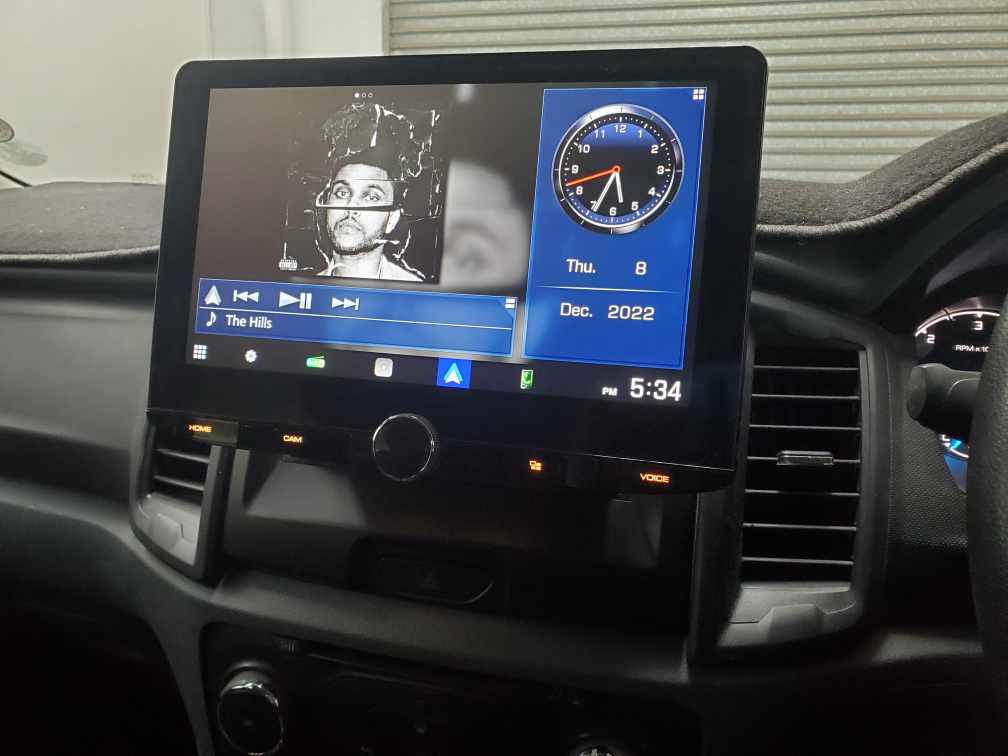
An automotive head unit is the car's central media and control system, handling audio, navigation, and connectivity.
I have built and tested car systems for years, and I know what makes a great automotive head unit. This guide explains what a head unit does, how to choose one, how to install it, and how to get the best sound and features. Read on to learn practical tips, real-world pitfalls, and clear steps to select and use an automotive head unit you will enjoy every day.

What is an automotive head unit?
An automotive head unit is the dashboard device that controls media, navigation, phone calls, and vehicle settings. It is often called a car stereo, infotainment system, or radio. Modern automotive head unit models combine touchscreen displays, voice control, Bluetooth, and smartphone integration.
Key roles of an automotive head unit:
- Play audio from radio, streaming, phone, or USB.
- Provide maps and turn-by-turn navigation.
- Connect to phones via Bluetooth, Android Auto, or Apple CarPlay.
- Interface with vehicle systems like steering wheel controls and backup cameras.
Most cars have either an OEM built-in automotive head unit or an aftermarket model you can upgrade. Whether stock or custom, the head unit shapes your driving comfort and safety. Manufacturers and installers focus on ergonomics and compatibility. Expect frequent software updates and evolving features in new models.
Key features and functions
A modern automotive head unit combines many functions. Here are the main items to consider.
Core features:
- Touchscreen display with adjustable brightness.
- Radio tuner for FM/AM and digital radio options.
- Bluetooth for hands-free calls and audio streaming.
- USB and auxiliary inputs for media playback.
- Smartphone integration using Android Auto or Apple CarPlay.
- Navigation with offline maps or online guidance.
Audio and performance features:
- Built-in amplifier or preamp outputs for external amps.
- Equalizer and time-alignment controls.
- Digital signal processing (DSP) for better sound tuning.
Safety and convenience:
- Rear-view camera input and parking guides.
- Voice control for hands-free operation.
- Steering wheel control compatibility.
Connectivity trends:
- Wireless Apple CarPlay and Android Auto.
- Wi-Fi for over-the-air updates.
- App stores or plugin support on some units.
These features vary by price and brand. Decide which features you use daily. For many drivers, phone integration and reliable Bluetooth matter most.
Types and form factors
Automotive head unit options fit different cars and needs. Choose the type that matches your vehicle and goals.
Common form factors:
- Single DIN: Compact and common in older cars.
- Double DIN: Larger screen and more modern design.
- OEM integrated: Built by the car maker with factory fit and features.
- Aftermarket: Offers more features and upgrades than many OEM units.
Software types:
- Native OS (proprietary systems from manufacturers).
- Android-based head units with app flexibility.
- Units with built-in CarPlay/Android Auto support.
Specialty head units:
- High-end audiophile units with built-in DACs and DSP.
- Units with embedded navigation and offline maps.
- Rugged units for off-road vehicles.
Match the head unit size and wiring to your dash. Some cars need dash kits or adapters for a clean fit.
How to choose the right automotive head unit
Pick a head unit with features you will use. Focus on compatibility, ease of use, and sound quality.
Steps to choose:
- Check dash fit and wiring
- Confirm single or double DIN fit.
- Verify harness options for your car.
- Prioritize connectivity
- If you use a smartphone, choose CarPlay/Android Auto.
- Look for Bluetooth stability and voice control.
- Consider audio needs
- Choose preouts and DSP for external amps and tuning.
- Verify channel count and equalizer precision.
- Evaluate screen and UI
- Look for responsive touch and bright display.
- Pick a simple interface for safer driving.
- Plan for integration
- Ensure compatibility with steering wheel controls and vehicle data.
- Check for CAN bus or adapter support if needed.
If you are unsure, read spec sheets and installation guides. Compare cost versus long-term value. Good units make daily drives easier and safer.
Installation overview and common pitfalls
Installation can be simple or tricky. DIY saves money but needs care. Professional installation reduces risk.
Basic installation steps:
- Disconnect the battery before starting work.
- Remove the trim and the old unit carefully.
- Use a wiring harness adapter to avoid cutting factory wires.
- Mount the new head unit with a dash kit for a clean fit.
- Reconnect the battery and test all functions.
Common pitfalls to avoid:
- Cutting factory wires instead of using an adapter.
- Ignoring steering wheel control integration.
- Buying a unit that lacks required vehicle CAN features.
- Not checking depth and space behind the dash for larger units.
If your car has factory amplifiers, alarms, or climate controls linked to the head unit, plan for adapters. I once tried a direct wire splice on a luxury car and lost steering wheel controls. A harness adapter would have saved time and money.
Upgrading and tuning for audio performance
An automotive head unit is central to a quality audio system. Upgrades can transform sound.
Upgrade checklist:
- Add a head unit with preamp outputs and DSP.
- Use a good amplifier matched to speaker power.
- Replace worn speakers for cleaner mid and highs.
- Add sound deadening to reduce road noise.
Tuning tips:
- Set gain so the amp reaches full output without clipping.
- Use time alignment to make sound appear from the dash.
- Tune equalizer in small steps and listen at normal volume.
Real-world tip from my shop work: a modest head unit upgrade plus a compact amp and new front speakers often yields the biggest improvement for the least money.
Cost, brands, and market trends
Pricing and trends influence choices. The market keeps moving toward connected, smart head units.
Price ranges:
- Budget units: Affordable features, basic sound.
- Mid-range: CarPlay/Android Auto, better audio controls.
- High-end: Advanced DSP, audiophile components, large screens.
Trends to watch:
- Wireless smartphone integration is standardizing.
- Built-in voice assistants and AI features are growing.
- Over-the-air updates keep systems current.
- Android-based units with app ecosystems are expanding.
Trusted brands vary by region and need. Look for brands that offer clear update paths and good support.
Personal experience and practical tips
I have installed many automotive head unit systems over the years. A few lessons stand out.
Lessons learned:
- Always use a wiring harness adapter to keep factory systems intact.
- Test functions before reassembling the dash to avoid rework.
- Choose a unit with reliable software updates. I had a unit that lacked updates and lost Bluetooth stability after a mobile OS change.
- If sound quality matters, prioritize preouts and DSP over flashy screens.
- Ask your installer about warranty on labor and parts.
A practical tip: spend a few extra dollars on a good dash kit and harness. The install will look cleaner and the resale value of your car will stay higher.
PAA-style quick questions answered briefly:
- How long does installing an automotive head unit take? Most installs take 1 to 3 hours for typical cars. Complex integrations can take longer.
- Will a new head unit improve sound? Yes, especially if it has better preouts, DSP, and clearer signal paths.
- Can I keep steering wheel controls? Usually yes, with the right adapter or harness.
Frequently Asked Questions of automotive head unit
What is the difference between single DIN and double DIN head units?
Single DIN units are compact and fit older dashboards. Double DIN units have larger screens and more features like navigation and bigger touch displays.
Do I need professional installation for an automotive head unit?
You can install many units yourself, but professional installation is recommended for complex cars or when retaining factory features like steering wheel controls.
Will a new automotive head unit work with my car’s factory amplifier?
Sometimes. If your system uses a factory amp, you may need an adapter or line-out converter to integrate an aftermarket head unit.
How do I choose between Android-based units and CarPlay/Android Auto units?
Pick CarPlay/Android Auto for seamless phone integration. Choose Android-based units if you want more apps and customization on the head unit itself.
Are wireless CarPlay and Android Auto reliable?
Wireless integration is convenient and getting better. Wired connections are still more stable for streaming and low-latency audio.
Can I add navigation later to my automotive head unit?
If your head unit supports navigation apps or has map updates, you can add or enable navigation later. Some units require paid map packages for offline maps.
How long does a typical head unit last?
A well-maintained head unit can last many years. Software support and hardware wear are the main limits; expect 5 to 10 years depending on updates and use.
Conclusion
An automotive head unit shapes how you interact with your car every day. Choose a unit that fits your dash, supports the features you use, and offers good audio connections if sound matters. Small choices, like a proper harness and DSP, make a big difference. Start by listing must-have features, then match them to fit and budget. Take action: compare models, inspect installation guides, and pick an installer or plan a careful DIY. Share your experience or questions below, and consider subscribing to stay updated on head unit trends and tips.